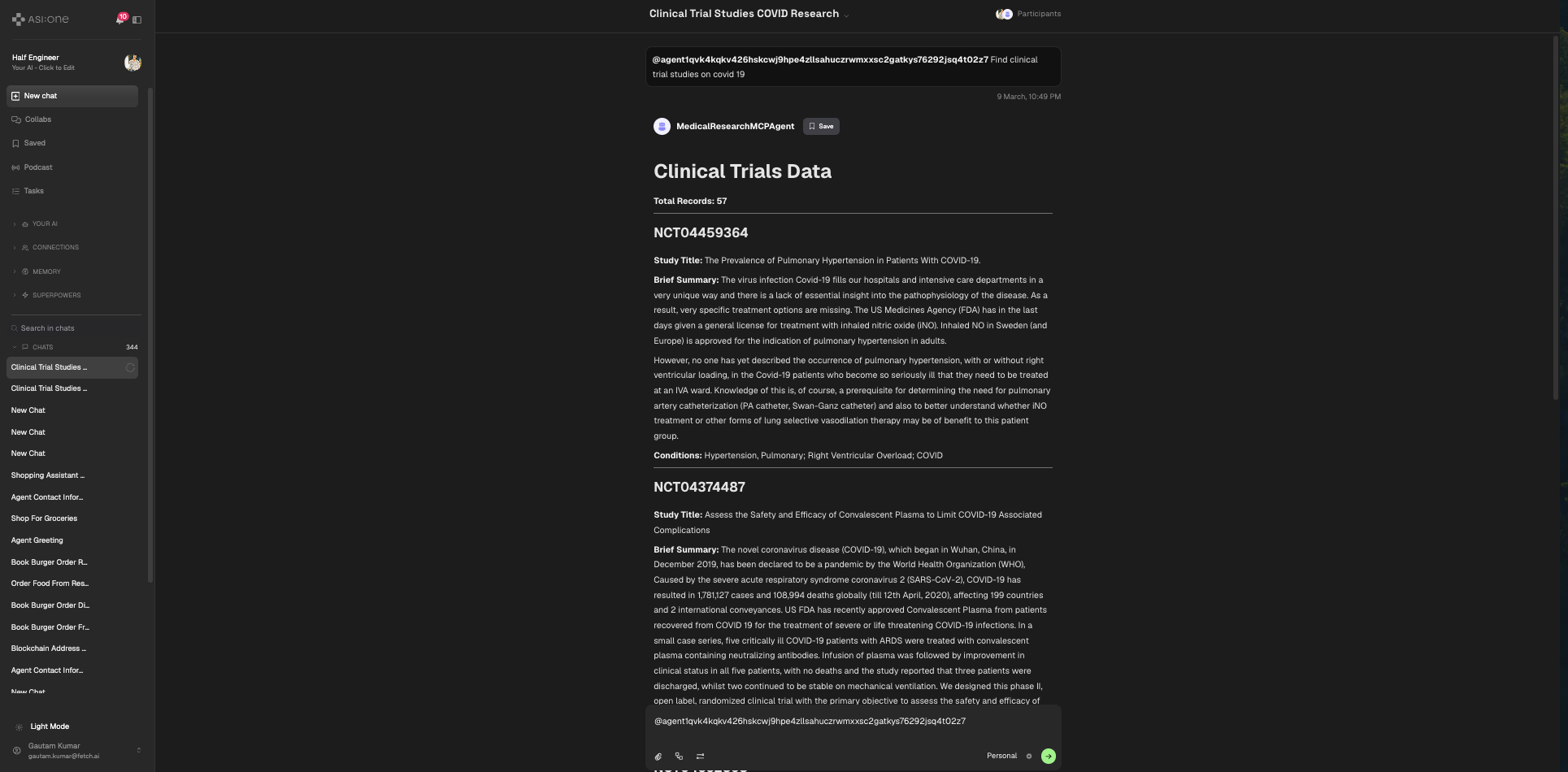
Connect an Agent to Multiple Remote MCP Servers
This example builds a uAgent client that connects to multiple remote MCP servers hosted on Smithery.ai (PubMed, paper search, and clinical trials), uses ASI:One (https://api.asi1.ai) for tool selection and response formatting, and registers on Agentverse so ASI:One (and other agents) can discover and chat with it.
This sample uses biomedical literature and clinical-trial tools for demonstration only. It is not medical advice, diagnosis, or treatment guidance. Always consult qualified clinicians for health decisions.
- Concept overview: What is MCP?
- Local MCP + LangGraph (stdio, OpenAI inside the graph): LangGraph Agent with MCP adapter
- Multi-server local MCP: Multi-server agent example
This page is the remote / Smithery path: HTTP MCP sessions + ASI:One chat-completions for tool calls, then Agentverse mailbox discovery. LangGraph examples keep the LLM inside the graph and connect to local MCP servers instead.
Overview
ASI:One appears in two roles here (easy to conflate):
- In-agent tool-selection LLM — your code calls
https://api.asi1.ai/v1/chat/completionswith an OpenAI-compatibletools/tool_callspayload so ASI:One picks which remote MCP tools to run. - Discovery / chat client — after the agent is on Agentverse with mailbox + Chat Protocol, end users (and ASI:One’s agent switch) talk to the agent over Agentverse.
Contrast with LangGraph + local MCP, where OpenAI runs inside LangGraph and MCP is usually stdio/local rather than Smithery HTTP.
- uAgent client connects to several remote MCP servers over HTTP via Smithery.ai
- Uses ASI:One chat-completions to select tools and format results
- Registers on Agentverse for discovery and Chat Protocol sessions
MCP Servers Used
This example connects only to the three servers listed in connect_to_servers (all hosted on Smithery.ai):
-
PubMed (
@JackKuo666/pubmed-mcp-server)- Search biomedical literature
- Get article metadata
-
Paper Search (
@openags/paper-search-mcp)- Search scientific research metadata
- Get paper details
-
Clinical Trials (
@JackKuo666/clinicaltrials-mcp-server)- Search clinical trial databases
- Get trial details and status
Other Smithery catalogs (for example medical calculators or web search) are not wired in this sample. Add a server to the servers list only if you also configure and test it.
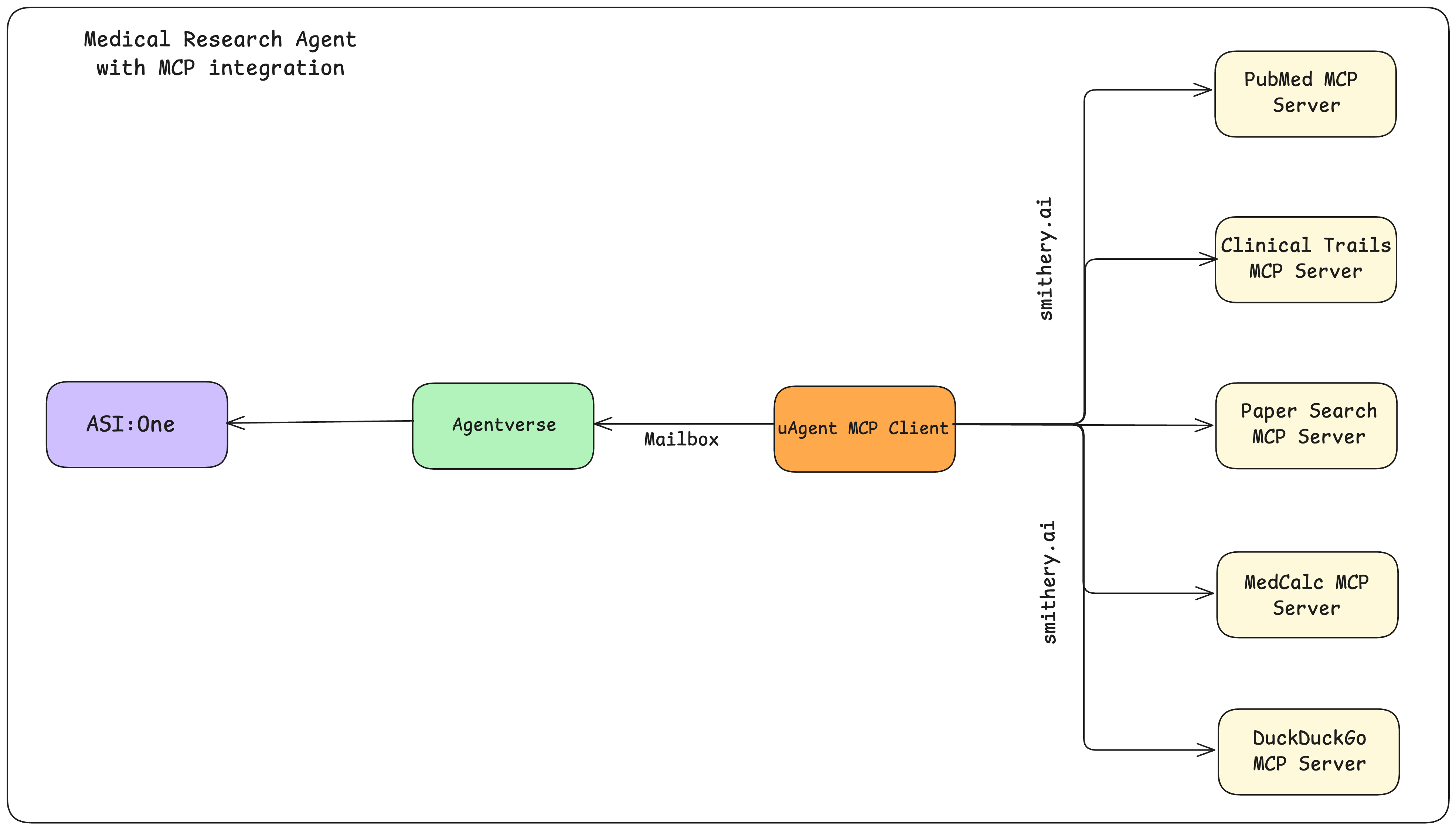
Example: Medical Research Agent
Configure the uAgent Client
from dotenv import load_dotenv
from uagents_core.contrib.protocols.chat import (
chat_protocol_spec,
ChatMessage,
ChatAcknowledgement,
TextContent,
StartSessionContent,
)
from uagents import Agent, Context, Protocol
from datetime import datetime, timezone, timedelta
from uuid import uuid4
import mcp
from mcp.client.streamable_http import streamablehttp_client
import json
import base64
import asyncio
import requests
from typing import Dict, List, Optional, Any
from contextlib import AsyncExitStack
import os
import re
# Load environment variables
load_dotenv()
# Get API keys from environment variables
ASI_LLM_KEY = os.getenv("ASI_LLM_KEY") or os.getenv("ASI1_API_KEY")
if not ASI_LLM_KEY:
raise ValueError(
"Please set the ASI_LLM_KEY (or ASI1_API_KEY) environment variable in your .env file"
)
ASI1_API_URL = os.getenv("ASI1_API_URL", "https://api.asi1.ai/v1/chat/completions")
SMITHERY_API_KEY = os.getenv("SMITHERY_API_KEY")
if not SMITHERY_API_KEY:
raise ValueError(
"Please set the SMITHERY_API_KEY environment variable in your .env file"
)
# Prefer a unique seed in production — a fixed string yields a predictable agent identity.
AGENT_SEED = os.getenv("AGENT_SEED", "medical_research_mcp_agent")
def _safe_tool_prefix(server_path: str) -> str:
"""Turn '@owner/name' into a stable OpenAI-compatible function-name prefix."""
return re.sub(r"[^a-zA-Z0-9_]", "_", server_path.lstrip("@"))
def _extract_mcp_text(content: Any) -> str:
"""Pull human-readable text from MCP CallToolResult.content shapes."""
if content is None:
return ""
if isinstance(content, str):
return content
if isinstance(content, list):
parts: List[str] = []
for item in content:
text = getattr(item, "text", None)
if text is not None:
parts.append(str(text))
continue
if isinstance(item, dict):
if item.get("text") is not None:
parts.append(str(item["text"]))
elif item.get("type") == "resource" and item.get("resource"):
parts.append(str(item["resource"]))
else:
parts.append(json.dumps(item, default=str))
else:
parts.append(str(item))
return "\n".join(parts)
text = getattr(content, "text", None)
if text is not None:
return str(text)
return str(content)
class MedicalResearchMCPClient:
def __init__(self):
self.sessions: Dict[str, mcp.ClientSession] = {}
self.exit_stack = AsyncExitStack()
self.asi_api_key = ASI_LLM_KEY
self.asi_api_url = ASI1_API_URL
self.model = "asi1"
self.all_tools: List[Dict[str, Any]] = []
# Maps namespaced LLM tool name -> (server_path, original MCP tool name)
self.tool_server_map: Dict[str, tuple[str, str]] = {}
self.server_configs: Dict[str, dict] = {}
self.default_timeout = timedelta(seconds=30)
self.max_tool_rounds = 5
self._connected = False
async def _create_chat_completion(
self,
messages: List[Dict[str, Any]],
tools: Optional[List[Dict[str, Any]]] = None,
temperature: float = 0.2,
max_tokens: int = 1000,
) -> Dict[str, Any]:
headers = {
"Authorization": f"Bearer {self.asi_api_key}",
"Content-Type": "application/json",
}
payload: Dict[str, Any] = {
"model": self.model,
"messages": messages,
"temperature": temperature,
"max_tokens": max_tokens,
}
if tools:
payload["tools"] = tools
response = await asyncio.to_thread(
requests.post,
self.asi_api_url,
headers=headers,
json=payload,
timeout=60,
)
if not response.ok:
raise requests.HTTPError(
f"{response.status_code} Error from ASI API: {response.text}",
response=response,
)
return response.json()
def _extract_message_content(self, response_data: Dict[str, Any]) -> str:
choices = response_data.get("choices", [])
if not choices:
return ""
message = choices[0].get("message", {})
return message.get("content", "") or ""
def get_server_config(self, server_path: str) -> dict:
"""Per-server Smithery config (empty for this sample's three servers)."""
if server_path not in self.server_configs:
# Only include keys a given server's schema requires.
config_templates = {
"@JackKuo666/pubmed-mcp-server": {},
"@openags/paper-search-mcp": {},
"@JackKuo666/clinicaltrials-mcp-server": {},
}
self.server_configs[server_path] = config_templates.get(server_path, {})
return self.server_configs[server_path]
async def connect_to_servers(self, ctx: Context) -> None:
"""Connect to all MCP servers and collect their tools."""
if self._connected and self.sessions:
return
servers = [
"@JackKuo666/pubmed-mcp-server",
"@openags/paper-search-mcp",
"@JackKuo666/clinicaltrials-mcp-server",
]
connected = 0
for server_path in servers:
try:
ctx.logger.info(f"Connecting to server: {server_path}")
server_config = self.get_server_config(server_path)
# Config only (no secrets). Pass the Smithery API key via Authorization
# so it is less likely to land in access logs than ?api_key=...
config_b64 = base64.b64encode(json.dumps(server_config).encode()).decode()
url = f"https://server.smithery.ai/{server_path}/mcp?config={config_b64}"
http_headers = {"Authorization": f"Bearer {SMITHERY_API_KEY}"}
read_stream, write_stream, _ = await self.exit_stack.enter_async_context(
streamablehttp_client(url, headers=http_headers)
)
session = await self.exit_stack.enter_async_context(
mcp.ClientSession(read_stream, write_stream)
)
await session.initialize()
tools_result = await session.list_tools()
tools = tools_result.tools
self.sessions[server_path] = session
prefix = _safe_tool_prefix(server_path)
for tool in tools:
namespaced = f"{prefix}__{tool.name}"
tool_info = {
"name": namespaced,
"description": f"[{server_path}] {tool.description}",
"input_schema": tool.inputSchema,
"server": server_path,
"tool_name": tool.name,
}
self.all_tools.append(tool_info)
self.tool_server_map[namespaced] = (server_path, tool.name)
connected += 1
ctx.logger.info(f"Successfully connected to {server_path}")
ctx.logger.info(
f"Available tools: {', '.join([t.name for t in tools])}"
)
except Exception as e:
ctx.logger.error(f"Error connecting to {server_path}: {str(e)}")
continue
total = len(servers)
ctx.logger.info(f"MCP connect summary: connected {connected}/{total} servers")
if connected == 0:
raise RuntimeError(
"No MCP servers connected. Check SMITHERY_API_KEY and network access."
)
self._connected = True
ctx.logger.info(
f"Ready with {len(self.all_tools)} namespaced tools across {connected} servers"
)
async def process_query(self, query: str, ctx: Context) -> str:
try:
if not self.sessions:
return (
"No MCP servers are connected yet. Wait for startup to finish, "
"or check the agent logs for connection errors."
)
messages: List[Dict[str, Any]] = [{"role": "user", "content": query}]
llm_tools = []
for tool in self.all_tools:
llm_tools.append(
{
"type": "function",
"function": {
"name": tool["name"],
"description": tool["description"],
"parameters": tool["input_schema"]
or {"type": "object", "properties": {}},
},
}
)
# Multi-turn tool loop: ASI:One may request tools across several rounds.
for _round in range(self.max_tool_rounds):
response_data = await self._create_chat_completion(
messages=messages,
tools=llm_tools,
temperature=0.2,
max_tokens=1000,
)
first_choice = (response_data.get("choices", [{}])[0] or {})
assistant_message = first_choice.get("message", {})
tool_calls = assistant_message.get("tool_calls") or []
if not tool_calls:
direct = self._extract_message_content(response_data)
return direct if direct else "No response received from ASI:One."
messages.append(
{
"role": "assistant",
"content": assistant_message.get("content"),
"tool_calls": tool_calls,
}
)
for tool_call in tool_calls:
function_data = tool_call.get("function", {})
namespaced_name = function_data.get("name")
tool_call_id = tool_call.get("id") or namespaced_name
tool_args_raw = function_data.get("arguments", "{}")
try:
tool_args = (
json.loads(tool_args_raw)
if isinstance(tool_args_raw, str)
else tool_args_raw
)
except json.JSONDecodeError:
tool_args = {}
mapping = self.tool_server_map.get(namespaced_name or "")
if not mapping:
tool_text = f"Unknown tool: {namespaced_name}"
else:
server_path, original_name = mapping
ctx.logger.info(
f"Calling tool {original_name} from {server_path} "
f"(as {namespaced_name})"
)
try:
result = await asyncio.wait_for(
self.sessions[server_path].call_tool(
original_name, tool_args
),
timeout=self.default_timeout.total_seconds(),
)
tool_text = _extract_mcp_text(result.content)
except asyncio.TimeoutError:
tool_text = (
"Error: The MCP server did not respond. "
"Please try again later."
)
except Exception as e:
tool_text = f"Error calling tool {original_name}: {str(e)}"
messages.append(
{
"role": "tool",
"tool_call_id": tool_call_id,
"content": tool_text,
}
)
# Final formatting pass after the tool loop budget is exhausted.
tool_dump = "\n\n".join(
m["content"]
for m in messages
if m.get("role") == "tool" and m.get("content")
)
format_prompt = (
"Please format the following response in a clear, user-friendly way. "
"Do not add any additional information or knowledge, just format what "
f"is provided:\n\n{tool_dump}\n\n"
"Instructions:\n"
"1. If the response contains multiple records (like clinical trials), "
"present ALL records in a clear format; do not say something like "
'"Saved to a CSV file" or anything similar.\n'
"2. Use appropriate headings and sections.\n"
"3. Maintain all the original information.\n"
"4. Do not add any external knowledge or commentary.\n"
"5. Do not summarize or modify the content.\n"
"6. Keep the formatting simple and clean.\n"
"7. If the response mentions a CSV file, do not include that "
"information in the response.\n"
"8. For long responses, ensure all records are shown, not just a subset."
)
format_response_data = await self._create_chat_completion(
messages=[{"role": "user", "content": format_prompt}],
temperature=0.2,
max_tokens=2000,
)
formatted = self._extract_message_content(format_response_data)
return formatted if formatted else tool_dump
except Exception as e:
ctx.logger.error(f"Error processing query: {str(e)}")
return f"An error occurred while processing your query: {str(e)}"
async def cleanup(self):
await self.exit_stack.aclose()
# Initialize chat protocol and agent
chat_proto = Protocol(spec=chat_protocol_spec)
mcp_agent = Agent(
name="MedicalResearchMCPAgent",
port=8001,
mailbox=True,
seed=AGENT_SEED,
)
client = MedicalResearchMCPClient()
@mcp_agent.on_event("startup")
async def on_startup(ctx: Context):
ctx.logger.info("Connecting to remote MCP servers on startup...")
try:
await client.connect_to_servers(ctx)
ctx.logger.info(
"Startup complete. Agent is ready for Chat Protocol messages "
"(keep this process running)."
)
except Exception as e:
ctx.logger.error(f"Startup MCP connect failed: {e}")
@chat_proto.on_message(model=ChatMessage)
async def handle_chat_message(ctx: Context, sender: str, msg: ChatMessage):
try:
ack = ChatAcknowledgement(
timestamp=datetime.now(timezone.utc),
acknowledged_msg_id=msg.msg_id,
)
await ctx.send(sender, ack)
if not client.sessions:
try:
await client.connect_to_servers(ctx)
except Exception as e:
err = ChatMessage(
timestamp=datetime.now(timezone.utc),
msg_id=uuid4(),
content=[
TextContent(
type="text",
text=f"MCP servers unavailable: {e}",
)
],
)
await ctx.send(sender, err)
return
for item in msg.content:
if isinstance(item, StartSessionContent):
ctx.logger.info(f"Got a start session message from {sender}")
continue
elif isinstance(item, TextContent):
ctx.logger.info(f"Got a message from {sender}: {item.text}")
response_text = await client.process_query(item.text, ctx)
ctx.logger.info(f"Response text: {response_text}")
response = ChatMessage(
timestamp=datetime.now(timezone.utc),
msg_id=uuid4(),
content=[TextContent(type="text", text=response_text)],
)
await ctx.send(sender, response)
else:
ctx.logger.info(f"Got unexpected content from {sender}")
except Exception as e:
ctx.logger.error(f"Error handling chat message: {str(e)}")
error_response = ChatMessage(
timestamp=datetime.now(timezone.utc),
msg_id=uuid4(),
content=[TextContent(type="text", text=f"An error occurred: {str(e)}")],
)
await ctx.send(sender, error_response)
@chat_proto.on_message(model=ChatAcknowledgement)
async def handle_chat_acknowledgement(
ctx: Context, sender: str, msg: ChatAcknowledgement
):
ctx.logger.info(
f"Received acknowledgement from {sender} for message {msg.acknowledged_msg_id}"
)
if msg.metadata:
ctx.logger.info(f"Metadata: {msg.metadata}")
mcp_agent.include(chat_proto)
if __name__ == "__main__":
try:
mcp_agent.run()
except Exception as e:
print(f"Error running agent: {str(e)}")
finally:
# uAgents may already own an event loop on some platforms; fall back safely.
try:
loop = asyncio.get_event_loop()
if loop.is_running():
loop.create_task(client.cleanup())
else:
loop.run_until_complete(client.cleanup())
except RuntimeError:
asyncio.run(client.cleanup())
Script Breakdown
This section walks through the main components of mcp_agent.py so you can see how each part builds an ASI:One-powered uAgent that connects to multiple remote MCP servers.
1. Loading Configuration and Dependencies
ASI_LLM_KEY = os.getenv("ASI_LLM_KEY") or os.getenv("ASI1_API_KEY")
SMITHERY_API_KEY = os.getenv("SMITHERY_API_KEY")
ASI1_API_URL = os.getenv("ASI1_API_URL", "https://api.asi1.ai/v1/chat/completions")
AGENT_SEED = os.getenv("AGENT_SEED", "medical_research_mcp_agent")
Environment variables are loaded with dotenv for ASI:One and Smithery.ai. Set a unique AGENT_SEED for any long-lived or production agent — reusing the sample default creates a predictable identity.
2. Creating the MCP Client
class MedicalResearchMCPClient:
    def __init__(self):
        ...
MedicalResearchMCPClient owns MCP sessions, namespaced tool metadata, and ASI:One chat-completions calls. AsyncExitStack keeps multiple HTTP MCP sessions alive for the agent process lifetime.
3. MCP Server Configuration
def get_server_config(self, server_path: str) -> dict:
    ...
Pick MCP servers on Smithery.ai, open each server’s API tab, and copy only the config fields that server’s schema requires. This sample’s three servers need empty configs.
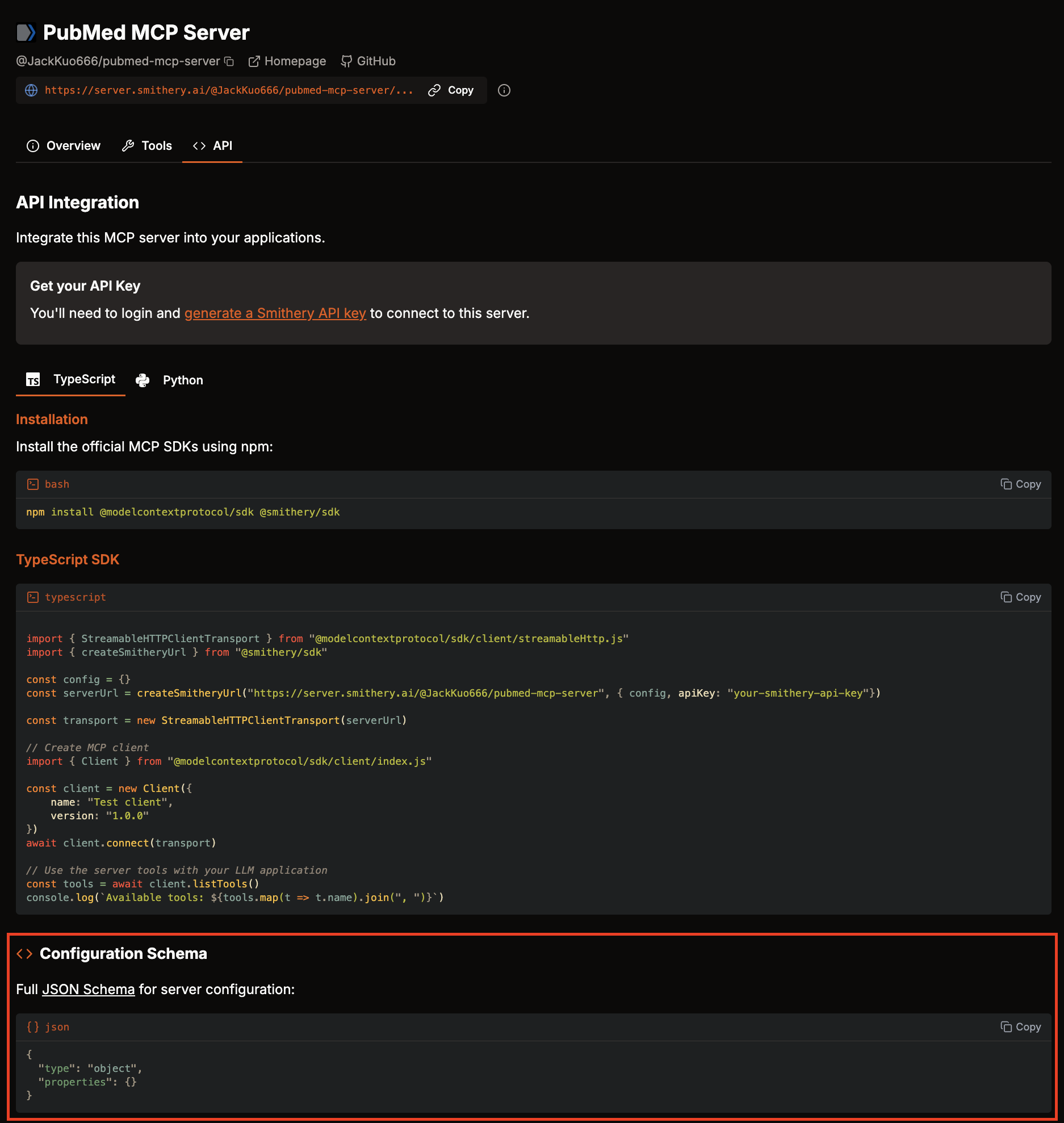
Note: For this example, we've selected MCP servers that do not require extra authentication or server parameters.
4. Connecting to Multiple Remote MCP Servers
async def connect_to_servers(self, ctx: Context) -> None:
    ...
Connections run on @agent.on_event("startup") so the first chat message is not blocked by Smithery handshakes. Failed servers are logged and skipped; the agent reports connected N/M and raises if N == 0.
config_b64 = base64.b64encode(json.dumps(server_config).encode()).decode()
url = f"https://server.smithery.ai/{server_path}/mcp?config={config_b64}"
http_headers = {"Authorization": f"Bearer {SMITHERY_API_KEY}"}
Prefer sending SMITHERY_API_KEY in the Authorization: Bearer ... header (as above). Putting secrets in ?api_key= query strings risks leakage via proxies, CDN logs, and browser history. If your Smithery deployment still requires a query parameter, treat that URL as sensitive and never commit it.
Tools are stored under namespaced names (owner_server__tool_name) so ASI:One never sees colliding function names across servers. At call time the map resolves back to (server_path, original_tool_name).
5. Processing User Queries
async def process_query(self, query: str, ctx: Context) -> str:
    ...
The agent builds an OpenAI-compatible tools array for ASI:One chat-completions:
llm_tools = [
    {
        "type": "function",
        "function": {
            "name": tool["name"],
            "description": tool["description"],
            "parameters": tool["input_schema"] or {"type": "object", "properties": {}},
        },
    }
    for tool in self.all_tools
]
When ASI:One returns tool_calls, the agent executes each MCP tool and appends role: "tool" messages, then calls ASI:One again (up to max_tool_rounds). That is a proper multi-turn tool loop — not a single completion with no tool result feedback.
tool_calls = assistant_message.get("tool_calls") or []
for tool_call in tool_calls:
    function_data = tool_call.get("function", {})
    namespaced_name = function_data.get("name")
    tool_args = json.loads(function_data.get("arguments", "{}"))
    server_path, original_name = self.tool_server_map[namespaced_name]
    result = await self.sessions[server_path].call_tool(original_name, tool_args)
    tool_text = _extract_mcp_text(result.content)
    messages.append(
        {"role": "tool", "tool_call_id": tool_call["id"], "content": tool_text}
    )
_extract_mcp_text prefers MCP content objects’ .text fields instead of raw str(item).
6. Initializing the uAgent
mcp_agent = Agent(
    name="MedicalResearchMCPAgent",
    port=8001,
    mailbox=True,
    seed=AGENT_SEED,
)
mailbox=True connects the local process to Agentverse so the agent is discoverable and callable. Change AGENT_SEED before deploying; do not reuse the sample seed in production.
7. Implementing the Chat Protocol
chat_proto = Protocol(spec=chat_protocol_spec)
The agent includes the standardized chat_protocol_spec to communicate with other agents and ASI:One.
@chat_proto.on_message(model=ChatMessage)
async def handle_chat_message(ctx: Context, sender: str, msg: ChatMessage):
    ...
When ASI:One (or another agent) selects this agent, it sends a ChatMessage. The handler acknowledges, runs process_query(), and replies with formatted text. See the Chat Protocol documentation for the full message shapes.
8. Cleanup on Shutdown
async def cleanup(self):
    await self.exit_stack.aclose()
Gracefully closes MCP sessions. The __main__ block avoids blindly calling asyncio.run() when a loop is already running (common under some uAgents runtimes).
9. Running the Agent
if __name__ == "__main__":
    mcp_agent.run()
Keep the process running so mailbox and Chat Protocol stay online. Stopping the process disconnects the agent from Agentverse.
Register the Agent on Agentverse
- Start the agent and watch for startup logs such as:
Connecting to remote MCP servers on startup...MCP connect summary: connected 3/3 serversStartup complete. Agent is ready for Chat Protocol messages- An Agent inspector URL (printed by uAgents) for linking the local agent to Agentverse
- Open the inspector link, complete mailbox / Agentverse registration, and confirm the agent appears under your local agents.
- Keep
python mcp_agent.pyrunning while you chat — exiting the process takes the agent offline. - Optionally paste a short description into the Overview tab on the Agentverse agent profile (see Getting Started) so ASI:One discovery works better.
Getting Started
-
Get your API keys:
- Smithery.ai API key
- ASI:One API key
- Store them only in
.env(never in source control)
-
Set up environment variables in a
.envfile:.envASI_LLM_KEY=your_asi_llm_keySMITHERY_API_KEY=your_smithery_api_key# Optional: unique seed for this deployment (do not reuse the sample default in production)AGENT_SEED=change-me-to-a-unique-seed -
Install dependencies (tested pins):
pip install "uagents>=0.25.5" "" "mcp>=1.0.0" python-dotenv requestsChat Protocol types come from
uagents-core(pulled by recentuagents, but pin it explicitly if imports fail). On success you should see packages resolve without conflicts; a quick import check:python -c "from uagents import Agent; from uagents_core.contrib.protocols.chat import chat_protocol_spec; import mcp; print('deps ok')" -
Create the agent file:
- Save the code above as
mcp_agent.pynext to your.env - Local (optional): a project
README.mdbesidemcp_agent.pyis only for your own notes — it is not read by Agentverse - Agentverse (recommended for discovery): after registration, open the agent’s Overview tab in Agentverse and paste a short README / description there so ASI:One and other users can find the agent
- Save the code above as
-
Run the agent (leave the terminal open):
python mcp_agent.pyExpected happy-path log lines include MCP
connected N/M, tool listings, mailbox/inspector URL, andStartup complete. -
Register and test:
- Use the inspector link from the startup logs to finish Agentverse registration
- In Agentverse, open local agents, select your agent, and use Chat with Agent
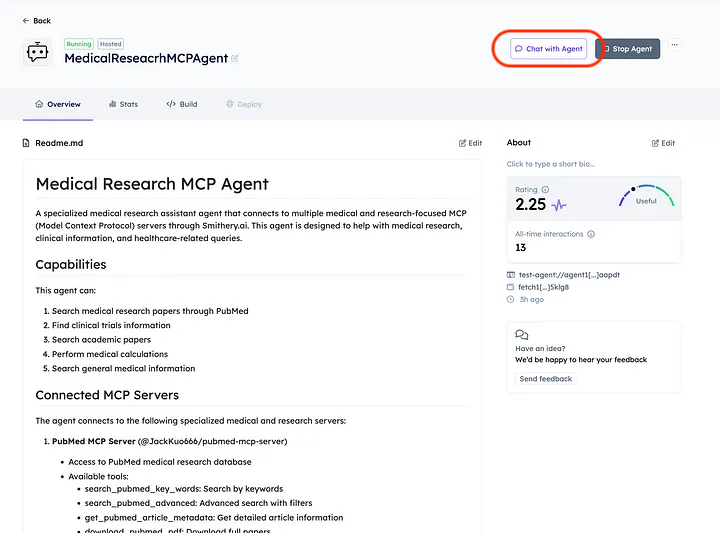
Query the agent through ASI:One (enable the Agents switch). Example: ask for recent PubMed papers on a topic and confirm the reply contains formatted literature/tool output (not Anthropic/tool_use errors).