LangGraph Agent with MCP Tools
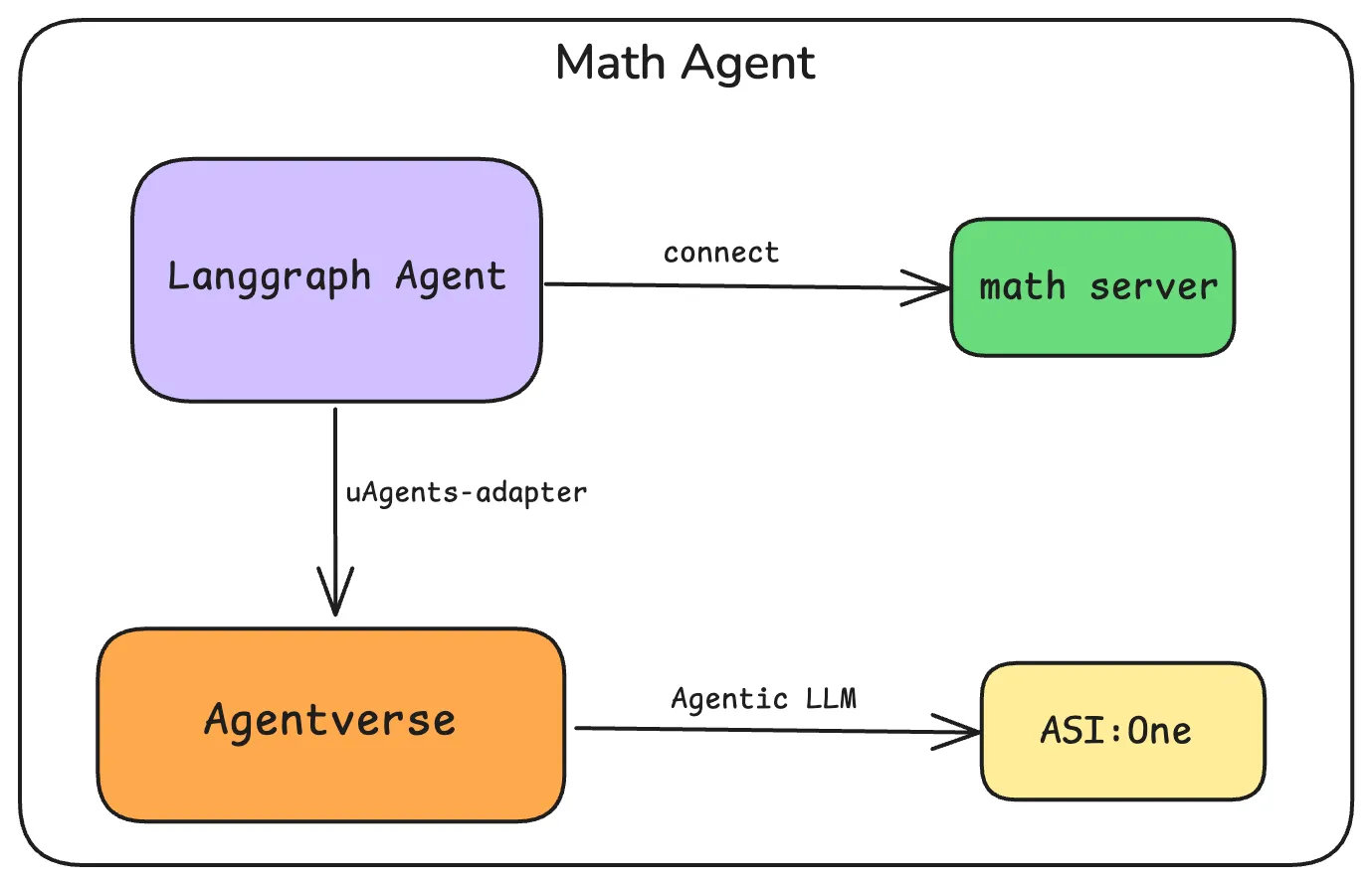
This example builds a LangGraph ReAct agent that calls tools from a local MCP math server via langchain-mcp-adapters, then wraps that agent as a uAgent with the LangChain uAgents adapter (LangchainRegisterTool / AgentManager) so it can be discovered and chatted with on Agentverse and ASI:One.
OpenAI powers the graph (ChatOpenAI / gpt-4o for reasoning and tool calls). ASI:One and Agentverse are for discovery and chat — they do not run the LangGraph brain.
This page is not about MCPServerAdapter (hosting an MCP server on Agentverse). That pattern lives in the uAgents Adapters guide and the MCP Server on Agentverse example. Here you use langchain-mcp-adapters as the MCP client, then the LangChain adapter to register the LangGraph agent.
Overview
- Local MCP math server exposes
add,subtract,multiply, anddivideover stdio. - LangGraph (
create_react_agent) loads those tools throughlangchain_mcp_adapters. uagents_adapter(LangchainRegisterTool,AgentManager) wraps the graph as a mailbox uAgent on Agentverse.- Callers reach it from ASI:One or Agentverse Chat with Agent; the agent still answers with OpenAI.
Flow: ASI:One / Agentverse chat → uAgent (mailbox) → LangChain wrapper → LangGraph ReAct agent → MCP stdio tools → OpenAI.
Prerequisites
Before you begin:
- Python 3.10+ (3.10–3.12 recommended). Prefer
python3/sys.executable; on Windows you can usepy -3.10. - A virtual environment (do not install into system Python).
- An OpenAI API key with billing enabled (the agent brain is
gpt-4o). - An Agentverse API key for mailbox registration.
- Keep the local process running while you chat (mailbox needs the agent online).
Sibling guide: Multi-Server MCP LangGraph Agent (math + weather with MultiServerMCPClient). Adapter overview: uAgents Adapters.
Example: Math MCP Server Integration
1. Create the Math MCP Server
The server exposes four tools: add, subtract, multiply, and divide. Stick to expressions that use these operations in demos and chat.
from mcp.server.fastmcp import FastMCP

mcp = FastMCP("Math")


@mcp.tool()
def add(a: int, b: int) -> int:
    """Add two numbers"""
    return a + b


@mcp.tool()
def subtract(a: int, b: int) -> int:
    """Subtract b from a"""
    return a - b


@mcp.tool()
def multiply(a: int, b: int) -> int:
    """Multiply two numbers"""
    return a * b


@mcp.tool()
def divide(a: int, b: int) -> float:
    """Divide a by b"""
    return a / b


if __name__ == "__main__":
    mcp.run(transport="stdio")
2. Create and Register the LangGraph Agent
Save this next to math_server.py. The sample uses sys.executable and an absolute path so the MCP child process starts reliably, and an asyncio.Event ready-gate so early Agentverse messages do not hit agent is None.
import asyncio
import os
import sys
from pathlib import Path

from dotenv import load_dotenv
from langchain_core.messages import HumanMessage
from langchain_mcp_adapters.tools import load_mcp_tools
from langchain_openai import ChatOpenAI
from langgraph.prebuilt import create_react_agent
from mcp import ClientSession, StdioServerParameters
from mcp.client.stdio import stdio_client

from uagents_adapter import LangchainRegisterTool, cleanup_uagent
from uagents_adapter.langchain import AgentManager

load_dotenv()

OPENAI_API_KEY = os.getenv("OPENAI_API_KEY")
API_TOKEN = os.getenv("AGENTVERSE_API_KEY")
AGENT_NAME = "math_agent_langchain_mcp"

if not OPENAI_API_KEY:
    raise SystemExit(
        "Missing OPENAI_API_KEY. Set it in .env — https://platform.openai.com/api-keys"
    )
if not API_TOKEN:
    raise SystemExit(
        "Missing AGENTVERSE_API_KEY. See "
        "https://innovationlab.fetch.ai/resources/docs/agentverse/agentverse-api-key"
    )

model = ChatOpenAI(model="gpt-4o", api_key=OPENAI_API_KEY)

agent = None
agent_ready = asyncio.Event()

MATH_SERVER = str(Path(__file__).resolve().parent / "math_server.py")


async def setup_math_agent():
    global agent

    print("Setting up math agent...")
    server_params = StdioServerParameters(
        command=sys.executable,
        args=[MATH_SERVER],
    )

    try:
        async with stdio_client(server_params) as (read, write):
            async with ClientSession(read, write) as session:
                await session.initialize()
                tools = await load_mcp_tools(session)
                agent = create_react_agent(model, tools)

                test_response = await agent.ainvoke(
                    {"messages": [HumanMessage(content="what's (3 + 5) x 12?")]}
                )
                print(f"Test response: {test_response['messages'][-1].content}")

                agent_ready.set()

                while True:
                    await asyncio.sleep(1)
    except Exception as exc:
        print(f"Error setting up math agent: {exc}")
        agent_ready.set()
        raise


def main():
    print("Initializing agent...")
    manager = AgentManager()

    async def agent_func(x):
        await agent_ready.wait()
        if agent is None:
            return "Error: math agent is not ready yet. Please try again shortly."
        response = await agent.ainvoke({"messages": [HumanMessage(content=x)]})
        return response["messages"][-1].content

    agent_wrapper = manager.create_agent_wrapper(agent_func)

    manager.start_agent(setup_math_agent)

    print("Registering math agent...")
    tool = LangchainRegisterTool()
    agent_info = tool.invoke(
        {
            "agent_obj": agent_wrapper,
            "name": AGENT_NAME,
            "port": 8080,
            "description": "A math calculation agent (add, subtract, multiply, divide via MCP)",
            "api_token": API_TOKEN,
            "mailbox": True,
        }
    )

    print(f"✅ Registered math agent: {agent_info}")

    try:
        manager.run_forever()
    except KeyboardInterrupt:
        print("🛑 Shutting down...")
        cleanup_uagent(AGENT_NAME)
        print("✅ Agent stopped.")


if __name__ == "__main__":
    main()
Getting Started
-
Create a project folder and virtualenv, then activate it:
mkdir mcp-langgraph-test && cd mcp-langgraph-testpython3 -m venv .venvsource .venv/bin/activate # Windows: .venv\Scripts\activate -
Set environment variables in a
.envfile:OPENAI_API_KEY=your_openai_api_keyAGENTVERSE_API_KEY=your_agentverse_api_key -
Install dependencies (pinned set this page was tested with):
pip install \"langchain-openai==0.3.14" \"langgraph==0.3.31" \"mcp>=1.0.0" \"langchain-mcp-adapters>=0.0.9" \"uagents-adapter[langchain]==0.6.2" \"python-dotenv>=1.0.0"Upstream LangChain is moving toward
langchain.agents.create_agent; this sample still useslanggraph.prebuilt.create_react_agentwith the pins above. If you upgrade past these versions, re-check the API. -
Create the files:
- Save the math server code as
math_server.pyin the project folder. - Save the agent code as
agent.pyin the same folder.
- Save the math server code as
-
Run the agent (leave this terminal open so mailbox stays connected):
python agent.py -
Test your agent from ASI:One or the Agentverse chat UI. Use queries that only need
+,-,*, or/(for example:what is (3 + 5) * 12?).
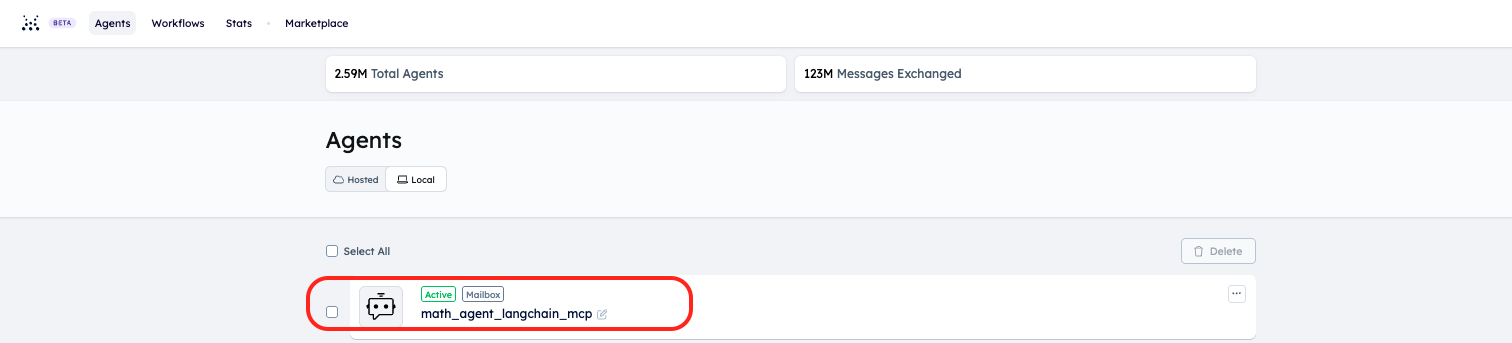
- Open your Agentverse account and go to local agents.
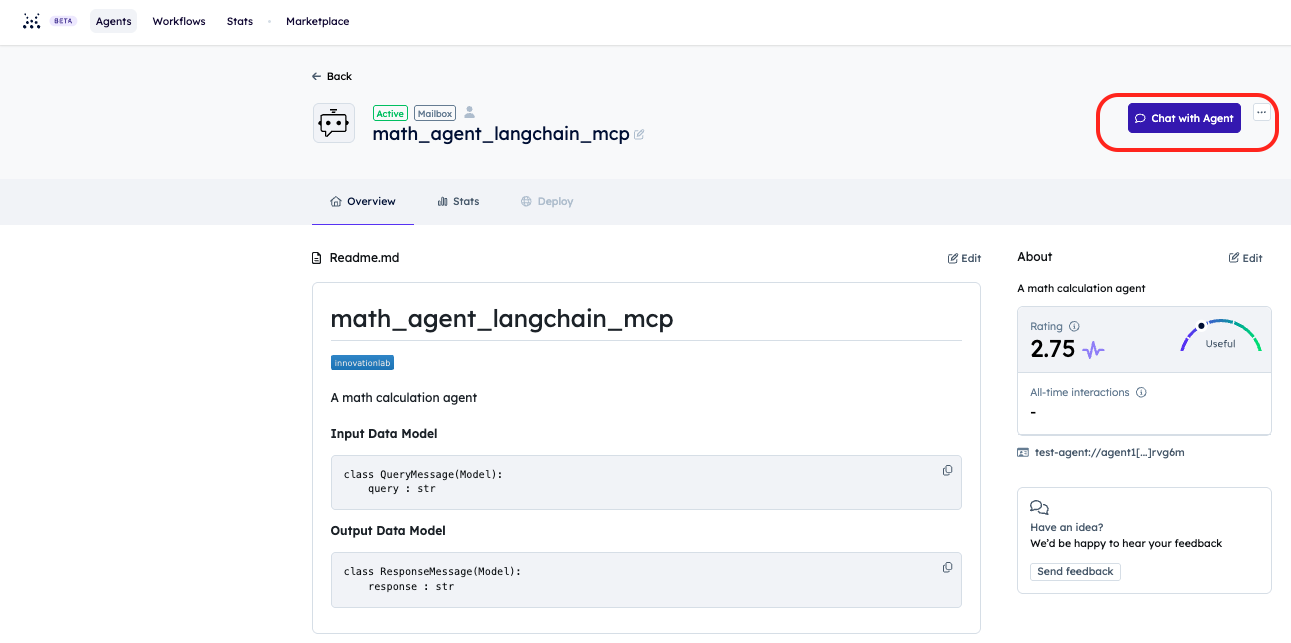
- Click your agent and use the Chat with Agent button on the Agentverse agent page.

Sample agent logs
After startup you should see a local tool test, successful Almanac / mailbox registration, then a finished chat answer. The structured-output QueryMessage hop is the adapter asking the caller to normalize free text into a query string before LangGraph runs.
If you see Mismatch in almanac contract versions: supported (…), deployed (…), registration can still succeed; upgrade uagents / uagents-adapter extras when convenient so the client matches the deployed contract.
(venv) xyz@Fetchs-MacBook-Pro mcp-langgraph-test % python3 agent.py
Initializing agent...
Setting up math agent...
Processing request of type ListToolsRequest
INFO:httpx:HTTP Request: POST https://api.openai.com/v1/chat/completions "HTTP/1.1 200 OK"
Processing request of type CallToolRequest
Processing request of type CallToolRequest
INFO:httpx:HTTP Request: POST https://api.openai.com/v1/chat/completions "HTTP/1.1 200 OK"
Test response: (3 + 5) × 12 = 8 × 12 = 96.
Registering math agent...
INFO:     [math_agent_langchain_mcp]: Starting agent with address: agent1qdspvt6tm34n3dnau9yekp8f3axmhd0vsmacxy59q20enmtvfvn0uxrvg6m
INFO:     [math_agent_langchain_mcp]: Agent 'math_agent_langchain_mcp' started with address: agent1qdspvt6tm34n3dnau9yekp8f3axmhd0vsmacxy59q20enmtvfvn0uxrvg6m
INFO:     [math_agent_langchain_mcp]: Agent inspector available at https://agentverse.ai/inspect/?uri=http%3A//127.0.0.1%3A8080&address=agent1qdspvt6tm34n3dnau9yekp8f3axmhd0vsmacxy59q20enmtvfvn0uxrvg6m
INFO:     [math_agent_langchain_mcp]: Starting server on http://0.0.0.0:8080 (Press CTRL+C to quit)
INFO:     [math_agent_langchain_mcp]: Starting mailbox client for https://agentverse.ai
INFO:     [math_agent_langchain_mcp]: Mailbox access token acquired
INFO:     [uagents.registration]: Registration on Almanac API successful
WARNING:  [uagents.registration]: Mismatch in almanac contract versions: supported (2.1.0), deployed (2.3.0). Update uAgents to the latest version for compatibility.
INFO:     [uagents.registration]: Almanac contract registration is up to date!
✅ Registered math agent: Created uAgent 'math_agent_langchain_mcp' with address agent1qdspvt6tm34n3dnau9yekp8f3axmhd0vsmacxy59q20enmtvfvn0uxrvg6m on port 8080
Connecting agent 'math_agent_langchain_mcp' to Agentverse...
INFO:     [mailbox]: Successfully registered as mailbox agent in Agentverse
Successfully connected agent 'math_agent_langchain_mcp' to Agentverse
Updating agent 'math_agent_langchain_mcp' README on Agentverse...
Successfully updated agent 'math_agent_langchain_mcp' README on Agentverse
INFO:     [math_agent_langchain_mcp]: Got a message from agent1qwy49pqq7zpg0d2ygv72wdr05vf4kuzc80lmnr9zev6h7vkdq3dk74rdxuq
INFO:     [math_agent_langchain_mcp]: Got a text message from agent1qwy49pqq7zpg0d2ygv72wdr05vf4kuzc80lmnr9zev6h7vkdq3dk74rdxuq: what is (3 + 5) * 12?
INFO:     [math_agent_langchain_mcp]: Sending structured output prompt to {'title': 'QueryMessage', 'type': 'object', 'properties': {'query': {'title': 'Query', 'type': 'string'}}, 'required': ['query']}
INFO:     [math_agent_langchain_mcp]: Sent structured output prompt to agent1q0h70caed8ax769shpemapzkyk65uscw4xwk6dc4t3emvp5jdcvqs9xs32y
INFO:     [math_agent_langchain_mcp]: Received structured output response from agent1q0h70caed8ax769shpemapzkyk65uscw4xwk6dc4t3emvp5jdcvqs9xs32y: what is (3 + 5) * 12?
INFO:httpx:HTTP Request: POST https://api.openai.com/v1/chat/completions "HTTP/1.1 200 OK"
Processing request of type CallToolRequest
Processing request of type CallToolRequest
INFO:httpx:HTTP Request: POST https://api.openai.com/v1/chat/completions "HTTP/1.1 200 OK"
INFO:     [math_agent_langchain_mcp]: Sent message to agent1qwy49pqq7zpg0d2ygv72wdr05vf4kuzc80lmnr9zev6h7vkdq3dk74rdxuq: (3 + 5) * 12 = 8 * 12 = 96
This example is a single math MCP server. To connect math and weather together with MultiServerMCPClient, see the Multi-Server MCP LangGraph Agent guide (same cleanup naming, ready-gate, and sys.executable patterns).