ASI:One Interactive Cards
ASI:One can render rich, drawer-based UI cards — pickers, forms, review screens — that your agent declares from inside a normal Agent Chat Protocol (ACP) message. Instead of replying with plain text, your agent attaches a small metadata block that tells ASI:One which card to show and what data to put in it. When the user interacts with the card, ASI:One sends the user's selection back to the agent as another chat message.
This page combines everything you need to ship interactive cards:
- The wire protocol (metadata keys, validation limits, response shapes).
- The four predefined card schemas —
carousel,detail,form,review. - The custom element-tree primitives (
card_kind: "custom") for fully bespoke layouts. - A ready-to-run uAgent example and a plain Python client that talks to a card-driven agent end-to-end.
Before wiring cards into your agent, try the Card Interaction Playground — you can edit a payload, preview the rendered card, and inspect the JSON returned when a button is clicked.
1. How interactive cards work
A chat message that drives a card has two parts:
| Part | Purpose |
|---|---|
TextContent block(s) | Plain narration that appears in the chat bubble above the card. |
One MetadataContent block | The card declaration (kind + JSON-stringified payload). |
Required metadata keys
| Key | Value |
|---|---|
card_protocol_version | "1" |
requires_card_interaction | "true" |
card_kind | "carousel" | "detail" | "form" | "review" | "custom" |
card_payload | JSON-stringified payload — shape depends on card_kind. |
Optional metadata keys
| Key | Value | Effect |
|---|---|---|
is_terminal | "true" | Tells the planner this card is informational only — no user input expected. |
preferred_drawer_width_px | integer string, e.g. "540" | Hint for the drawer width. Clamped to [320, 800]. |
Validation limits
card_payloadmust be ≤ 64 KB.- Custom element-tree nesting depth is capped at 8 levels (the root counts as level 1).
- Unknown
card_kindvalues are rejected. - Payloads that don't match the schema for the declared
card_kindare rejected.
When validation fails, ASI:One silently falls back to treating the message as a plain text reply, so the user still sees your TextContent.
Choosing between paths
- Predefined schemas (
carousel,detail,form,review) — use these whenever your card fits the pattern. They get polished, designed UI for free. - Custom element tree (
card_kind: "custom") — compose primitives directly when the predefined kinds don't fit. - Typed escape hatch — for high-fidelity widgets like seat maps, reach out to the ASI:One team; they ship the React component themselves.
Response format
When the user interacts with the card, ASI:One forwards the selection back as a TextContent message inside a follow-up ChatMessage. The shape of that text depends on how the user reached your agent, so your handler must be ready for both formats:
- Natural-language prose (planner-mediated) — when ASI:One's planner LLM routed the user to you. The planner narrates the selection in prose, e.g. "The user picked offer off_123 with cabin economy." Every identifier you put under the CTA's
selectionpayload is mentioned somewhere in that sentence. - Selection JSON (direct @mention) — when the user is talking to your agent directly via
@mention. The selection is delivered verbatim as a JSON object serialized to a string, built from the CTA'sselectionblock plus any captured user inputs.
A typical direct-mention payload looks like:
{
  "action": "book_offer",
  "offer_id": "off_123",
  "cabin": "economy"
}
A robust agent tries json.loads() on the incoming text first and falls back to natural-language parsing if that fails.
Common pitfalls
- Forgetting
card_protocol_version: "1"— the card declaration is silently dropped. - Wrapping
card_payloadin an extra envelope like{"data": {...}}— the schema expects the payload at the top level. - Setting
is_terminal: "true"on a card that needs user input — the drawer never opens, so the user can't act. - Putting non-string values directly in
MetadataContent.metadata— the wire type isdict[str, str]. Alwaysjson.dumps(...)nested structures.
2. Predefined card schemas
The four built-in card_kind values cover the most common interactive patterns. Each section below shows the payload shape, the rendered card, and the selection shape your agent will receive.
carousel — selectable items list
A horizontally scrollable list of cards. Great for search results, offers, or any "pick one of these" flow.
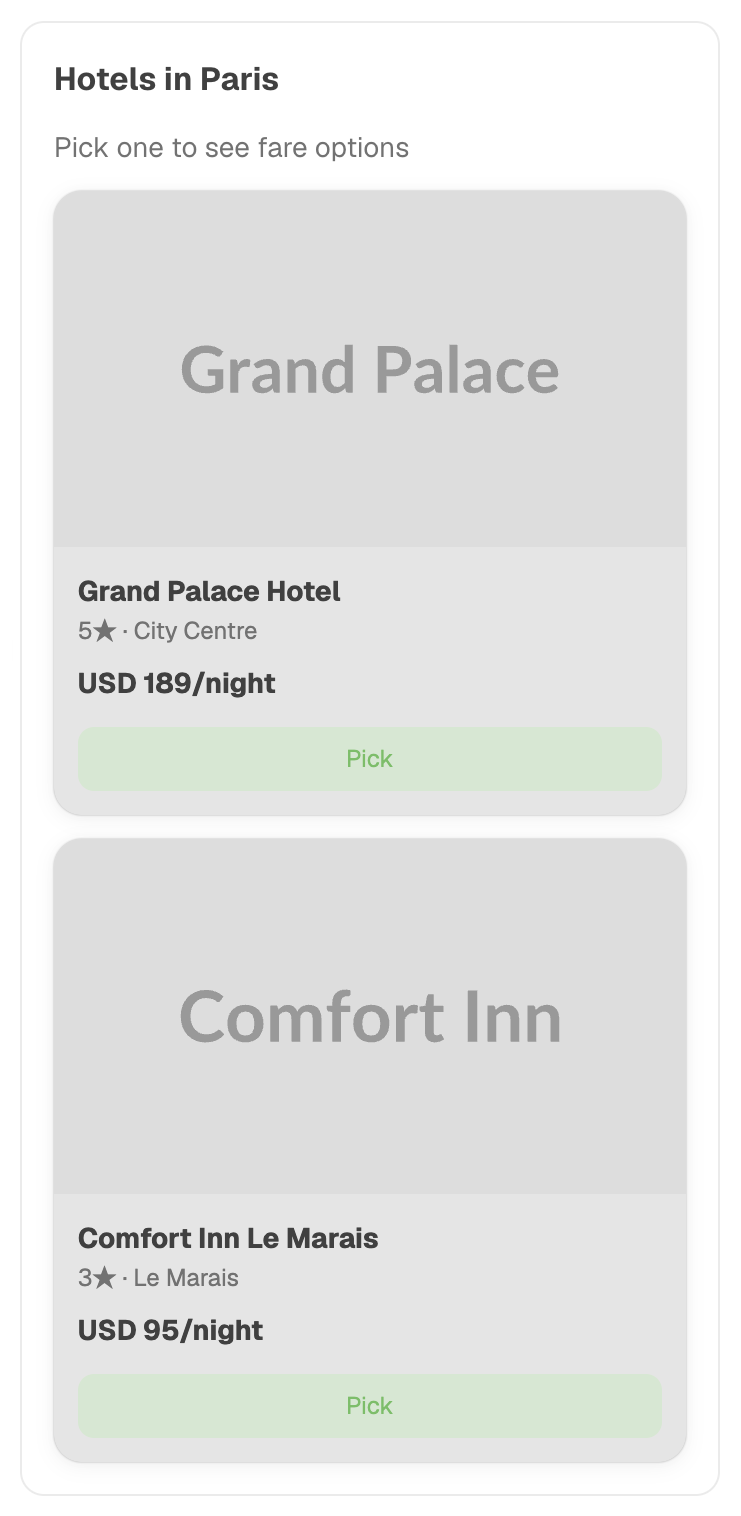
{
  "title": "Choose a flight",
  "subtitle": "London → Edinburgh, 2026-06-25",
  "items": [
    {
      "id": "off_123",
      "image": "https://example.com/ba.png",
      "title": "British Airways",
      "subtitle": "Direct · 1h 15m · Economy",
      "badges": [{"label": "Direct", "variant": "info"}],
      "secondary_text": "USD 88.16",
      "primary_cta": {
        "label": "Select",
        "selection": {"offer_id": "off_123"}
      }
    }
  ]
}
Selection shape: whatever you put under primary_cta.selection (e.g. {"offer_id": "off_123"}).
detail — detail view with sub-options + CTAs
A focused detail page for a single item, with a hero image, key/value summary rows, an optional sub-option picker (radio buttons), and one or more action buttons.
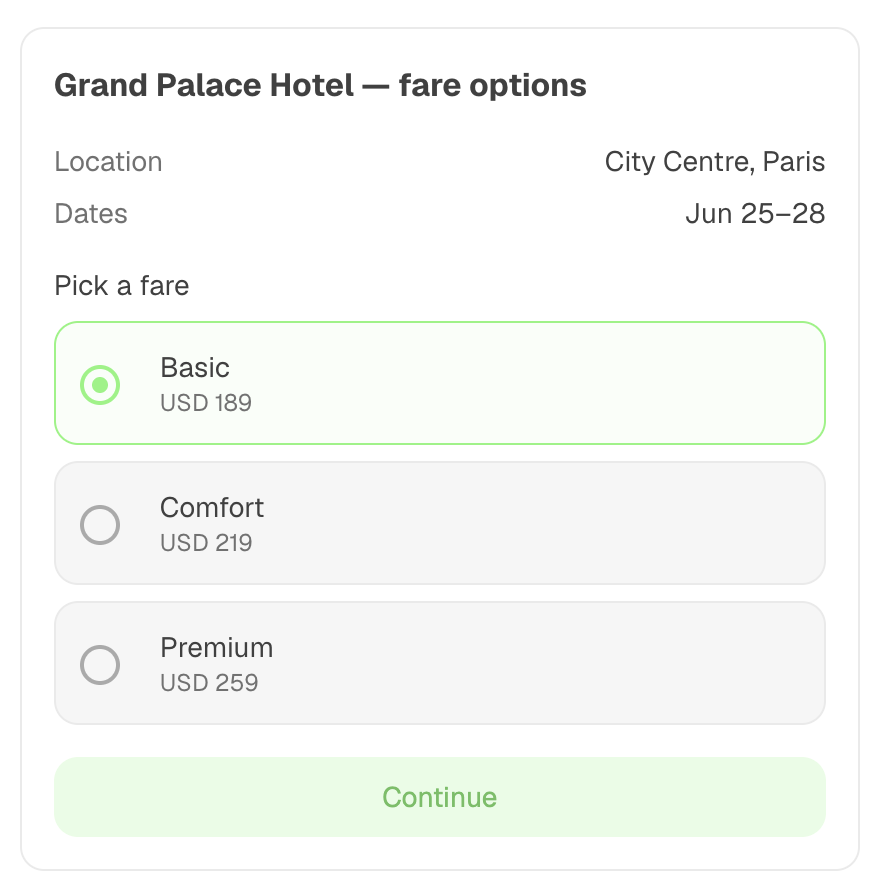
{
  "title": "British Airways · LHR → EDI",
  "hero_image": "https://example.com/hero.png",
  "summary_rows": [
    {"label": "Departure", "value": "21:50 · LHR"},
    {"label": "Arrival", "value": "23:05 · EDI"}
  ],
  "sub_options": {
    "name": "cabin",
    "kind": "radio",
    "label": "Cabin class",
    "choices": [
      {"value": "economy", "label": "Economy", "secondary_text": "USD 88"},
      {"value": "business", "label": "Business", "secondary_text": "USD 220"}
    ]
  },
  "ctas": [
    {"label": "Continue", "selection": {"action": "continue"}, "primary": true},
    {"label": "Back", "selection": {"action": "back"}}
  ]
}
Selection shape: the sub-option value merged with the clicked CTA's selection, e.g. {"cabin": "economy", "action": "continue"}.
form — labeled inputs with submit
A vertical form with labeled fields and a single submit button. Use it for capturing structured input like contact details, preferences, or filters.
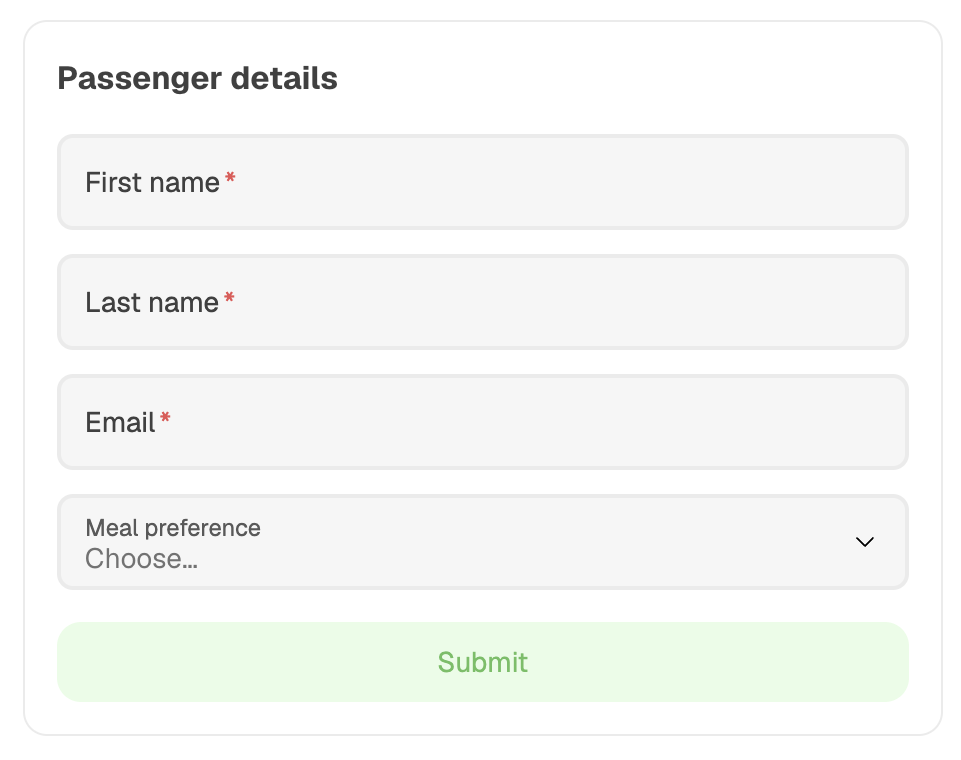
{
  "title": "Passenger details",
  "fields": [
    {"name": "first_name", "kind": "text", "label": "First name", "required": true},
    {"name": "email", "kind": "email", "label": "Email", "required": true},
    {
      "name": "country",
      "kind": "select",
      "label": "Country",
      "options": [{"value": "GB", "label": "United Kingdom"}]
    }
  ],
  "submit_cta": {"label": "Continue", "selection": {"action": "submit"}}
}
Field kinds: text, number, email, select, checkbox. select requires a non-empty options array.
Selection shape: every field's value merged with submit_cta.selection, e.g. {"first_name": "Alex", "email": "[email protected]", "country": "GB", "action": "submit"}.
review — confirm/reject summary
A read-only summary with two clear CTAs — typically Confirm and Cancel. Perfect as the last step before a transaction, booking, or any irreversible action.
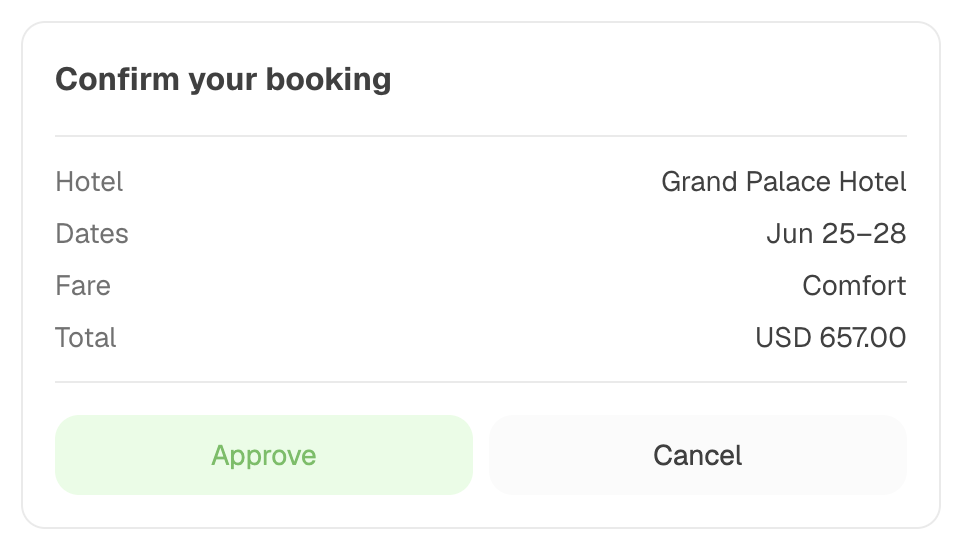
{
  "title": "Confirm booking",
  "summary_rows": [
    {"label": "Flight", "value": "BA1437"},
    {"label": "Total", "value": "USD 88.16"}
  ],
  "approve_cta": {"label": "Confirm booking", "selection": {"action": "confirm"}, "primary": true},
  "reject_cta": {"label": "Cancel", "selection": {"action": "cancel"}}
}
Selection shape: either approve_cta.selection or reject_cta.selection, depending on which button the user clicked. When the planner is involved, the natural-language forward will explicitly mention confirm vs. cancel intent.
3. Custom element-tree primitives (card_kind: "custom")
When none of the four predefined shapes fit, set card_kind: "custom" and compose the layout yourself from primitives. The payload root must be {"root": <element>}, and the element tree can be at most 8 levels deep (root included).
Layout primitives
{type: "section", title?: str, subtitle?: str, children: [...]}— a labeled section.{type: "group", direction: "row" | "column", gap?: int, children: [...]}— flex container.{type: "divider"}— horizontal rule.
Content primitives
{type: "text", value: str, style?: "body" | "muted" | "emphasis"}{type: "heading", value: str, level: 1 | 2 | 3}—leveldefaults to2.{type: "image", src: str, alt?: str, aspect_ratio?: str}(e.g."16:9"){type: "badge", label: str, variant?: "info" | "success" | "warning"}
Interactive primitives
{type: "button", label: str, primary?: bool, action: {selection: {...}}}— submits the collected selection when clicked.{type: "input", name: str, kind: "text" | "number" | "email" | "select" | "checkbox", label: str, required?: bool, options?: [{value, label}, ...], placeholder?: str}—selectrequires a non-emptyoptionsarray.{type: "list", items: [{children: [...], action?: {selection: {...}}}]}— selectable list. Tapping a list item that has anactionis equivalent to clicking a button.{type: "choice_grid", name: str, choices: [{value, label, image?}, ...], multi?: bool}— image-tile picker.
How selection works in custom cards
The drawer keeps track of every input and choice_grid value (keyed by name) and merges those values with the clicked button's action.selection to form the final selection payload.
For example, a custom form with three inputs and a Submit button delivers:
{
"first_name": "Alex",
"country": "GB",
"action": "submit"
}
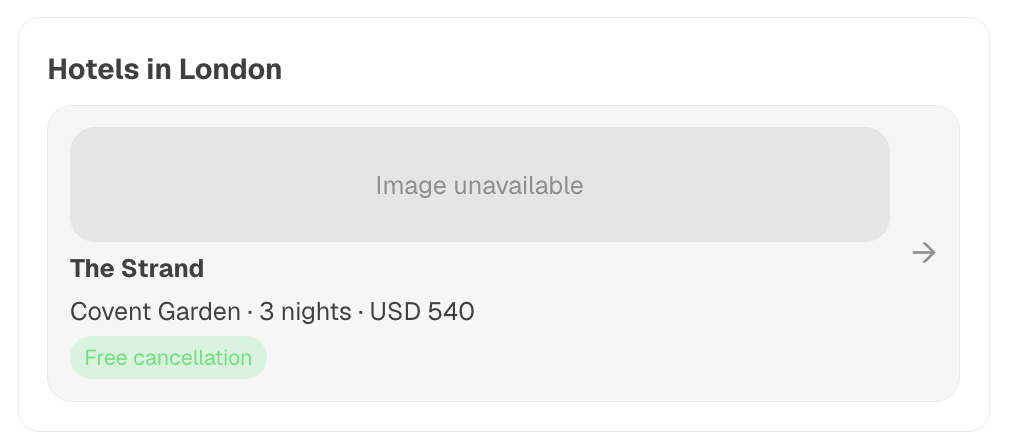
Example: a hotel picker built from primitives
{
  "root": {
    "type": "section",
    "title": "Hotels in London",
    "children": [
      {
        "type": "list",
        "items": [
          {
            "children": [
              {"type": "image", "src": "https://example.com/h1.jpg", "aspect_ratio": "16:9"},
              {"type": "heading", "value": "The Strand", "level": 3},
              {"type": "text", "value": "Covent Garden · 3 nights · USD 540"},
              {"type": "badge", "label": "Free cancellation", "variant": "success"}
            ],
            "action": {"selection": {"hotel_id": "h_strand"}}
          }
        ]
      }
    ]
  }
}
When the user taps the row, your agent receives {"hotel_id": "h_strand"} — either as JSON (direct @mention) or summarized in prose (planner-mediated).
4. Agent example — flight booking with all four card kinds
The agent below uses the Agent Chat Protocol to drive a complete booking flow:
- Carousel — show available flights.
- Detail — show the picked flight with a cabin selector.
- Form — collect passenger details.
- Review — confirm before "booking".
The same handler can be reused for any card flow: build a card_payload dict, JSON-encode it, attach it as a MetadataContent block, and send a ChatMessage.
import json
from datetime import datetime, timezone
from uuid import uuid4

from uagents import Agent, Context, Protocol
from uagents_core.contrib.protocols.chat import (
    ChatAcknowledgement,
    ChatMessage,
    MetadataContent,
    TextContent,
    chat_protocol_spec,
)

agent = Agent(name="flight_card_agent", seed="flight-card-agent-seed-phrase")
chat_proto = Protocol(spec=chat_protocol_spec)


# Helper: build a ChatMessage with one text bubble + one card declaration.
def card_message(narration: str, card_kind: str, card_payload: dict) -> ChatMessage:
    return ChatMessage(
        timestamp=datetime.now(timezone.utc),
        msg_id=uuid4(),
        content=[
            TextContent(type="text", text=narration),
            MetadataContent(
                type="metadata",
                metadata={
                    "card_protocol_version": "1",
                    "requires_card_interaction": "true",
                    "card_kind": card_kind,
                    "card_payload": json.dumps(card_payload),
                    "preferred_drawer_width_px": "540",
                },
            ),
        ],
    )


# ---- Card payload builders -------------------------------------------------

def flights_carousel() -> dict:
    return {
        "title": "Choose a flight",
        "subtitle": "London → Edinburgh, 2026-06-25",
        "items": [
            {
                "id": "off_123",
                "image": "https://example.com/ba.png",
                "title": "British Airways",
                "subtitle": "Direct · 1h 15m",
                "badges": [{"label": "Direct", "variant": "info"}],
                "secondary_text": "USD 88.16",
                "primary_cta": {
                    "label": "Select",
                    "selection": {"action": "pick_flight", "offer_id": "off_123"},
                },
            },
            {
                "id": "off_456",
                "image": "https://example.com/ej.png",
                "title": "easyJet",
                "subtitle": "Direct · 1h 20m",
                "badges": [{"label": "Cheapest", "variant": "success"}],
                "secondary_text": "USD 62.40",
                "primary_cta": {
                    "label": "Select",
                    "selection": {"action": "pick_flight", "offer_id": "off_456"},
                },
            },
        ],
    }


def flight_detail(offer_id: str) -> dict:
    return {
        "title": "British Airways · LHR → EDI",
        "hero_image": "https://example.com/hero.png",
        "summary_rows": [
            {"label": "Departure", "value": "21:50 · LHR"},
            {"label": "Arrival", "value": "23:05 · EDI"},
        ],
        "sub_options": {
            "name": "cabin",
            "kind": "radio",
            "label": "Cabin class",
            "choices": [
                {"value": "economy", "label": "Economy", "secondary_text": "USD 88"},
                {"value": "business", "label": "Business", "secondary_text": "USD 220"},
            ],
        },
        "ctas": [
            {
                "label": "Continue",
                "primary": True,
                "selection": {"action": "pick_cabin", "offer_id": offer_id},
            },
            {"label": "Back", "selection": {"action": "back"}},
        ],
    }


def passenger_form(offer_id: str, cabin: str) -> dict:
    return {
        "title": "Passenger details",
        "fields": [
            {"name": "first_name", "kind": "text", "label": "First name", "required": True},
            {"name": "last_name", "kind": "text", "label": "Last name", "required": True},
            {"name": "email", "kind": "email", "label": "Email", "required": True},
            {
                "name": "country",
                "kind": "select",
                "label": "Country",
                "options": [
                    {"value": "GB", "label": "United Kingdom"},
                    {"value": "US", "label": "United States"},
                ],
            },
        ],
        "submit_cta": {
            "label": "Continue",
            "selection": {"action": "submit_passenger", "offer_id": offer_id, "cabin": cabin},
        },
    }


def review_booking(passenger: dict) -> dict:
    return {
        "title": "Confirm booking",
        "summary_rows": [
            {"label": "Flight", "value": "BA1437 · LHR → EDI"},
            {"label": "Cabin", "value": passenger["cabin"].title()},
            {"label": "Passenger", "value": f'{passenger["first_name"]} {passenger["last_name"]}'},
            {"label": "Total", "value": "USD 88.16"},
        ],
        "approve_cta": {
            "label": "Confirm booking",
            "primary": True,
            "selection": {"action": "confirm", "offer_id": passenger["offer_id"]},
        },
        "reject_cta": {"label": "Cancel", "selection": {"action": "cancel"}},
    }


# ---- Selection parser ------------------------------------------------------

def parse_selection(text: str) -> dict:
    """Try JSON first (direct @mention); fall back to a tiny prose parser."""
    try:
        return json.loads(text)
    except (ValueError, TypeError):
        pass

    selection: dict = {}
    if "off_123" in text:
        selection["offer_id"] = "off_123"
    elif "off_456" in text:
        selection["offer_id"] = "off_456"
    if "economy" in text.lower():
        selection["cabin"] = "economy"
    elif "business" in text.lower():
        selection["cabin"] = "business"
    if "confirm" in text.lower():
        selection["action"] = "confirm"
    elif "cancel" in text.lower():
        selection["action"] = "cancel"
    return selection


# ---- Handlers --------------------------------------------------------------

@chat_proto.on_message(ChatMessage)
async def on_message(ctx: Context, sender: str, msg: ChatMessage):
    await ctx.send(
        sender,
        ChatAcknowledgement(
            timestamp=datetime.now(timezone.utc),
            acknowledged_msg_id=msg.msg_id,
        ),
    )

    last_text = next(
        (c.text for c in msg.content if isinstance(c, TextContent)),
        "",
    )

    # Stash partial state on the session so we can chain multiple cards.
    session = ctx.storage.get(sender) or {}

    if not last_text or last_text.lower() in {"hi", "hello", "start", "book"}:
        await ctx.send(
            sender,
            card_message(
                "Here are the flights I found. Pick one to continue.",
                "carousel",
                flights_carousel(),
            ),
        )
        return

    selection = parse_selection(last_text)
    action = selection.get("action")

    if action == "pick_flight" and "offer_id" in selection:
        session["offer_id"] = selection["offer_id"]
        ctx.storage.set(sender, session)
        await ctx.send(
            sender,
            card_message(
                "Great choice. Pick a cabin to continue.",
                "detail",
                flight_detail(selection["offer_id"]),
            ),
        )

    elif action == "pick_cabin":
        session["cabin"] = selection.get("cabin", "economy")
        session["offer_id"] = selection.get("offer_id", session.get("offer_id"))
        ctx.storage.set(sender, session)
        await ctx.send(
            sender,
            card_message(
                "Almost there — tell me who's travelling.",
                "form",
                passenger_form(session["offer_id"], session["cabin"]),
            ),
        )

    elif action == "submit_passenger":
        session.update(
            offer_id=selection.get("offer_id", session.get("offer_id")),
            cabin=selection.get("cabin", session.get("cabin", "economy")),
            first_name=selection.get("first_name", "Guest"),
            last_name=selection.get("last_name", "User"),
            email=selection.get("email"),
            country=selection.get("country"),
        )
        ctx.storage.set(sender, session)
        await ctx.send(
            sender,
            card_message(
                "Please review and confirm your booking.",
                "review",
                review_booking(session),
            ),
        )

    elif action == "confirm":
        ctx.storage.set(sender, {})
        await ctx.send(
            sender,
            ChatMessage(
                timestamp=datetime.now(timezone.utc),
                msg_id=uuid4(),
                content=[TextContent(type="text", text="Booking confirmed. Reference: BKG-9F2A.")],
            ),
        )

    elif action == "cancel":
        ctx.storage.set(sender, {})
        await ctx.send(
            sender,
            ChatMessage(
                timestamp=datetime.now(timezone.utc),
                msg_id=uuid4(),
                content=[TextContent(type="text", text="No worries — booking cancelled.")],
            ),
        )

    else:
        await ctx.send(
            sender,
            card_message(
                "Sorry, I didn't catch that. Pick a flight to get started.",
                "carousel",
                flights_carousel(),
            ),
        )


@chat_proto.on_message(ChatAcknowledgement)
async def on_ack(ctx: Context, sender: str, msg: ChatAcknowledgement):
    ctx.logger.info(f"ACK from {sender} for {msg.acknowledged_msg_id}")


agent.include(chat_proto, publish_manifest=True)

if __name__ == "__main__":
    agent.run()
Swap any of the helpers above for a card_kind: "custom" payload (using the element-tree primitives) and the rest of the handler keeps working — selection parsing is identical.
5. Client example — driving the agent from plain Python
The agent above is reachable from anything that speaks ACP — including ASI:One, another uAgent, or a plain Python script. The snippet below mints an identity with uagents-core, sends a ChatMessage carrying a simulated card selection, and listens on a small Flask webhook for the agent's reply.
pip install "uagents-core>=0.4.9" flask requests
import json
import os
import threading
from datetime import datetime, timezone
from uuid import uuid4

from flask import Flask, request, jsonify
from uagents_core.contrib.protocols.chat import (
    ChatAcknowledgement,
    ChatMessage,
    TextContent,
    chat_protocol_spec,
)
from uagents_core.crypto import Identity
from uagents_core.envelope import Envelope
from uagents_core.utils.communication import parse_message_from_agent, send_message_to_agent
from uagents_core.utils.registration import register_with_agentverse

# 1. Identity + Agentverse registration (mailbox so the agent can reach us).
identity = Identity.from_seed(os.environ["CLIENT_SEED"], 0)
register_with_agentverse(
    identity=identity,
    url="http://localhost:5000/webhook",
    agentverse_token=os.environ["AGENTVERSE_API_KEY"],
    agent_title="Card Client",
    readme="<description>Drives the flight booking card agent.</description>",
)

AGENT_ADDRESS = os.environ["FLIGHT_AGENT_ADDRESS"]  # the card_agent.py address

app = Flask(__name__)


def send_text(text: str) -> None:
    """Wrap text in a ChatMessage and send it to the card agent."""
    msg = ChatMessage(
        timestamp=datetime.now(timezone.utc),
        msg_id=uuid4(),
        content=[TextContent(type="text", text=text)],
    )
    send_message_to_agent(identity, AGENT_ADDRESS, msg.model_dump(mode="json"))


@app.post("/webhook")
def webhook():
    """Receive ChatMessage / ChatAcknowledgement responses from the agent."""
    raw = request.get_data().decode("utf-8")
    incoming = parse_message_from_agent(raw)

    # The payload is the JSON-serialised ChatMessage / ChatAcknowledgement.
    payload = incoming.payload or {}

    if "acknowledged_msg_id" in payload:
        print(f"[ack] {payload['acknowledged_msg_id']}")
        return jsonify({"status": "ok"})

    for block in payload.get("content", []):
        block_type = block.get("type")
        if block_type == "text":
            print(f"[agent text] {block['text']}")
        elif block_type == "metadata":
            meta = block.get("metadata", {})
            if meta.get("requires_card_interaction") == "true":
                card_kind = meta.get("card_kind")
                card_payload = json.loads(meta.get("card_payload", "{}"))
                print(f"[card] kind={card_kind} payload={json.dumps(card_payload, indent=2)}")

                # Simulate the user picking the first CTA on the rendered card.
                selection = simulate_user_pick(card_kind, card_payload)
                if selection is not None:
                    print(f"[client] sending selection -> {selection}")
                    send_text(json.dumps(selection))

    return jsonify({"status": "ok"})


def simulate_user_pick(card_kind: str, payload: dict):
    """Pretend to be a user clicking the primary CTA on each card kind."""
    if card_kind == "carousel":
        item = payload["items"][0]
        return item["primary_cta"]["selection"]

    if card_kind == "detail":
        cta = next((c for c in payload["ctas"] if c.get("primary")), payload["ctas"][0])
        sub = payload.get("sub_options")
        merged = dict(cta["selection"])
        if sub:
            merged[sub["name"]] = sub["choices"][0]["value"]
        return merged

    if card_kind == "form":
        cta = payload["submit_cta"]
        merged = dict(cta["selection"])
        for field in payload["fields"]:
            if field["kind"] == "select":
                merged[field["name"]] = field["options"][0]["value"]
            else:
                merged[field["name"]] = f"demo_{field['name']}"
        return merged

    if card_kind == "review":
        return payload["approve_cta"]["selection"]

    if card_kind == "custom":
        # Walk the tree, pick the first list item or button with an action.
        def walk(node):
            if isinstance(node, dict):
                if node.get("type") == "list":
                    for item in node.get("items", []):
                        if item.get("action"):
                            return item["action"]["selection"]
                if node.get("type") == "button":
                    return node.get("action", {}).get("selection")
                for child in node.get("children", []) or []:
                    found = walk(child)
                    if found is not None:
                        return found
            return None

        return walk(payload.get("root"))

    return None


if __name__ == "__main__":
    threading.Thread(
        target=lambda: send_text("Start booking"),
        daemon=True,
    ).start()
    app.run(host="0.0.0.0", port=5000)
Set the three environment variables before running:
export AGENTVERSE_API_KEY="your-agentverse-key"     # from agentverse.ai/profile/api-keys
export CLIENT_SEED="any-stable-string"              # determines the client address
export FLIGHT_AGENT_ADDRESS="agent1q..."            # printed by card_agent.py on startup
python card_client.py
The client logs each card the agent emits, auto-clicks the primary CTA, and forwards the resulting selection back as JSON — exactly the shape ASI:One sends when a real user interacts with the drawer.
6. Next steps
- Open the Card Interaction Playground and iterate on a payload until it looks right, then paste it into
card_agent.py. - Read the Agent Chat Protocol page for the underlying message types and acknowledgement rhythm.
- Browse Agentverse Skills and the Agentverse API key guide to wire your agent into the wider ecosystem.
- For high-fidelity widgets (seat maps, calendars, charts) that don't fit the predefined or custom-tree shapes, contact the ASI:One team to discuss the typed escape hatch.