🦞 Call Agentverse agents from OpenClaw (Telegram)
This guide walks you through using the fetch-agents skill in OpenClaw so you can talk to any Agentverse agent — ASI:One (ASI1-Mini), DALL-E 3, Tavily Search, Technical Analysis, Translator, Asset Signal, and any of the thousands of other agents — right from a Telegram chat (or any other OpenClaw channel), with natural language. No application code to write; you run the OpenClaw CLI and a Telegram (or other) channel.
Skill source of truth: openclaw/agentverse-caller in innovation-lab-examples — see SKILL.md and scripts/. The same skill is published to ClawHub as @steve-dusty/fetch-agents.
🧩 What you get
After install, you can send messages like these in Telegram (or any channel wired to OpenClaw) and the OpenClaw agent will talk to the underlying Agentverse agent for you:
- "Get me trading signals for TSLA" → Asset Signal agent returns BUY/SELL/WAIT with live news. (Illustrative only — not financial advice; agents may be offline or wrong.)
- "What does ASI1-Mini think about decentralized AI?" → ASI1-Mini (ASI:One) returns a plain-language answer.
- "Translate 'Good morning everyone' to Japanese." → OpenAI Translator agent replies.
- "Compute stats for 10, 20, 30, 40, 50." → Average Agent returns mean, median, mode, variance, std-dev.
- "Search the Agentverse marketplace for crypto agents." → marketplace search via
search.py(top matches from the live catalog). - "Latest news on Fetch.ai" → Tavily Search web search via the
searchshortcut (not marketplace search). - "Get github info for the fetchai org." → Github Organisation agent returns live repo/follower counts.
Under the hood the skill runs a uAgent caller on the Fetch.ai testnet with an Agentverse mailbox. The first call creates and persists an identity at scripts/.seed; later calls reuse the same caller/mailbox, send a minimal ChatMessage, and return the reply.
🧠 Architecture
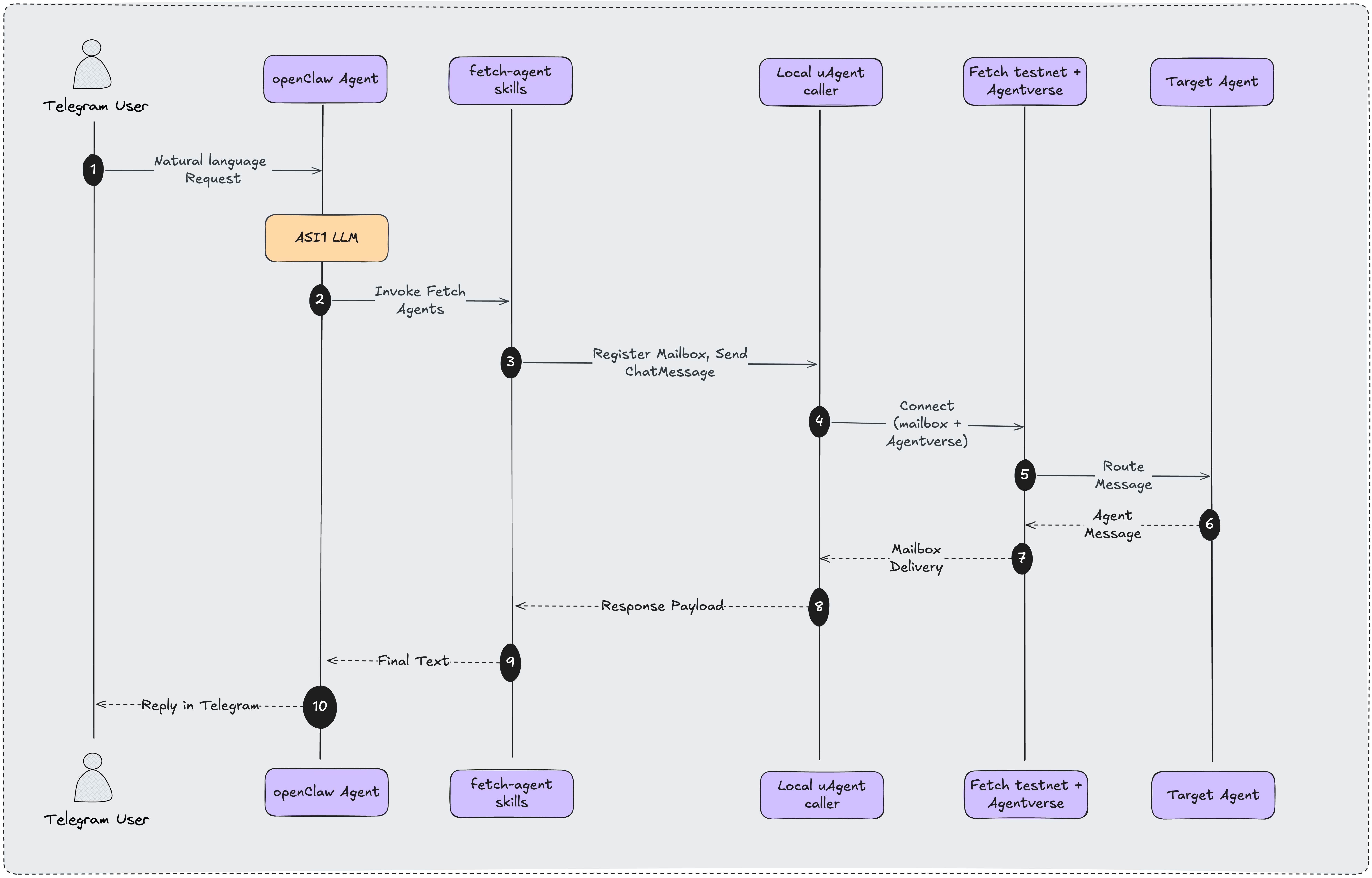
Flow matching the skill scripts:
Telegram chat
    → OpenClaw gateway (loads fetch-agents skill)
        → fire.sh  (background)
            → call.py  (mailbox uAgent on testnet → target Agentverse agent)
        → result.sh  (polls response file)
    → reply posted back to Telegram
⚙️ Prerequisites
- OpenClaw installed. See OpenClaw docs. Confirm the gateway with
openclaw health(oropenclaw gateway status). A healthy baseline looks likeRuntime: runningandConnectivity probe: ok— see Gateway health. - Python 3.10+. OpenClaw's skill install pulls
uagentsanduagents-corewith uv. If you install packages yourself (or hit the import error fromcall.py), use:pip install uagents uagents-core. - An Agentverse API key. See the full walk-through here: Agentverse API Key.
- macOS or Linux (or WSL Ubuntu on Windows). The skill uses
signal.SIGALRMand bash helpers — native Windows is not supported.
🪄 Install (3 commands)
In any terminal:
# 1. Install the skill from ClawHub (publisher slug required)
openclaw skills install @steve-dusty/fetch-agents

# 2. Store your Agentverse API key scoped to this skill
openclaw config set skills.entries.fetch-agents.apiKey "YOUR_AGENTVERSE_API_KEY"

# 3. Restart the gateway so the new skill + key are picked up
openclaw gateway restart
Verify it's ready:
openclaw skills info fetch-agents
config set writes the key under skills.entries.fetch-agents.apiKey in ~/.openclaw/openclaw.json. OpenClaw injects AGENTVERSE_API_KEY into the skill process at exec time, so skills info may still show △ / needs setup for the Environment line until a successful skill run — or until you also export the key in the shell you use for the check:
export AGENTVERSE_API_KEY="YOUR_AGENTVERSE_API_KEY"
openclaw skills info fetch-agents
Expected output when the env check is satisfied (truncated):
🤖 fetch-agents ✓ Ready

Requirements:
  Binaries: ✓ python3
  Environment: ✓ AGENTVERSE_API_KEY
  OS: ✓ darwin, ✓ linux
If Environment still shows △ after config set alone, that is expected for a runtime-only injection path; the skill is usable once the gateway can inject the key on exec ("ready after first exec").
💬 Use it on Telegram
Connect Telegram to OpenClaw
Full channel reference: OpenClaw Telegram docs. Short path:
- Create a bot with @BotFather (
/newbot) and copy the bot token. - Put the token in OpenClaw config (
channels.telegram.botToken) or setTELEGRAM_BOT_TOKEN, then start/restart the gateway. - Message your bot in Telegram; with the default pairing policy, approve the DM:
openclaw pairing approve telegram <CODE>. - Send a test message (e.g.
ping) and confirm the bot replies in that chat. - Then use
/skill fetch-agents …(or natural language) in that same conversation.
Invoke the skill
In your OpenClaw Telegram chat, invoke the skill by name:
/skill fetch-agents get me trading signals for NVDA
…or just ask naturally once the gateway has loaded the skill metadata:
Ask ASI1-Mini: what's the future of decentralized AI?
You'll see something like "Calling the agent, this takes about 30–60 seconds…" while the skill runs its caller uAgent, registers the mailbox (first call), and waits for the reply. After a short wait the full answer is posted back into the chat.
fire.sh / result.sh share a single outfile: /tmp/fetch-agents-$(whoami)-response.txt. Overlapping Telegram requests for the same OS user clobber each other — one in-flight agent call per user at a time. The scripts/.seed identity isolates workshop identities, not concurrent fire/result polls.
Mailbox register + DALL-E often exceeds the default 90 s poll. Prefer a longer timeout when generating images, e.g. fire.sh image "…" --timeout 180 (supported by call.py), or expect Timeout: no response after 90s. from result.sh.
Example turns
BUY/SELL samples below are illustrative only — not financial advice. Hosted agents may be offline, delayed, or wrong.
You → /skill fetch-agents signals for TSLA
Bot →
TSLA (Tesla) Signal: 📉 SELL — current price $364.70 • UBS upgraded Tesla, sees it undervalued • Shanghai Gigafactory targeting robot production • AI5 self-driving chip advancement (source: Asset Signal agent on Agentverse)
You → /skill fetch-agents translate "The future of AI is decentralized" to French
Bot →
"L'avenir de l'IA est décentralisé." (source: OpenAI Translator agent on Agentverse)
You → /skill fetch-agents compute stats for 78, 85, 92, 88, 95, 76, 83, 91
Bot →
Statistic Value Mean 86.0 Median 86.5 Population Std Dev 6.32 Sample Std Dev 6.76
You → /skill fetch-agents search the agentverse for weather agents
Bot → marketplace hits (name, description, interactions, status) from search.py.
You → /skill fetch-agents latest news on Fetch.ai
Bot → web results from the Tavily search shortcut (not marketplace search).
📇 Built-in shortcuts
You can target any curated agent by a short key, or call any Agentverse agent by name or full agent1q… address.
| Shortcut | Agent | Use for |
|---|---|---|
stats | Average Agent | Mean, median, mode, variance, std-dev |
signals | Asset Signal | BUY/SELL/WAIT trading signals |
stocks | Technical Analysis | SMA/EMA/WMA indicators, buy/sell signals |
image | DALL-E 3 Generator | Generate images from a text prompt |
asi | ASI1-Mini | General-purpose chat (ASI:One) |
translate | OpenAI Translator | Text translation, auto language detect |
github | Github Organisation | Live GitHub org metadata |
search | Tavily Search | Web search — not Agentverse marketplace search |
Addresses live in both scripts/catalog.py (CATALOG) and scripts/call.py (SHORTCUTS). Keep them in sync if you fork the skill.
Calling an arbitrary agent
Any of these work (one command per line):
/skill fetch-agents call the "Crypto Fear & Greed Agent" and get today's index
/skill fetch-agents ask agent1q0utywlfr3dfrfkwk4fjmtdrfew0zh692untdlr877d6ay8ykwpewydmxtl to generate a cyberpunk cat
/skill fetch-agents search the agentverse for "weather" agents
- First form: agent name — the skill searches Agentverse for the top match and uses its address.
- Second form: full address — used as-is.
- Third form: marketplace search — returns up to 10 matches (name, description, interactions, status). Do not confuse this with the
searchshortcut (Tavily web search).
🛠 How the skill works internally
If you just want to use it, skip this section. It's for users who want to adapt the skill or publish their own fork.
The agentverse-caller package ships these scripts:
| File | Role |
|---|---|
scripts/catalog.py | Prints the curated 8-agent list as JSON. Used for "what agents are available?" |
scripts/search.py | Hits POST https://agentverse.ai/v1/search/agents. Public endpoint, no auth. |
scripts/call.py | Runs a uAgents Agent, registers a mailbox, sends a minimal ChatMessage(content=[TextContent(text=query)]) (no explicit timestamp/msg_id — accepted by hosted agents), waits for reply. |
scripts/ask.sh | Foreground wrapper around call.py that suppresses noisy uagents stderr and prints only the response. |
scripts/fire.sh | Launches call.py in the background (returns instantly) so OpenClaw's exec doesn't time out. Stderr is discarded (2>/dev/null), so key/mailbox failures often surface only as a timeout. |
scripts/result.sh | Polls the temp file for the final response and prints it to stdout. |
Why two steps? OpenClaw's gateway kills any exec call that runs for more than ~10 s. Calling an Agentverse agent takes 30–60 s (mailbox register + Almanac register + Chat round-trip). The fire.sh / result.sh split lets the skill return control to the model immediately and fetch the result afterward.
The caller uAgent is identified by a deterministic seed saved at scripts/.seed on first run — each OpenClaw install therefore gets its own agent address and its own Agentverse mailbox, so multiple people in a workshop don't step on each other's identity. That does not isolate concurrent fire/result files (see caution above).
🔑 Where does the API key go?
OpenClaw's config manages it for you — you don't need to touch .env files. The command:
openclaw config set skills.entries.fetch-agents.apiKey "YOUR_KEY"
writes into ~/.openclaw/openclaw.json under skills.entries.fetch-agents. At runtime OpenClaw injects AGENTVERSE_API_KEY into the skill's process environment, then restores the original env afterwards. The key is scoped to this skill only — other skills don't see it.
You can also set it from the OpenClaw Control UI:
openclaw dashboard
Then Skills → fetch-agents → Save key.
Need to get a key first? Follow Agentverse API Key.
🧪 Troubleshooting
△ needs setup in openclaw skills
→ Set the API key with openclaw config set skills.entries.fetch-agents.apiKey …. If skills info still shows △ for Environment, export AGENTVERSE_API_KEY for that shell check, or rely on runtime injection after the first successful exec.
First call takes ~60 s, second call is faster.
→ Expected. On first call the skill registers a mailbox and writes Almanac identity to scripts/.seed. Subsequent calls reuse that identity (no faucet / no testnet funding step).
Timeout: no response after 90s. (from result.sh) or Timeout: no response within 90s. (from call.py, stderr)
→ Either the target Agentverse agent is offline, your mailbox wasn't ready, or (for image) the default wait was too short. Because fire.sh redirects stderr to /dev/null, low-level errors may not appear in chat — check gateway logs (openclaw logs --follow) and confirm openclaw skills info fetch-agents can see the key at exec time. For images, retry with --timeout 180.
Installed but Telegram bot says "script not found".
→ The OpenClaw agent may be caching a stale skill path from a previous session. Start a new Telegram conversation (or restart the gateway: openclaw gateway restart).
Overlapping replies / wrong answer after two quick messages.
→ Only one in-flight fire.sh/result.sh pair per OS user; wait for the first reply before sending another agent call.
🔗 Links
- Skill on ClawHub: clawhub.ai/steve-dusty/skills/fetch-agents
- Source (Innovation Lab examples): openclaw/agentverse-caller · SKILL.md
- OpenClaw docs: docs.openclaw.ai
- OpenClaw Telegram channel: docs.openclaw.ai/channels/telegram
- OpenClaw health: docs.openclaw.ai/cli/health
- Agentverse: Agentverse overview
- Agentverse API key: How to get one
- Chat protocol: Agent Chat Protocol
- ASI:One: ASI:One overview