Use ASI1 as the default model in OpenClaw
This guide follows the interactive OpenClaw setup wizard (QuickStart) and connects ASI:One as a Custom Provider using the OpenAI-compatible endpoint https://api.asi1.ai/v1 and model asi1. You can also configure the same settings by editing the config file manually.
The screenshots in this page are for UI flow only — any key visible there is for demonstration (treat demo keys as sk_…****); use your own key on your machine. If a key was ever exposed (chat, screenshot, repo), rotate it in the ASI:One / asi1.ai dashboard and update OpenClaw config.
What you need
| Item | Notes |
|---|---|
| OpenClaw | Installed via the official installer (see below). |
| ASI:One API key | Required. Create one in the ASI:One quickstart. Requests without a Bearer key return 401. |
| Network | Outbound HTTPS to https://api.asi1.ai/v1 (chat path: /v1/chat/completions) from the machine running the gateway. |
Step 1 — Install OpenClaw
The official installer is macOS and Linux only (curl | bash). On Windows, use WSL (Ubuntu) and run the same commands inside the Linux environment, or follow OpenClaw docs for any Windows-specific guidance if published.
The installer checks for Node.js (supported: 22.22.3+, 24.15.0+, or 25.9.0+), npm, and Git, then installs the OpenClaw CLI and starts setup. Prefer downloading and inspecting the script before piping it to bash if your security policy requires it:
curl -fsSL https://openclaw.ai/install.sh -o openclaw-install.sh
less openclaw-install.sh   # optional review
bash openclaw-install.sh
Or the one-liner:
curl -fsSL https://openclaw.ai/install.sh | bash
When installation finishes, the OpenClaw setup wizard opens in the terminal.
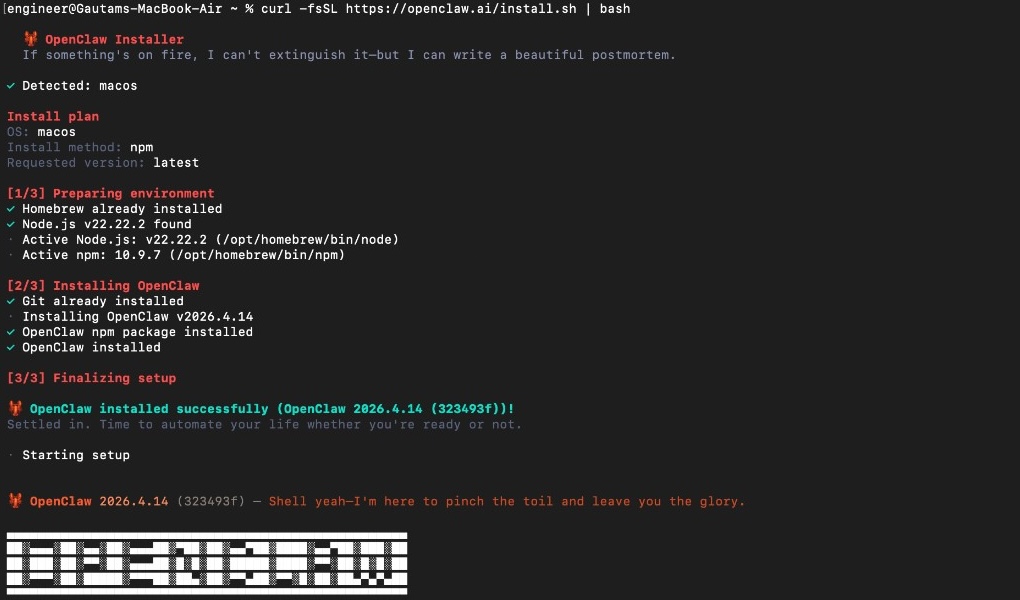
Example: installer summary and OpenClaw banner. Your version string may differ (e.g. OpenClaw 2026.4.14).
Step 2 — Security acknowledgement
Read the Security notice. OpenClaw is a powerful local agent; understand gateway security before exposing tools or chat channels.
Answer Yes to continue after you accept the personal-by-default risk model.
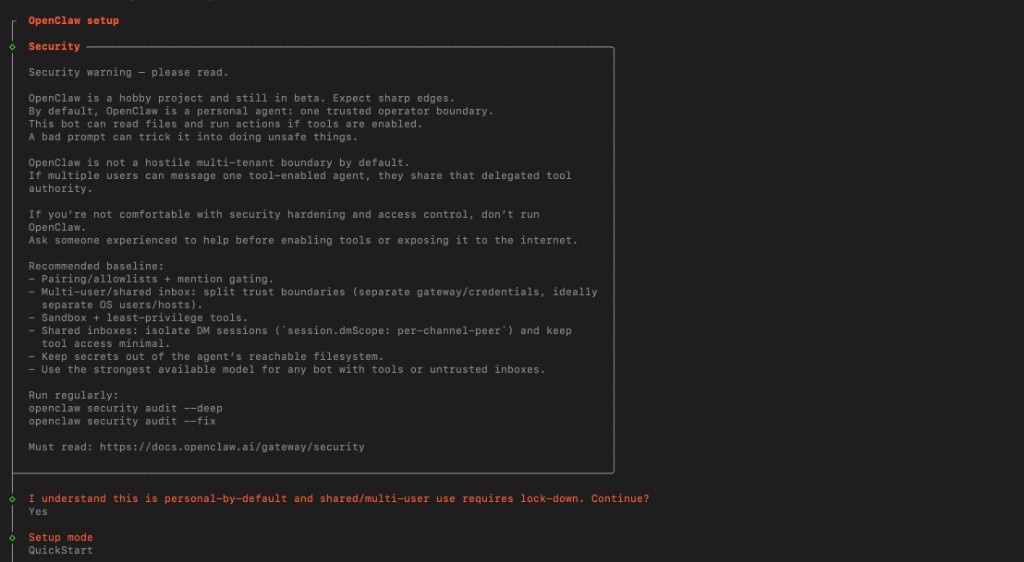
Step 3 — Setup mode: QuickStart
Choose QuickStart. The wizard shows defaults for the local gateway, for example:
| Setting | Typical QuickStart value |
|---|---|
| Gateway port | 18789 (example from wizard) |
| Gateway bind | Loopback (127.0.0.1) |
| Gateway auth | Token (default) |
| Tailscale exposure | Off |
| Flow | Direct to chat channels |
Exact values can change with OpenClaw versions; follow what your wizard displays.
Step 4 — Model / auth provider: Custom Provider
Select Custom Provider (any OpenAI- or Anthropic-compatible endpoint). ASI:One exposes an OpenAI-compatible HTTP API, so this is the right option.
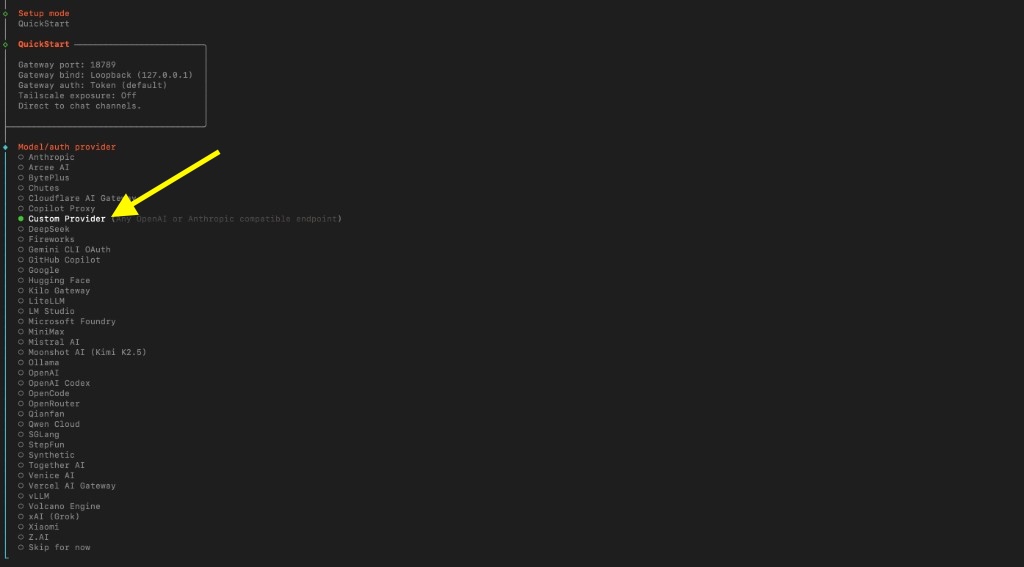
Step 5 — ASI:One endpoint and API key
Enter the following when prompted.
| Wizard prompt | Value for ASI:One |
|---|---|
| API Base URL | https://api.asi1.ai/v1 |
| How do you want to provide this API key? | Paste API key now (stores the key in OpenClaw config) or Use external secret provider (recommended for shared machines) |
| API Key | Paste your ASI:One key. A key is required — do not leave this blank (ASI:One returns 401 without auth). |
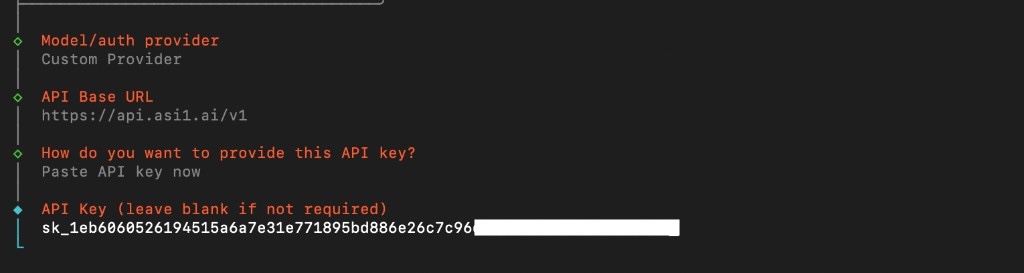
When you paste API key now, OpenClaw stores it locally (see warning at top). Do not commit ~/.openclaw/openclaw.json or share it.
Key storage options (detail)

| Option | When to use |
|---|---|
| Paste API key now | Fastest; key is stored in local OpenClaw config. |
| Use external secret provider | Better when you do not want the key in plaintext config. |
Step 6 — Compatibility and model name
After the key step, the wizard continues with checks similar to:
| Prompt | ASI:One value |
|---|---|
| Endpoint compatibility | OpenAI-compatible |
| Model ID | asi1 |
The wizard verifies the endpoint (Verification successful).
It then assigns an Endpoint ID (an internal name for this custom endpoint). In a real run this looks like a unique slug, for example innovationlab-api-asi1-ai — yours may differ. Do not assume the provider slug is asi1 unless you chose that name yourself in manual config.
| Prompt | Notes |
|---|---|
| Endpoint ID | Wizard-generated id for this provider entry. Copy this from the success line below. |
| Model alias (optional) | Friendly label in pickers; skip if unsure. |
At the end you should see a line like:
Configured custom provider: innovationlab-api-asi1-ai/asi1
Copy the Endpoint ID from that line (everything before /asi1). The full model reference is always EndpointId/asi1 (for example innovationlab-api-asi1-ai/asi1). Use that exact string in openclaw config set and as agents.defaults.model.primary.
The manual JSON sample below uses provider slug asi1 only as an example when you chose that slug — then the model ref is asi1/asi1. After the wizard, replace asi1/... with your Endpoint ID.
Step 7 — Channels (QuickStart)
QuickStart continues with channel status (Discord, Telegram, Slack, etc.). Connecting a channel is optional for testing the model; see OpenClaw channels for pairing, tokens, and security (DM pairing, dmPolicy, etc.).
You can talk to the model locally without Telegram — see Verify and Local chat without a channel below.
Concepts (quick reference)
| Term | Meaning |
|---|---|
| Endpoint ID | Name OpenClaw uses for this custom provider in config (wizard-assigned or chosen in advanced flows). |
| Model ref | EndpointId/asi1 — first segment is your Endpoint ID; model id must be asi1. |
| OpenAI-compatible | Same HTTP shape as OpenAI Chat Completions (/v1/chat/completions). |
Manual config (equivalent JSON5)
If you prefer files over the wizard, merge something like this into ~/.openclaw/openclaw.json. OpenClaw accepts JSON5 in that file (comments and unquoted keys allowed; strict JSON also works). Replace provider key asi1 with your Endpoint ID if the wizard created a different slug, and set agents.defaults.model.primary to EndpointId/asi1 to match.
models.mode: "merge" keeps your custom provider alongside built-in catalogs; agent-local models.json can still override baseUrl / apiKey — see OpenClaw model providers.
OpenClaw’s api: "openai-completions" means an OpenAI-compatible chat completions client against your baseUrl /v1 (not the legacy /v1/completions text API). ASI:One’s default path is /v1/chat/completions. Details: OpenClaw model providers.
Export the same env name Innovation Lab / ASI:One docs use elsewhere:
export ASI_ONE_API_KEY="YOUR_ASI_ONE_API_KEY"
{
  env: {
    ASI_ONE_API_KEY: "YOUR_ASI_ONE_API_KEY",
  },
  agents: {
    defaults: {
      // After the wizard, use YOUR Endpoint ID — e.g. "innovationlab-api-asi1-ai/asi1"
      model: { primary: "asi1/asi1" },
    },
  },
  models: {
    mode: "merge",
    providers: {
      // Provider slug must match the first segment of model.primary
      asi1: {
        baseUrl: "https://api.asi1.ai/v1",
        apiKey: "${ASI_ONE_API_KEY}",
        api: "openai-completions",
        models: [
          {
            id: "asi1",
            name: "ASI1",
            // OpenClaw capability flags (align with ASI:One models docs)
            reasoning: true,
            input: ["text", "image"],
            // Official asi1 context window: 196,608 tokens
            // https://docs.asi1.ai/documentation/models
            contextWindow: 196608,
            // OpenClaw per-response output cap (not ASI:One's only limit;
            // leftover context window is the real ceiling)
            maxTokens: 8192,
          },
          // Optional: same API key also serves these models
          // https://docs.asi1.ai/documentation/models
          {
            id: "asi1-mini",
            name: "ASI1 Mini",
            reasoning: true,
            input: ["text"],
            contextWindow: 262144,
            maxTokens: 8192,
          },
          {
            id: "asi1-ultra",
            name: "ASI1 Ultra",
            reasoning: true,
            input: ["text"],
            contextWindow: 202752,
            maxTokens: 8192,
          },
        ],
      },
    },
  },
}
Keep primary on …/asi1 unless you intentionally switch defaults. Model specs: ASI:One models (IL pages often round the window to ~200,000).
Config keys
| Key | Role |
|---|---|
models.providers.<id> | Provider slug (id) — must match the first segment of agents.defaults.model.primary. |
baseUrl | https://api.asi1.ai/v1 |
api | "openai-completions" — OpenClaw name for Chat Completions–style custom providers |
models[].id | asi1 (or asi1-mini / asi1-ultra) |
CLI: set default model only
If the provider already exists, copy the Endpoint ID from Configured custom provider: EndpointId/asi1, then:
openclaw config set agents.defaults.model.primary YOUR_ENDPOINT_ID/asi1
Example after a wizard run:
openclaw config set agents.defaults.model.primary innovationlab-api-asi1-ai/asi1
Do not run … asi1/asi1 unless your Endpoint ID really is asi1.
Verify
List models for your provider:
openclaw models list --provider YOUR_ENDPOINT_ID
You should see model asi1 (and any optional siblings you registered) listed for that provider.
Then run a real smoke test — either the Python sanity check below (prints the reply) or a one-shot local agent turn:
openclaw agent exec --model YOUR_ENDPOINT_ID/asi1 "Reply with exactly: pong"
Or open an interactive local chat (no Telegram required):
openclaw chat
Local chat without a channel
Channels in Step 7 are optional. After verify:
openclaw agent exec --model YOUR_ENDPOINT_ID/asi1 "Hello from ASI1"for a one-shot prompt, oropenclaw chat/openclaw tui --localfor an interactive session against your default model.
See OpenClaw agent CLI and TUI.
Python (sanity check)
Same endpoint and model as OpenClaw. Set ASI_ONE_API_KEY in your environment first, then print the reply:
import os
from openai import OpenAI

api_key = os.environ.get("ASI_ONE_API_KEY")
if not api_key:
    raise SystemExit("Set ASI_ONE_API_KEY before running this check.")

client = OpenAI(
    api_key=api_key,
    base_url="https://api.asi1.ai/v1",
)

response = client.chat.completions.create(
    model="asi1",
    messages=[{"role": "user", "content": "Hello!"}],
)
print(response.choices[0].message.content)
Troubleshooting
| Issue | What to check |
|---|---|
| Verification fails | baseUrl ends with /v1, key is valid, outbound HTTPS to https://api.asi1.ai/v1. |
| 401 Unauthorized | Key missing, wrong, or revoked — paste a fresh key from the ASI:One dashboard and rotate if it was exposed. |
| 429 Too Many Requests | Rate limit / quota — wait and retry; check account usage. |
Empty models list / wrong model | Endpoint ID mismatch — use the id from Configured custom provider: EndpointId/asi1, not a guessed asi1 slug. |
| Wrong model ref | Default must be EndpointId/asi1 with models[].id = asi1. |
| Chat hangs after verify OK | OpenClaw often sends stream: true; confirm proxies allow SSE. ASI:One supports streaming chat completions. |
| Key in repo | Never commit openclaw.json with pasted keys. |
Related
| Page | Topic |
|---|---|
| Call Agentverse agents from OpenClaw (fetch-agents) | Agentverse skill — uses AGENTVERSE_API_KEY, not the ASI:One LLM key on this page |
| ASI:One quickstart / API keys | Create and manage ASI_ONE_API_KEY |
| ASI:One OpenAI Compatibility | OpenAI-compatible client setup |
| ASI:One Chat Completions | /v1/chat/completions |
| ASI:One models | asi1 / asi1-mini / asi1-ultra context windows and capabilities |
| ASI:One API reference | Limits and parameters |
| OpenClaw providers | Upstream provider list |
| OpenClaw model providers | Custom baseUrl, openai-completions, merge rules |