Developer Quickstart
Get up and running with ASI:One in minutes. This guide will walk you through setting up your first API request.
Prerequisites
- An ASI:One API key
- Basic knowledge of HTTP requests
- Your preferred programming language (Python, JavaScript, or cURL)
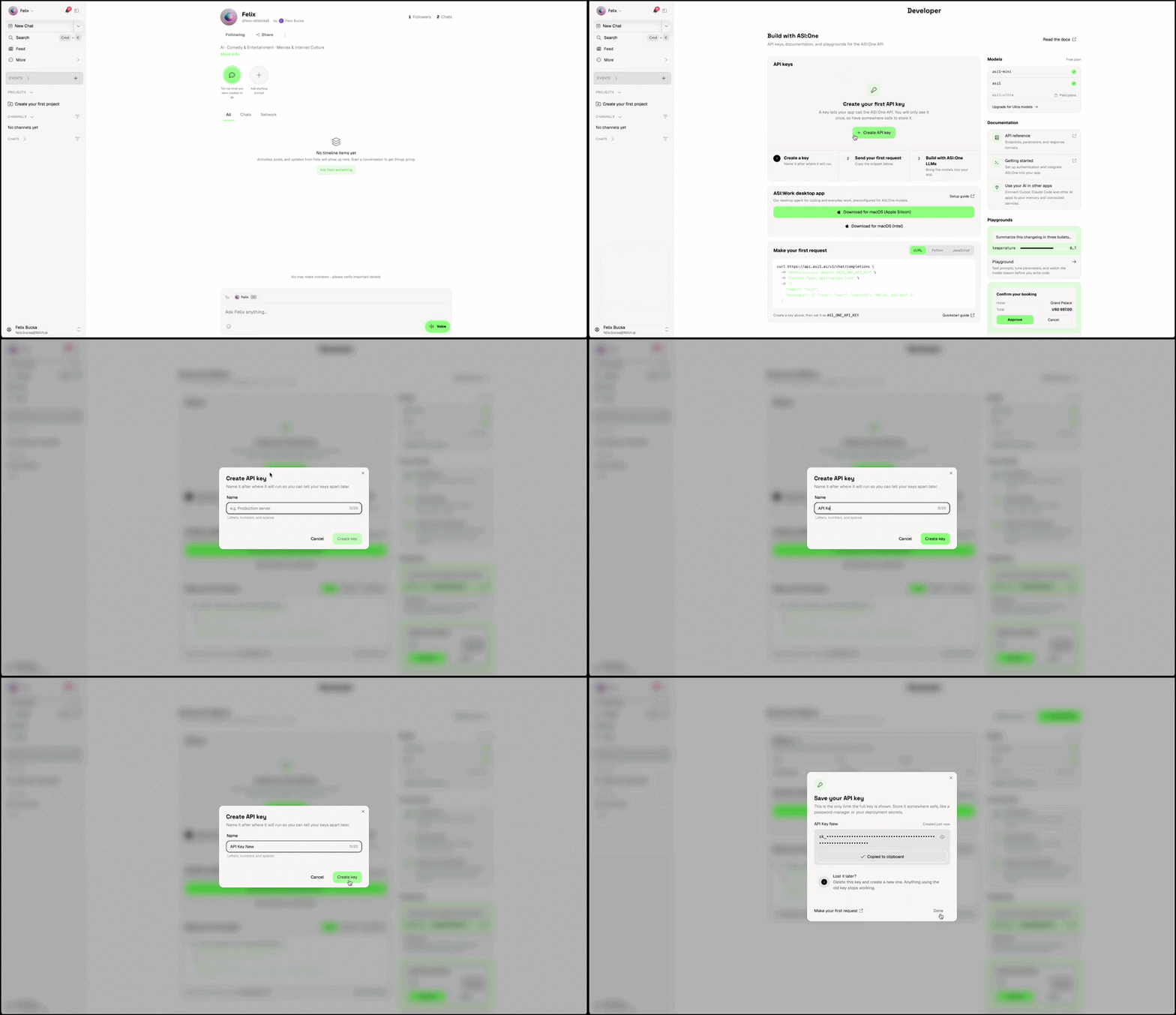
Step 1: Get Your API Key
- Sign up at ASI:One Platform
- Navigate to Developer Section.
- Click on
Create New. - Give name to your
api_keyand save it somewhere safe.
Step 2: Make Your First Request
- cURL
- Python
- JavaScript
curl https://api.asi1.ai/v1/chat/completions \
  -H "Content-Type: application/json" \
  -H "Authorization: Bearer YOUR_API_KEY_HERE" \
  -d '{
    "model": "asi1",
    "messages": [
      {"role": "user", "content": "Hello! How can you help me today?"}
    ]
  }'
import requests, os, json

url = "https://api.asi1.ai/v1/chat/completions"
headers = {
    "Authorization": f"Bearer {os.getenv('ASI_ONE_API_KEY')}",
    "Content-Type": "application/json"
}
body = {
    "model": "asi1",
    "messages": [{"role": "user", "content": "Hello! How can you help me today?"}]
}
print(requests.post(url, headers=headers, json=body).json()["choices"][0]["message"]["content"])
import OpenAI from 'openai';
const client = new OpenAI({
  apiKey: process.env.ASI_ONE_API_KEY,
  baseURL: 'https://api.asi1.ai/v1',
});

const response = await client.chat.completions.create({
  model: 'asi1',
  messages: [{ role: 'user', content: 'Hello! How can you help me today?' }],
});

console.log(response.choices[0].message.content);
Step 3: Try the Three Models
The ASI:One family includes three models that share the same API. Switch between them by changing the model field. Learn more about each model in Models.
- asi1
- asi1-ultra
- asi1-mini
The adaptive default. Balances reasoning depth, speed, and cost. Start here for general workloads.
curl https://api.asi1.ai/v1/chat/completions \
  -H "Content-Type: application/json" \
  -H "Authorization: Bearer YOUR_API_KEY_HERE" \
  -d '{
    "model": "asi1",
    "messages": [
      {"role": "user", "content": "Help me plan a trip to Tokyo"}
    ]
  }'
The deepest-reasoning model. Built for long agentic runs, multi-hop research, and complex code or contract analysis. Supports up to 500 tool calls per turn.
curl https://api.asi1.ai/v1/chat/completions \
  -H "Content-Type: application/json" \
  -H "Authorization: Bearer YOUR_API_KEY_HERE" \
  -d '{
    "model": "asi1-ultra",
    "messages": [
      {"role": "user", "content": "Audit this 800-line contract and flag the top five risks"}
    ]
  }'
The fastest, lightest model. Built for low-latency workloads — real-time chat, voice, classification, autocomplete, and simple tool calls.
curl https://api.asi1.ai/v1/chat/completions \
  -H "Content-Type: application/json" \
  -H "Authorization: Bearer YOUR_API_KEY_HERE" \
  -d '{
    "model": "asi1-mini",
    "messages": [
      {"role": "user", "content": "Classify this support ticket as billing, bug, or feature request: My invoice shows the wrong amount."}
    ]
  }'
Step 4: Understanding the Response
Your API call will return a response like this:
{
    "id": "ec3e76554baa4ebb838173e7f32fdb94",
    "choices": [{
        "finish_reason": "stop",
        "index": 0,
        "logprobs": null,
        "message": {
            "content": "Hey there! 👋 ...",
            "refusal": null,
            "role": "assistant",
            "annotations": null,
            "audio": null,
            "function_call": null,
            "tool_calls": null,
            "reasoning_content": null
        },
        "matched_stop": 151336
    }],
    "created": 1768409272,
    "model": "asi1",
    "object": "chat.completion",
    "service_tier": null,
    "system_fingerprint": null,
    "usage": {
        "completion_tokens": 149,
        "prompt_tokens": 2105,
        "total_tokens": 2254,
        "completion_tokens_details": null,
        "prompt_tokens_details": null,
        "reasoning_tokens": 0
    },
    "metadata": {
        "weight_version": "default"
    }
}
Key parts you usually read:
• choices[0].message.content – the assistant’s reply (the “Hey there! 👋 …” text).
• usage – token accounting for cost/limits.
Agent-specific fields:
• executable_data – where an agentic model will return structured tool calls or agent manifests (empty here because no discovery was requested).
• intermediate_steps – debugging breadcrumbs for multi-step plans (also empty here).
• thought – a lightweight reasoning trace; often newline characters when the model didn’t need explicit chain-of-thought.
So the call succeeded and the payload is exactly what you’d expect for a plain text question.
If you want the docs’ example to match this, just replace the existing sample JSON block with the snippet above (or cut it down to only the choices and usage sections to keep it concise).
Next Steps
- Explore the ASI:One models — compare
asi1,asi1-ultra, andasi1-mini - Learn about function calling
- Check out advanced examples