Multi-Server MCP LangGraph Agent
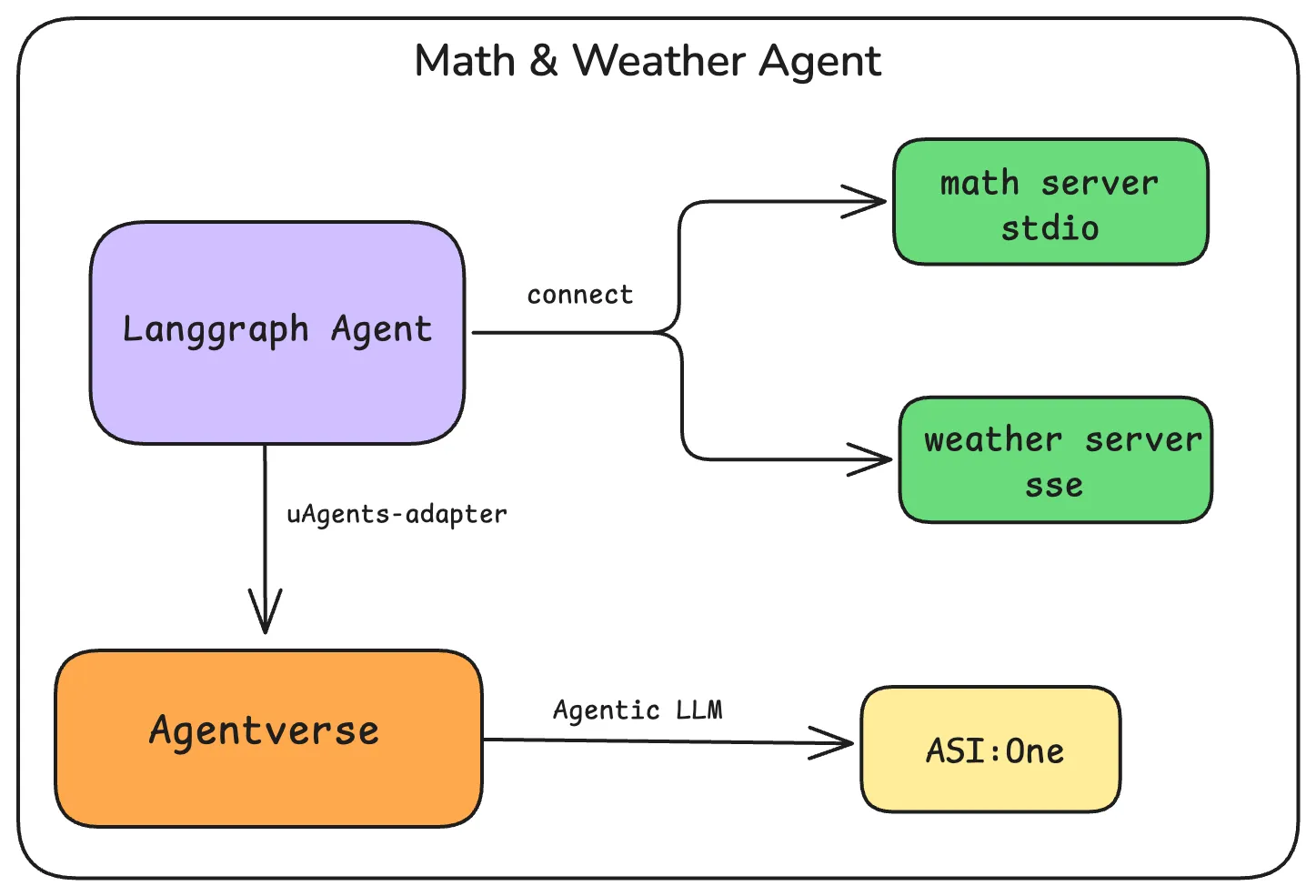
This guide demonstrates two approaches for building LangGraph agents that connect to multiple MCP servers, then wrap them as uAgents and register them on Agentverse for discovery and use by ASI:One.
If you are new to MCP + LangGraph, start with the simpler single-server guide: LangGraph Agent with MCP adapter.
Roles in this demo:
- OpenAI
gpt-4ois the agent brain (tool selection and reasoning). - ASI:One / Agentverse is how users discover and chat with the registered uAgent.
- Weather tools are mock —
get_weatherreturns a fixed sunny reply, not live forecast data.
Overview
Both examples in this guide:
- Connect to multiple MCP servers (math and weather) using
langchain_mcp_adapters.MultiServerMCPClient - Use stdio for the local math server and streamable HTTP for the weather server (preferred over deprecated SSE)
- Wrap the LangGraph agent using
uagents_adapterto become a uAgent - Register the uAgent on Agentverse, making it discoverable and callable by ASI:One
The key difference is in the agent architecture:
- Basic Multi-Server Agent: Uses LangGraph's
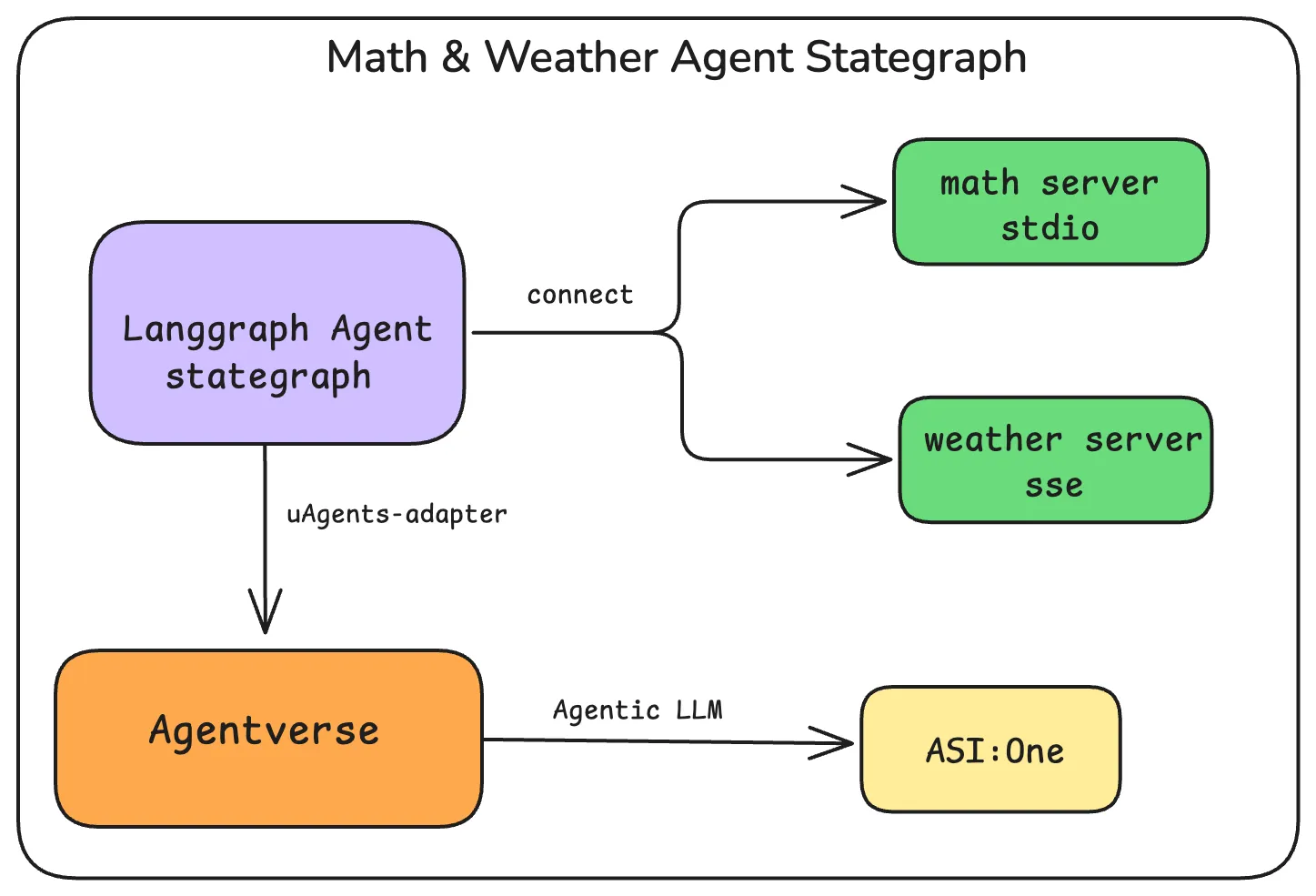
create_react_agent(ReAct auto tool-loop) - Advanced State Graph Agent: Uses an explicit
StateGraphwithcall_model↔ToolNodeedges
Transport Methods
In both examples, we use two different transport methods for the MCP servers:
stdio transport (math server)
- Used for local MCP servers that run as subprocesses
- Communication happens through standard input/output
- Good for local development and testing
- Example:
mcp.run(transport="stdio")
HTTP / streamable HTTP transport (weather server)
- FastMCP serves streamable HTTP with
mcp.run(transport="streamable-http")(default path/mcp, port8000) - Clients use
transport: "http"and URLs likehttp://localhost:8000/mcp(langchain-mcp-adapters) - SSE (
transport: "sse",/sse) is deprecated in current LangChain MCP docs; prefer HTTP unless you intentionally pin an older SSE-first stack
The MultiServerMCPClient handles both transport types. Construct the client plainly, then call tools = await client.get_tools() (do not use async with MultiServerMCPClient(...)).
Common Server Setup
Both examples use the same MCP servers. Set those up first.
1. Create the Math MCP Server
from mcp.server.fastmcp import FastMCP

mcp = FastMCP("Math")


@mcp.tool()
def add(a: int, b: int) -> int:
    """Add two numbers"""
    return a + b


@mcp.tool()
def multiply(a: int, b: int) -> int:
    """Multiply two numbers"""
    return a * b


if __name__ == "__main__":
    mcp.run(transport="stdio")
2. Create the Weather MCP Server
from mcp.server.fastmcp import FastMCP

mcp = FastMCP("Weather", port=8000)


@mcp.tool()
def get_weather(city: str) -> str:
    """Get the current weather for a city"""
    # Mock implementation — not a live weather API
    return f"The weather in {city} is sunny and 25°C"


if __name__ == "__main__":
    mcp.run(transport="streamable-http")
Prerequisite: Start the weather server before either agent. Multi-server get_tools() can fail or return an incomplete tool set if weather is down.
Approach 1: Basic Multi-Server Agent
This approach uses LangGraph's create_react_agent to create a simple agent that can access tools from multiple MCP servers.
Before you run: Start weather_server.py in another terminal first. Do not run the basic and graph agents at the same time — both bind port 8080.
Create and Register the Basic Multi-Server Agent
import asyncio
import os
import sys
from pathlib import Path

from dotenv import load_dotenv
from langchain_core.messages import HumanMessage
from langchain_mcp_adapters.client import MultiServerMCPClient
from langchain_openai import ChatOpenAI
from langgraph.prebuilt import create_react_agent
from uagents_adapter import LangchainRegisterTool, cleanup_uagent
from uagents_adapter.langchain import AgentManager

load_dotenv()

OPENAI_API_KEY = os.getenv("OPENAI_API_KEY")
API_TOKEN = os.getenv("AGENTVERSE_API_KEY")

model = ChatOpenAI(model="gpt-4o")

AGENT_NAME = "multi_server_agent_math_langchain_mcp"
MATH_SERVER = str(Path(__file__).resolve().parent / "math_server.py")

agent = None
agent_ready = asyncio.Event()


async def setup_multi_server_agent():
    global agent

    print("Setting up multi-server agent...")
    print("Prerequisite: weather_server.py must already be running on port 8000.")
    try:
        client = MultiServerMCPClient(
            {
                "math": {
                    "command": sys.executable,
                    "args": [MATH_SERVER],
                    "transport": "stdio",
                },
                "weather": {
                    "url": "http://localhost:8000/mcp",
                    "transport": "http",
                },
            }
        )

        tools = await client.get_tools()
        print(f"Connected servers: math (stdio), weather (http)")
        print(f"Successfully loaded {len(tools)} tools: {[t.name for t in tools]}")

        agent = create_react_agent(model, tools)

        print("Testing math capabilities...")
        math_response = await agent.ainvoke(
            {"messages": [HumanMessage(content="what's (3 + 5) x 12?")]}
        )
        print(f"Math test response: {math_response['messages'][-1].content}")

        print("Testing weather capabilities...")
        weather_response = await agent.ainvoke(
            {"messages": [HumanMessage(content="what's the weather in NYC?")]}
        )
        print(f"Weather test response: {weather_response['messages'][-1].content}")

        agent_ready.set()

        while True:
            await asyncio.sleep(1)
    except Exception as e:
        print(f"Error setting up agent: {e}")
        print(
            "Leaving agent_ready unset so chat requests time out with a clear error "
            "instead of soft-failing forever. Fix the setup error and restart."
        )
        raise


def main():
    manager = AgentManager()

    async def agent_func(x):
        try:
            await asyncio.wait_for(agent_ready.wait(), timeout=60)
        except asyncio.TimeoutError:
            return "Error: Agent setup timed out. Check weather server and logs, then restart."

        if agent is None:
            return "Error: Agent not initialized properly. Please try again later."

        response = await agent.ainvoke({"messages": [HumanMessage(content=x)]})
        return response["messages"][-1].content

    agent_wrapper = manager.create_agent_wrapper(agent_func)
    manager.start_agent(setup_multi_server_agent)

    print("Registering multi-server agent...")
    tool = LangchainRegisterTool()
    agent_info = tool.invoke(
        {
            "agent_obj": agent_wrapper,
            "name": AGENT_NAME,
            "port": 8080,
            "description": "A multi-service agent that can handle math calculations and weather queries",
            "api_token": API_TOKEN,
            "mailbox": True,
        }
    )

    print(f"✅ Registered multi-server agent: {agent_info}")

    try:
        manager.run_forever()
    except KeyboardInterrupt:
        print("🛑 Shutting down...")
        cleanup_uagent(AGENT_NAME)
        print("✅ Agent stopped.")


if __name__ == "__main__":
    main()
Approach 2: Advanced State Graph Agent
This approach uses LangGraph's StateGraph to create a more sophisticated agent with explicit state management and conditional workflow branching.
Before you run: Start weather_server.py in another terminal first. Do not run this agent at the same time as the basic agent — both use port 8080.
Create and Register the Multi-Server Graph Agent
import asyncio
import os
import sys
from pathlib import Path

from dotenv import load_dotenv
from langchain_core.messages import HumanMessage
from langchain_mcp_adapters.client import MultiServerMCPClient
from langchain_openai import ChatOpenAI
from langgraph.graph import START, MessagesState, StateGraph
from langgraph.prebuilt import ToolNode, tools_condition
from uagents_adapter import LangchainRegisterTool, cleanup_uagent
from uagents_adapter.langchain import AgentManager

load_dotenv()

OPENAI_API_KEY = os.getenv("OPENAI_API_KEY")
API_TOKEN = os.getenv("AGENTVERSE_API_KEY")

model = ChatOpenAI(model="gpt-4o")

AGENT_NAME = "multi_server_graph_agent_math_langchain_mcp"
MATH_SERVER = str(Path(__file__).resolve().parent / "math_server.py")

_global_graph = None
graph_ready = asyncio.Event()


async def setup_multi_server_graph_agent():
    global _global_graph

    print("Setting up multi-server graph agent...")
    print("Prerequisite: weather_server.py must already be running on port 8000.")
    try:
        client = MultiServerMCPClient(
            {
                "math": {
                    "command": sys.executable,
                    "args": [MATH_SERVER],
                    "transport": "stdio",
                },
                "weather": {
                    "url": "http://localhost:8000/mcp",
                    "transport": "http",
                },
            }
        )

        tools = await client.get_tools()
        print(f"Connected servers: math (stdio), weather (http)")
        print(f"Successfully loaded {len(tools)} tools: {[t.name for t in tools]}")

        def call_model(state: MessagesState):
            response = model.bind_tools(tools).invoke(state["messages"])
            return {"messages": response}

        builder = StateGraph(MessagesState)
        builder.add_node(call_model)
        builder.add_node(ToolNode(tools))
        builder.add_edge(START, "call_model")
        builder.add_conditional_edges("call_model", tools_condition)
        builder.add_edge("tools", "call_model")
        _global_graph = builder.compile()
        print("Graph successfully compiled")

        try:
            print("Testing math capabilities...")
            math_response = await _global_graph.ainvoke(
                {"messages": [HumanMessage(content="what's (3 + 5) x 12?")]}
            )
            print(f"Math test response: {math_response['messages'][-1].content}")

            print("Testing weather capabilities...")
            weather_response = await _global_graph.ainvoke(
                {"messages": [HumanMessage(content="what's the weather in NYC?")]}
            )
            print(f"Weather test response: {weather_response['messages'][-1].content}")
        except Exception as e:
            print(f"Error during testing: {e}")

        graph_ready.set()

        while True:
            await asyncio.sleep(1)
    except Exception as e:
        print(f"Error setting up graph: {e}")
        print(
            "Leaving graph_ready unset so chat requests time out with a clear error "
            "instead of soft-failing forever. Fix the setup error and restart."
        )
        raise


def main():
    print("Initializing agent...")
    manager = AgentManager()

    async def graph_func(x):
        try:
            await asyncio.wait_for(graph_ready.wait(), timeout=60)
        except asyncio.TimeoutError:
            return "Error: Graph setup timed out. Check weather server and logs, then restart."

        if _global_graph is None:
            error_msg = "Error: Graph not initialized properly. Please try again later."
            print(f"Response: {error_msg}")
            return error_msg

        try:
            print(f"\nReceived query: {x}")
            messages = [HumanMessage(content=x)] if isinstance(x, str) else x
            response = await _global_graph.ainvoke({"messages": messages})
            result = response["messages"][-1].content
            print(f"\n✅ Response: {result}\n")
            return result
        except Exception as e:
            error_msg = f"Error processing request: {str(e)}"
            print(f"\n❌ {error_msg}\n")
            return error_msg

    agent_wrapper = manager.create_agent_wrapper(graph_func)
    manager.start_agent(setup_multi_server_graph_agent)

    print("Registering multi-server graph agent...")
    tool = LangchainRegisterTool()
    try:
        agent_info = tool.invoke(
            {
                "agent_obj": agent_wrapper,
                "name": AGENT_NAME,
                "port": 8080,
                "description": "A multi-service graph agent that can handle math calculations and weather queries",
                "api_token": API_TOKEN,
                "mailbox": True,
            }
        )
        print(f"✅ Registered multi-server graph agent: {agent_info}")
    except Exception as e:
        print(f"⚠️ Error registering agent: {e}")
        print("Continuing with local agent only...")

    try:
        manager.run_forever()
    except KeyboardInterrupt:
        print("🛑 Shutting down...")
        cleanup_uagent(AGENT_NAME)
        print("✅ Agent stopped.")


if __name__ == "__main__":
    main()
Key Differences Between the Two Approaches
In short: the basic agent relies on ReAct’s automatic tool loop via create_react_agent, while the graph agent wires an explicit call_model ↔ ToolNode cycle with conditional edges.
- Architecture — Basic uses
create_react_agent(ReAct-style). Graph usesStateGraphfor explicit workflow control. - Control flow — Basic: managed internally by ReAct. Graph: nodes, edges, and
tools_conditionbranching you define. - State management — Basic: implicit inside the ReAct agent. Graph: explicit
MessagesStateyou can inspect and extend. - Extensibility — Basic: quicker setup, less flexible. Graph: more boilerplate, better for multi-step specialized workflows.
Getting Started
-
Get your Agentverse API key — Follow the Agentverse API Key guide and store the key securely (treat it like a password; rotate it from the Agentverse dashboard if it is exposed).
-
Set up environment variables in a
.envfile:OPENAI_API_KEY=your_openai_api_keyAGENTVERSE_API_KEY=your_agentverse_api_key -
Install dependencies (include
langgraph; pin or match a tested set):pip install \"langchain-openai>=1.0.0,<2" \"langgraph>=0.3.0,<2" \"mcp>=1.9.0,<2" \"langchain-mcp-adapters>=0.1.0,<0.4" \"uagents-adapter>=0.6.2" \"python-dotenv>=1.0.0"Tested with: Python 3.10–3.12,
langgraph0.3+/1.x (create_react_agentfromlanggraph.prebuilt),langchain-mcp-adapters0.1.x–0.3.x (await client.get_tools(), HTTP weather transport),uagents-adapter0.6.x. Same stack shape as LangGraph Agent with MCP adapter, plus multi-server HTTP. -
Create the files — Save
math_server.py,weather_server.py, and eitherbasic_agent.pyorgraph_agent.pyin the same directory. -
Start the weather server, then one agent (not both agents at once — port 8080 collision):
# Terminal 1: weather MCP server (required first)python weather_server.py# Terminal 2: basic agent OR graph agent (pick one)python basic_agent.py# python graph_agent.pyDo not run
basic_agent.pyandgraph_agent.pysimultaneously; both listen on port 8080. -
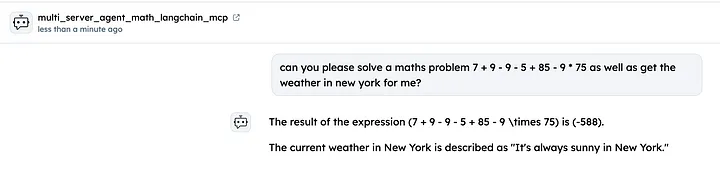
Test your agent from the Agentverse chat UI.
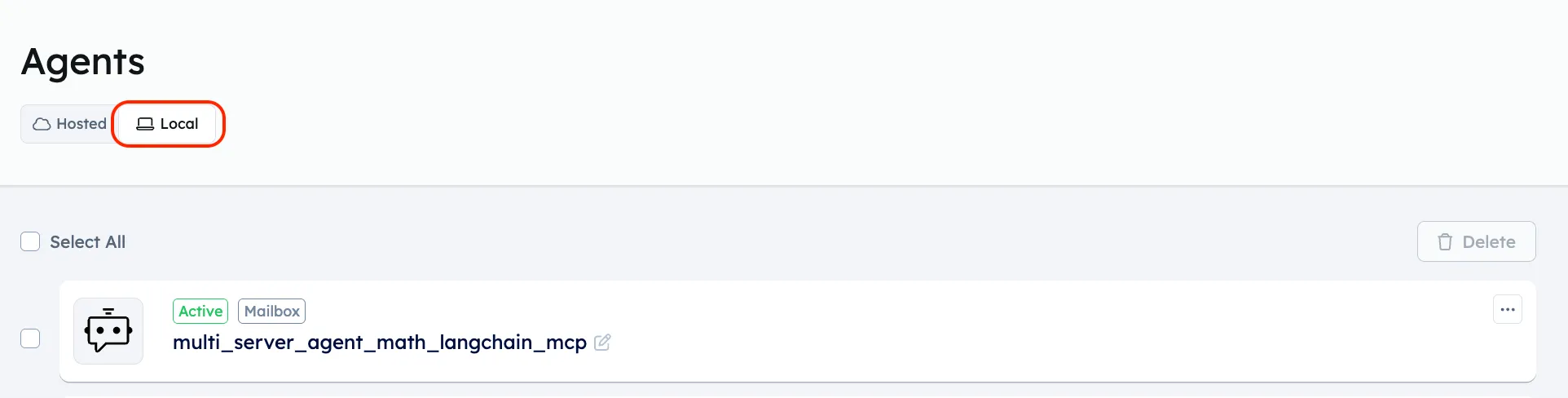
- Open your Agentverse account and go to local agents.
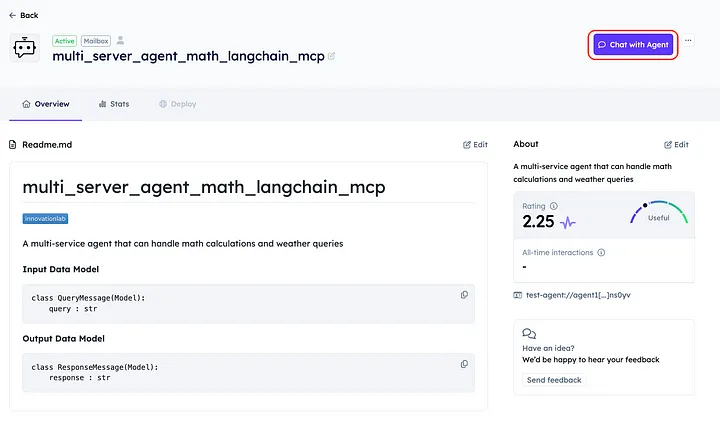
- Click your agent and use Chat with Agent on the Agentverse agent page.
Sample success logs
Terminal 1 — weather server up:
INFO: Uvicorn running on http://127.0.0.1:8000 (Press CTRL+C to quit)
Terminal 2 — basic agent (graph agent looks similar):
Setting up multi-server agent...
Prerequisite: weather_server.py must already be running on port 8000.
Connected servers: math (stdio), weather (http)
Successfully loaded 3 tools: ['add', 'multiply', 'get_weather']
Testing math capabilities...
Math test response: (3 + 5) × 12 = 96
Testing weather capabilities...
Weather test response: The weather in NYC is sunny and 25°C
Registering multi-server agent...
✅ Registered multi-server agent: Created uAgent 'multi_server_agent_math_langchain_mcp' ...
INFO:     [multi_server_agent_math_langchain_mcp]: Starting mailbox client for https://agentverse.ai
When to Use Each Approach
Use the Basic Agent when:
- You need a simple agent that can access multiple tools
- You want a quick setup with minimal boilerplate
- The agent's decision-making process is relatively straightforward
Use the Graph Agent when:
- You need more control over the agent's workflow
- You want explicit state management
- You need complex conditional branching in your agent's behavior
- You're building an agent with multiple specialized steps or phases
These examples show how to connect to multiple MCP servers with stdio + HTTP transports and two LangGraph architectures. Extend the same patterns to more servers or richer graphs as needed.