Image Agent Payment Protocol Example
This example demonstrates a seller agent that requests a small payment (USDC via Skyfire) before generating an image and sending it back as a chat resource. Based on the image-agent-payment-protocol example in innovation-lab-examples.
The code blocks below are a reference to the full flow (pay → prompt → Pollinations → Agentverse storage → ResourceContent). Clone the example and run it; do not assemble files from snippets alone.
What it shows
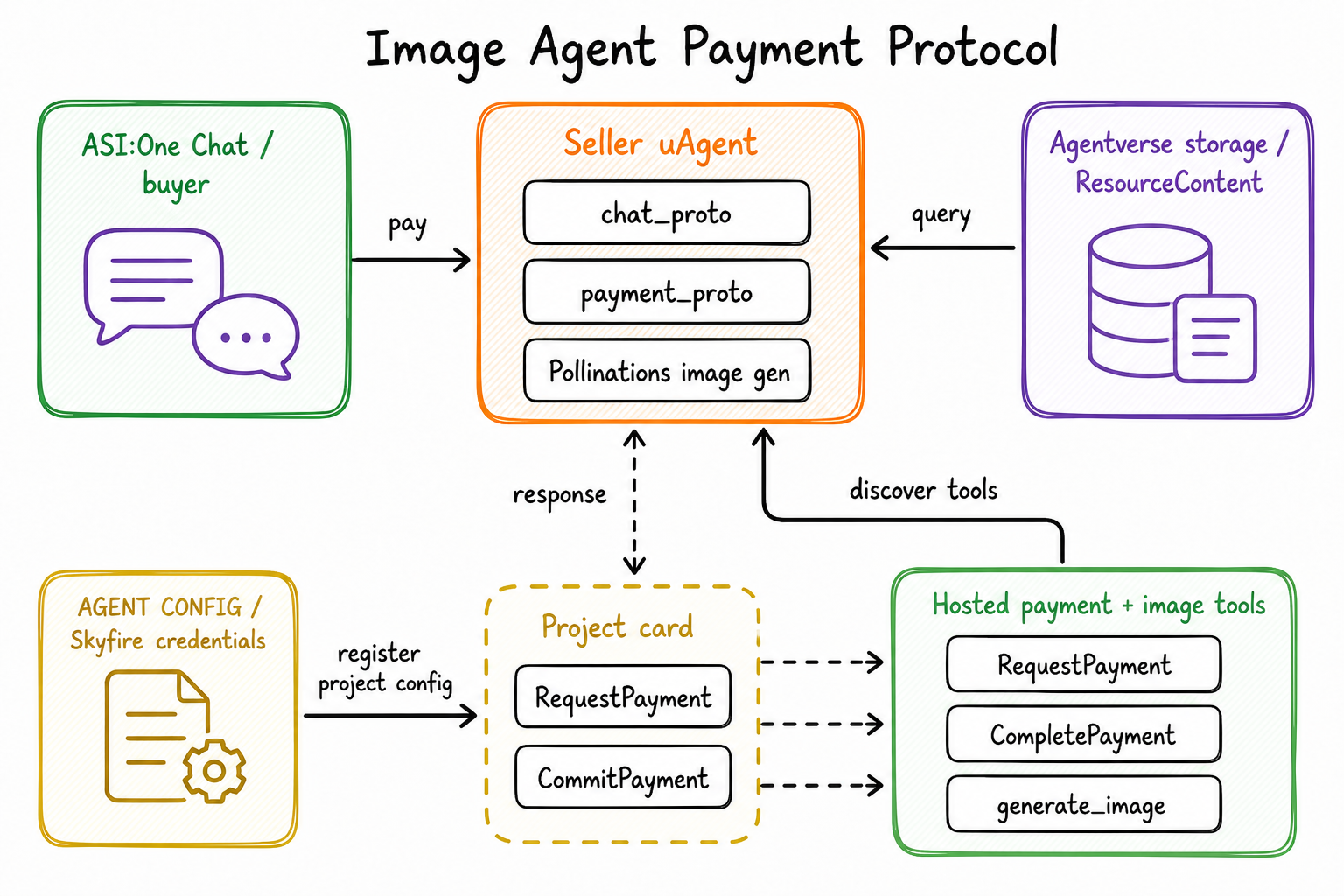
- Seller-side
AgentPaymentProtocol(payment_protocol_spec,role="seller"). - Skyfire JWT verification and USDC charge (
verify_and_charge). - After payment: one image prompt, generation via Pollinations, upload with
ExternalStorage, return asResourceContent. - Chat protocol: acknowledgements, payment gating, and post-payment image delivery.
Getting Started (clone first)
Requires Python 3.10+, a Skyfire seller account, and an Agentverse API key (mailbox plus image storage).
macOS / Linux:
git clone https://github.com/fetchai/innovation-lab-examples.git
cd innovation-lab-examples/image-agent-payment-protocol
python3 -m venv .venv
source .venv/bin/activate
pip install -r requirements.txt
cp .env.example .env
Windows (Command Prompt):
git clone https://github.com/fetchai/innovation-lab-examples.git
cd innovation-lab-examples\image-agent-payment-protocol
python -m venv .venv
.venv\Scripts\activate
pip install -r requirements.txt
copy .env.example .env
Edit .env with your keys (see Environment), then:
python agent.py
The example repo may still pin older uagents versions. This page is tested against uagents==0.25.5 and uagents-core==0.4.9 (Payment Protocol + ResourceContent / ExternalStorage). If you hit import errors, install those pins in the venv:
uagents==0.25.5
uagents-core==0.4.9
aiohttp==3.10.9
python-jose[cryptography]==3.3.0
python-dotenv==1.0.1
requests
Project Structure
Key files in the example:
agent.py– Agent setup; includes chat and payment protocolschat_proto.py– Chat protocol, ack, payment gate, post-payment promptpayment_proto.py– Seller payment logic, Pollinations, storage,ResourceContentskyfire.py– JWT verification and charge against the Skyfire API.env.example– Canonical environment variable names
Full sources:
Payment Protocol (imports)
from uagents_core.contrib.protocols.payment import (
    Funds,
    RequestPayment,
    RejectPayment,
    CommitPayment,
    CancelPayment,
    CompletePayment,
    payment_protocol_spec,
)
CancelPayment is part of the spec; this seller example handles CommitPayment and RejectPayment.
Skyfire helpers
Use the full skyfire.py from the cloned repo. It:
- Reads canonical seller vars
SELLER_SKYFIRE_API_KEYandSELLER_SERVICE_ID, with fallback aliasesSKYFIRE_API_KEYandSKYFIRE_SERVICE_ID. - Uses
SELLER_ACCOUNT_IDorJWT_AUDIENCEas the JWT audience. - Normalizes
JWT_ISSUERwith.rstrip("/")(do not add a trailing slash in.env). - Fetches JWKS, verifies the JWT (
ssimust match the service id), thenPOSTsSKYFIRE_TOKENS_API_URLwith headersskyfire-api-keyandskyfire-api-version: 2. - Exposes
verify_and_charge(token, amount_usdc, logger)andget_skyfire_service_id().
Do not copy empty pass stubs; keep that file next to agent.py by cloning the repo.
Payment logic (seller)
import os
from datetime import datetime, timezone
from uuid import uuid4
from urllib.parse import quote

from uagents import Context, Protocol
from uagents_core.contrib.protocols.chat import ChatMessage, Resource, ResourceContent
from uagents_core.contrib.protocols.payment import (
    Funds,
    RequestPayment,
    RejectPayment,
    CommitPayment,
    CompletePayment,
    payment_protocol_spec,
)
from uagents_core.storage import ExternalStorage

from skyfire import verify_and_charge, get_skyfire_service_id
from chat_proto import create_text_chat

_agent_wallet = None

def set_agent_wallet(wallet):
    global _agent_wallet
    _agent_wallet = wallet

payment_proto = Protocol(spec=payment_protocol_spec, role="seller")

USDC_FUNDS = Funds(currency="USDC", amount="0.001", payment_method="skyfire")

async def request_payment_from_user(ctx: Context, user_address: str):
    accepted_funds = [USDC_FUNDS]
    skyfire_service_id = get_skyfire_service_id()

    metadata = {}
    if skyfire_service_id:
        metadata["skyfire_service_id"] = skyfire_service_id
    if _agent_wallet:
        metadata["provider_agent_wallet"] = str(_agent_wallet.address())

    payment_request = RequestPayment(
        accepted_funds=accepted_funds,
        recipient=ctx.agent.address,
        deadline_seconds=300,
        reference=str(uuid4()),
        description="ASI1 Image Gen: after payment, send your image prompt (one image per payment)",
        metadata=metadata,
    )
    await ctx.send(user_address, payment_request)

@payment_proto.on_message(CommitPayment)
async def handle_commit_payment(ctx: Context, sender: str, msg: CommitPayment):
    payment_verified = False
    if msg.funds.payment_method == "skyfire" and msg.funds.currency == "USDC":
        try:
            payment_verified = await verify_and_charge(
                msg.transaction_id, "0.001", ctx.logger
            )
        except Exception as e:
            ctx.logger.error(f"Skyfire verify/charge error: {e}")
            payment_verified = False
    else:
        ctx.logger.error(f"Unsupported payment method: {msg.funds.payment_method}")

    if payment_verified:
        session_id = str(ctx.session)
        ctx.storage.set(f"{sender}:{session_id}:awaiting_prompt", True)
        ctx.storage.set(f"{sender}:{session_id}:verified_payment", True)
        await ctx.send(sender, CompletePayment(transaction_id=msg.transaction_id))
        await ctx.send(
            sender,
            create_text_chat("Payment verified. Please send your image prompt."),
        )
    else:
        await ctx.send(sender, RejectPayment(reason="Payment verification failed"))

@payment_proto.on_message(RejectPayment)
async def handle_reject_payment(ctx: Context, sender: str, msg: RejectPayment):
    await ctx.send(
        sender,
        create_text_chat(
            "You rejected the payment. Reply if you want a new payment request."
        ),
    )

async def generate_image_after_payment(ctx: Context, user_address: str):
    session_id = str(ctx.session)
    prompt = ctx.storage.get(f"prompt:{user_address}:{session_id}")
    if not prompt:
        await ctx.send(user_address, create_text_chat("Error: No prompt found"))
        return

    clean_prompt = " ".join(str(prompt).split())[:200] or "an image"
    pollinations_url = (
        f"https://image.pollinations.ai/prompt/{quote(clean_prompt)}?width=512&height=512"
    )

    try:
        import requests

        resp = requests.get(pollinations_url, timeout=90)
        ctype = resp.headers.get("Content-Type", "")
        if resp.status_code != 200 or not resp.content or not ctype.startswith("image/"):
            await ctx.send(user_address, create_text_chat("Image generation failed"))
            return

        api_key = os.getenv("AGENTVERSE_API_KEY")
        base_url = os.getenv("AGENTVERSE_URL", "https://agentverse.ai")
        if not api_key:
            await ctx.send(
                user_address,
                create_text_chat(
                    "Storage not configured. Please set AGENTVERSE_API_KEY to deliver the image."
                ),
            )
            return

        storage = ExternalStorage(
            api_token=api_key, storage_url=f"{base_url}/v1/storage"
        )
        asset_id = storage.create_asset(
            name=str(ctx.session), content=resp.content, mime_type=ctype or "image/png"
        )
        storage.set_permissions(asset_id=asset_id, agent_address=user_address)
        asset_uri = f"agent-storage://{storage.storage_url}/{asset_id}"

        await ctx.send(
            user_address,
            ChatMessage(
                timestamp=datetime.now(timezone.utc),
                msg_id=uuid4(),
                content=[
                    ResourceContent(
                        type="resource",
                        resource_id=asset_id,
                        resource=Resource(
                            uri=asset_uri,
                            metadata={
                                "mime_type": ctype or "image/png",
                                "role": "generated-image",
                            },
                        ),
                    )
                ],
            ),
        )
    except Exception as e:
        ctx.logger.error(f"Image generation error: {e}")
        await ctx.send(user_address, create_text_chat(f"Error generating image: {e}"))
generate_image_after_payment is required for the documented image path. The repo file also sanitizes prompts that contain extra ASI:One context blocks; see the full payment_proto.py.
Chat Protocol integration
from datetime import datetime, timezone
from uuid import uuid4

from uagents import Context, Protocol
from uagents_core.contrib.protocols.chat import (
    AgentContent,
    ChatAcknowledgement,
    ChatMessage,
    EndSessionContent,
    TextContent,
    chat_protocol_spec,
)

def create_text_chat(text: str, end_session: bool = False) -> ChatMessage:
    content: list[AgentContent] = [TextContent(type="text", text=text)]
    if end_session:
        content.append(EndSessionContent(type="end-session"))
    return ChatMessage(
        timestamp=datetime.now(timezone.utc),
        msg_id=uuid4(),
        content=content,
    )

chat_proto = Protocol(spec=chat_protocol_spec)

@chat_proto.on_message(ChatMessage)
async def handle_message(ctx: Context, sender: str, msg: ChatMessage):
    await ctx.send(
        sender,
        ChatAcknowledgement(
            timestamp=datetime.now(timezone.utc), acknowledged_msg_id=msg.msg_id
        ),
    )

    from payment_proto import request_payment_from_user, generate_image_after_payment

    for item in msg.content:
        if isinstance(item, TextContent):
            text = item.text.strip()
            session_id = str(ctx.session)
            awaiting_key = f"{sender}:{session_id}:awaiting_prompt"
            verified_key = f"{sender}:{session_id}:verified_payment"

            if ctx.storage.get(awaiting_key) and ctx.storage.get(verified_key):
                ctx.storage.remove(awaiting_key)
                ctx.storage.remove(verified_key)
                ctx.storage.set(f"prompt:{sender}:{session_id}", text)
                await generate_image_after_payment(ctx, sender)
                return

            await ctx.send(
                sender,
                create_text_chat(
                    "Please complete a small payment first. After that, send your image prompt."
                ),
            )
            await request_payment_from_user(ctx, sender)

@chat_proto.on_message(ChatAcknowledgement)
async def handle_ack(ctx: Context, sender: str, msg: ChatAcknowledgement):
    ctx.logger.info(
        f"Got an acknowledgement from {sender} for {msg.acknowledged_msg_id}"
    )
After CompletePayment, storage flags awaiting_prompt and verified_payment must be set so the next text message is treated as the image prompt.
Agent setup
import os
import dotenv
from uagents import Agent, Context

dotenv.load_dotenv()

from chat_proto import chat_proto
from payment_proto import payment_proto, set_agent_wallet

agent = Agent(
    name=os.getenv("AGENT_NAME", "ASI1ImageAgent"),
    seed=os.getenv("AGENT_SEED"),
    port=int(os.getenv("AGENT_PORT", "8021")),
    mailbox=True,
    agentverse=os.getenv("AGENTVERSE_URL", "https://agentverse.ai"),
)

set_agent_wallet(agent.wallet)

@agent.on_event("startup")
async def startup(ctx: Context):
    ctx.logger.info(f"ASI1 Image Agent started: {agent.wallet.address()}")
    ctx.logger.info("=== ASI1 Image Generation Agent ===")
    ctx.logger.info("Accepted: $0.001 USDC (via Skyfire)")

agent.include(chat_proto, publish_manifest=True)
agent.include(payment_proto, publish_manifest=True)

if __name__ == "__main__":
    agent.run()
The example repo uses a fixed name="ASI1ImageAgent" and no seed. Every reader then derives the same agent address (for example agent1qvc7umyf0zspmx7wtm6d27pk3lfcj0ackwn99hghv9jwp3wfxesvkjsf0qk). Set a unique AGENT_NAME and/or AGENT_SEED in .env so your agent does not collide with other copies on Agentverse.
mailbox=True registers the local process with the Agentverse mailbox so ASI:One and other agents can reach it without exposing a public IP. Sign in to Agentverse and connect the mailbox from the inspector (see Mailbox agents). That login is separate from AGENTVERSE_API_KEY, which this example uses to upload the generated image to Agentverse External Storage.
Environment
Copy .env.example to .env. Canonical names match the example repo:
AGENTVERSE_URL=https://agentverse.ai
AGENTVERSE_API_KEY=

SELLER_ACCOUNT_ID=
SELLER_SERVICE_ID=
SELLER_SKYFIRE_API_KEY=
JWKS_URL=https://app.skyfire.xyz/.well-known/jwks.json
JWT_ISSUER=https://app.skyfire.xyz
SKYFIRE_TOKENS_API_URL=https://api.skyfire.xyz/api/v1/tokens/charge
SKYFIRE_ENV=production

# Optional: avoid address collisions with other copies of this example
AGENT_NAME=ASI1ImageAgent
AGENT_SEED=
AGENT_PORT=8021
| Variable | Purpose |
|---|---|
AGENTVERSE_API_KEY | Required to deliver the image. Without it the agent replies Storage not configured. Please set AGENTVERSE_API_KEY to deliver the image. Create a key in Agentverse API keys. |
AGENTVERSE_URL | Agentverse host (default https://agentverse.ai). Storage uses {AGENTVERSE_URL}/v1/storage. |
SELLER_SKYFIRE_API_KEY | Skyfire seller API key (alias: SKYFIRE_API_KEY). |
SELLER_SERVICE_ID | Skyfire service id; must match JWT claim ssi (alias: SKYFIRE_SERVICE_ID). |
SELLER_ACCOUNT_ID | JWT audience (alias: JWT_AUDIENCE or SKYFIRE_ACCOUNT_ID). |
JWT_ISSUER | Must be https://app.skyfire.xyz without a trailing slash. skyfire.py also strips / at runtime. |
Skyfire checkout checklist
- Create a Skyfire seller service and copy
SELLER_SKYFIRE_API_KEY,SELLER_SERVICE_ID, andSELLER_ACCOUNT_IDinto.env. - Keep
USDC_FUNDS = Funds(currency="USDC", amount="0.001", payment_method="skyfire")and putskyfire_service_idonRequestPayment.metadata. - On
CommitPayment, callverify_and_charge(msg.transaction_id, "0.001", ctx.logger)and only sendCompletePaymenton success.
Run locally
After Getting Started and filling .env:
macOS / Linux:
source .venv/bin/activate
python agent.py
Windows:
.venv\Scripts\activate
python agent.py
Expected flow
Use ASI:One (or another chat client that implements Agent Chat + Payment Protocol, including Skyfire Pay and ResourceContent). Local inspector URL is printed at startup (typically based on port 8021).
- Chat with the agent → it sends
RequestPayment($0.001 USDC via Skyfire). - Complete Skyfire Pay in the client →
CommitPayment. - Agent verifies, sends
CompletePayment, then asks for an image prompt. - Send a prompt → Pollinations generates an image → Agentverse storage → chat
ResourceContent.
Troubleshooting
| Symptom | What to check |
|---|---|
Storage not configured. Please set AGENTVERSE_API_KEY… | Set AGENTVERSE_API_KEY in .env. This is required to upload the image; mailbox login alone is not enough. |
| Skyfire not configured / charge fails | Use SELLER_SKYFIRE_API_KEY and SELLER_SERVICE_ID. Legacy aliases SKYFIRE_API_KEY / SKYFIRE_SERVICE_ID work in skyfire.py but are not the names in .env.example. |
| JWT issuer mismatch | JWT_ISSUER=https://app.skyfire.xyz with no trailing slash. |
| Same address as everyone else | Change AGENT_NAME and/or set AGENT_SEED. |
| Client never shows Pay | Use ASI:One or another client that renders Skyfire from RequestPayment.metadata. |
| Image never arrives after pay | Next message must be the prompt while awaiting_prompt is set; missing storage key fails before delivery. |
Related examples
- FET Image Agent Payment Protocol — same paid-image idea, on-chain FET instead of Skyfire USDC.
- Image Generation Agent — chat-protocol image generation without payment.
- A2A Cart Store — Skyfire checkout in an A2A cart flow.
- Agent Payment Protocol — protocol roles and message types.
- Stripe Horoscope Agent — Payment Protocol with Stripe instead of Skyfire.