Image Generation Agent
This guide shows how to build a local Image Generation Agent that accepts a text prompt over the Agent Chat Protocol, calls the ASI:One image API, and returns a renderable image URL in ASI:One Chat.
For a first ASI:One-compatible agent (mailbox, inspector, chat), start with ASI:One Compatible Agents. For request payload, sizes, and auth, use the ASI:One Image Generation API page — this example does not duplicate that schema.
Overview
You will:
- Accept a natural-language prompt through
ChatMessage/TextContent - Call
POST https://api.asi1.ai/v1/image/generate - Prefer an HTTPS image URL from the API; if the response is a base64 data URL, host a copy so chat can render
 - Reply with one
ChatMessagethat contains both the markdown image andEndSessionContent(success and error paths)
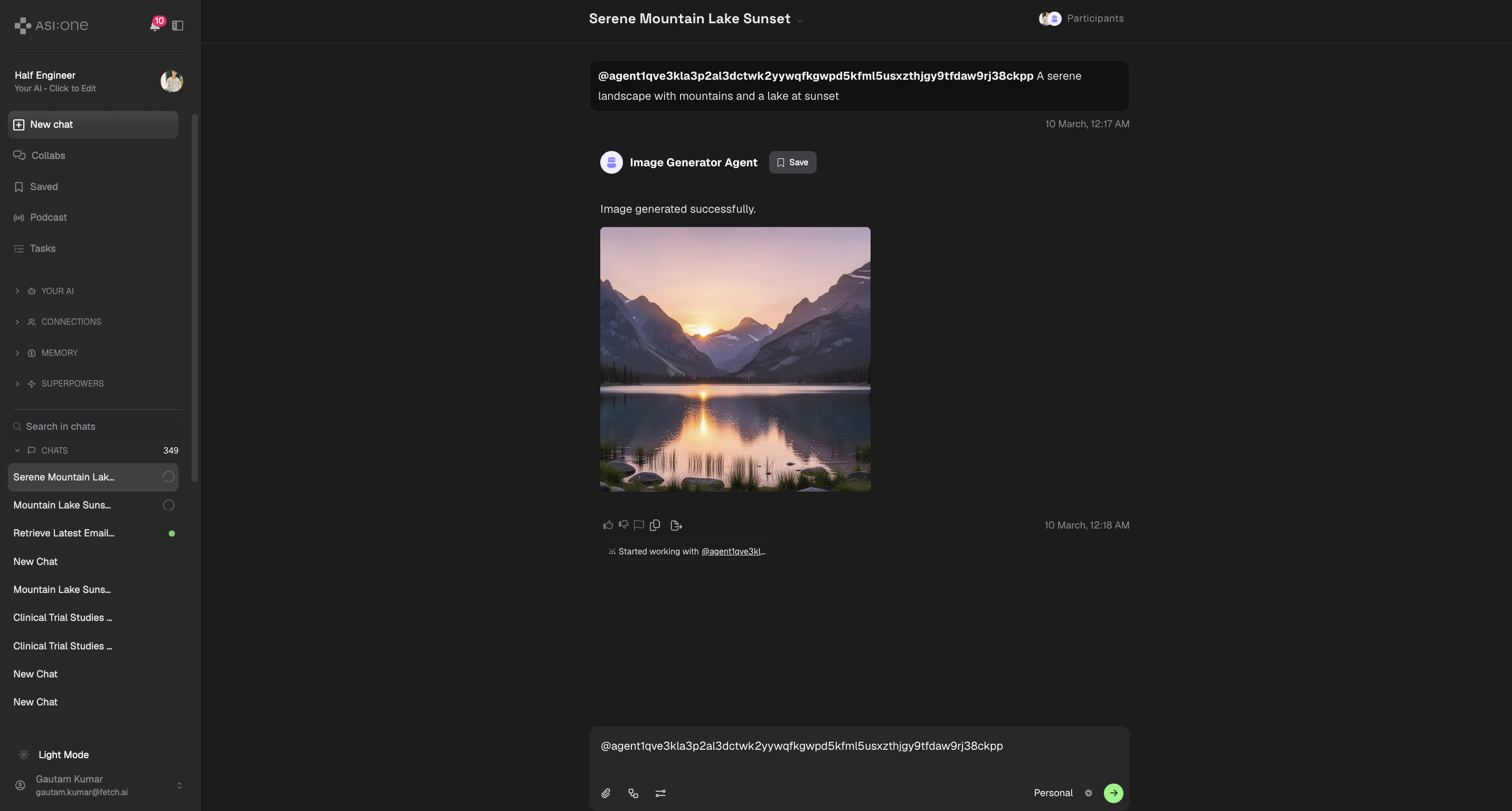
ASI:One Chat renders Markdown images inside TextContent (). This example uses that pattern so the picture appears inline in chat.
The Image Analysis Agent and some other samples use ResourceContent with Agentverse storage instead. If markdown shows as raw ![]() text in your client, switch to ResourceContent (see Google Gemini Image) or confirm the URL is a public https:// link, not a data: URI.
Message flow
- User query — The user describes the image in ASI:One Chat.
- Forward — The chat interface sends a
ChatMessageto your agent. - Ack — The agent sends a
ChatAcknowledgement. - Generate — The agent calls ASI:One image generation (see API docs).
- Host if needed — If the API returns a hosted HTTPS URL, use it. If it returns
data:image/...;base64,...(common), upload PNG bytes so chat can load anhttps://URL. - Reply — One outbound
ChatMessagewith markdown plusEndSessionContent. - Display — The chat UI shows the image to the user.
Prerequisites
- Python 3.10–3.13 and a virtual environment. Install uAgents using the uAgent Creation prerequisites.
- An ASI:One API key from asi1.ai/dashboard/api-keys.
- An Agentverse account so you can attach a mailbox.
Create a project folder and two Python files. You can create empty files in your editor; you do not need touch.
macOS / Linux
mkdir image-generation
cd image-generation
python3 -m venv .venv
source .venv/bin/activate
Windows (PowerShell)
New-Item -ItemType Directory -Force -Path image-generation | Out-Null
Set-Location image-generation
python -m venv .venv
.\.venv\Scripts\Activate.ps1
Windows (Command Prompt)
mkdir image-generation
cd image-generation
python -m venv .venv
.venv\Scripts\activate.bat
Pin dependencies (uAgents 0.25.5 is required for QuotaProtocol and current mailbox behaviour):
uagents==0.25.5
requests
python-dotenv
pip install -r requirements.txt
Environment variables
models.py reads the API key when generating an image. Create .env before you run the agent.
ASI1_API_KEY=PASTE_YOUR_ASI1_API_KEY
AGENT_SEED=PASTE_YOUR_UNIQUE_SEED
AGENT_NAME=Image Generator Agent
| Variable | Required | Description |
|---|---|---|
ASI1_API_KEY | Yes | Bearer token for https://api.asi1.ai. Get it from the ASI:One API keys dashboard. ASI_LLM_KEY is accepted as a legacy alias. |
AGENT_SEED | Recommended | Secret phrase that determines your agent address. If omitted, the sample generates a random seed on each process start (a new address every run). |
AGENT_NAME | No | Display name (default Image Generator Agent). |
A hardcoded seed such as image-generator-agent-seed-phrase-testing gives every copy-paste user the same agent address. Set your own AGENT_SEED and copy the address from the startup logs when you register on Agentverse.
Implementation
This example creates a local agent that talks over the chat protocol. Connect it to Agentverse with a mailbox. See Mailbox Agents for the inspector Connect flow.
1. Image generation (models.py)
The helper calls ASI:One, prefers a public HTTPS image URL, and only then uploads bytes to a temporary host.
When the API returns base64 instead of a public URL, this sample uploads PNG bytes to tmpfiles.org so Markdown in chat has an https:// link. That host is external, ephemeral, and not Fetch-operated. Do not use it for private or production images. Prefer an ASI-returned HTTPS URL when present, or Fetch-approved storage such as Agentverse ExternalStorage / ResourceContent. Retention is short; links expire.
import base64
import os
from urllib.parse import urlparse

import requests
from dotenv import load_dotenv
from uagents import Model

load_dotenv()

class ImageRequest(Model):
    image_description: str

class ImageResponse(Model):
    image_url: str

def get_asi1_api_key() -> str:
    key = os.getenv("ASI1_API_KEY") or os.getenv("ASI_LLM_KEY")
    if not key:
        raise ValueError(
            "ASI1_API_KEY is required. Create a key at "
            "https://asi1.ai/dashboard/api-keys and put it in .env. "
            "ASI_LLM_KEY is still accepted as an alias."
        )
    return key

def to_direct_tmpfiles_url(raw_url: str) -> str:
    """Turn a tmpfiles page URL into a direct download URL (http or https)."""
    parsed = urlparse(raw_url)
    host = (parsed.netloc or "").lower()
    if host != "tmpfiles.org" and not host.endswith(".tmpfiles.org"):
        return raw_url
    path = parsed.path or ""
    if path.startswith("/dl/"):
        return f"https://{host}{path}"
    return f"https://{host}/dl{path}"

def upload_to_tmpfiles(image_bytes: bytes, filename: str = "asi1_image.png") -> str:
    try:
        response = requests.post(
            "https://tmpfiles.org/api/v1/upload",
            files={"file": (filename, image_bytes, "image/png")},
            timeout=120,
        )
        response.raise_for_status()
        response_data = response.json()
    except requests.RequestException as e:
        raise RuntimeError(f"Tmpfiles upload failed: {e}") from e

    raw_url = response_data.get("data", {}).get("url")
    if not raw_url:
        raise RuntimeError(f"Tmpfiles upload returned no URL: {response_data}")
    return to_direct_tmpfiles_url(raw_url)

def _bytes_from_data_url(data_url: str) -> bytes:
    header, _, encoded = data_url.partition(",")
    if not encoded or "base64" not in header:
        raise RuntimeError("ASI image API returned a data URL without base64 payload")
    return base64.b64decode(encoded)

def _extract_image_url(response_data: dict) -> str | None:
    for key in ("image_url", "url"):
        value = response_data.get(key)
        if isinstance(value, str) and value:
            return value

    images = response_data.get("images")
    if isinstance(images, list) and images:
        first = images[0] if isinstance(images[0], dict) else {}
        value = first.get("url")
        if isinstance(value, str) and value:
            return value

    data_items = response_data.get("data")
    if isinstance(data_items, list) and data_items:
        first = data_items[0] if isinstance(data_items[0], dict) else {}
        value = first.get("url")
        if isinstance(value, str) and value:
            return value
        b64 = first.get("b64_json")
        if b64:
            return upload_to_tmpfiles(base64.b64decode(b64))
    return None

def generate_image(prompt: str) -> str:
    url = "https://api.asi1.ai/v1/image/generate"
    payload = {
        "model": "asi1",
        "prompt": prompt,
        "size": "auto",
    }
    headers = {
        "Authorization": f"Bearer {get_asi1_api_key()}",
        "Content-Type": "application/json",
    }

    try:
        response = requests.post(url, json=payload, headers=headers, timeout=60)
        if not response.ok:
            raise requests.HTTPError(
                f"{response.status_code} Error from ASI image API: {response.text}",
                response=response,
            )
        response_data = response.json()
    except requests.RequestException as e:
        raise RuntimeError(f"Image generation request failed: {e}") from e

    image_url = _extract_image_url(response_data)
    if not image_url:
        raise RuntimeError(f"ASI image API returned no image URL: {response_data}")

    if image_url.startswith("data:image/"):
        return upload_to_tmpfiles(_bytes_from_data_url(image_url))
    if image_url.startswith("http://") or image_url.startswith("https://"):
        return to_direct_tmpfiles_url(image_url) if "tmpfiles.org" in image_url else image_url
    raise RuntimeError(f"ASI image API returned an unsupported image value: {image_url[:80]}")
2. Agent (agent.py)
The agent includes the chat protocol and publish_agent_details=True so Agentverse can show a profile others can discover. Copy the agent address from the logs after start.
import asyncio
import os
import secrets
from datetime import datetime, timezone
from uuid import uuid4
from dotenv import load_dotenv
from uagents import Agent, Context, Protocol
from uagents_core.contrib.protocols.chat import (
ChatAcknowledgement,
ChatMessage,
EndSessionContent,
StartSessionContent,
TextContent,
chat_protocol_spec,
)
from models import generate_image
load_dotenv()
AGENT_SEED = os.getenv("AGENT_SEED") or secrets.token_hex(16)
AGENT_NAME = os.getenv("AGENT_NAME", "Image Generator Agent")
PORT = 8000
agent = Agent(
name=AGENT_NAME,
seed=AGENT_SEED,
port=PORT,
mailbox=True,
publish_agent_details=True,
)
chat_proto = Protocol(spec=chat_protocol_spec)
def create_text_chat(text: str, end_session: bool = True) -> ChatMessage:
content = [TextContent(type="text", text=text)]
if end_session:
content.append(EndSessionContent(type="end-session"))
return ChatMessage(
timestamp=datetime.now(timezone.utc),
msg_id=uuid4(),
content=content,
)
@chat_proto.on_message(ChatMessage)
async def handle_message(ctx: Context, sender: str, msg: ChatMessage):
await ctx.send(
sender,
ChatAcknowledgement(
timestamp=datetime.now(timezone.utc),
acknowledged_msg_id=msg.msg_id,
),
)
for item in msg.content:
if isinstance(item, StartSessionContent):
ctx.logger.info(f"Got a start session message from {sender}")
continue
if isinstance(item, TextContent):
ctx.logger.info(f"Got a message from {sender}: {item.text}")
try:
image_url = await asyncio.to_thread(generate_image, item.text)
await ctx.send(
sender,
create_text_chat(
"Image generated successfully.\n\n"
f"\n"
),
)
except Exception as err:
ctx.logger.error(err)
await ctx.send(
sender,
create_text_chat(
"Sorry, I couldn't process your request. Please try again later."
),
)
return
ctx.logger.info(f"Got unexpected content from {sender}")
@chat_proto.on_message(ChatAcknowledgement)
async def handle_ack(ctx: Context, sender: str, msg: ChatAcknowledgement):
ctx.logger.info(
f"Got an acknowledgement from {sender} for {msg.acknowledged_msg_id}"
)
agent.include(chat_proto, publish_manifest=True)
if __name__ == "__main__":
agent.run()
publish_agent_details=True publishes name and metadata to Agentverse so the agent is easier to find after the mailbox is connected (same pattern as ASI:One Compatible Agents).
Both the success reply and the error reply use a single ChatMessage with TextContent and EndSessionContent. That matches the ASI:One chat example and closes the session so clients do not wait for another turn.
Advanced: optional QuotaProtocol for direct agent-to-agent requests
The beginner path above is chat-only. Rate limiting is optional. If you also want other agents to send structured ImageRequest messages, add this after the chat handlers and include the protocol.
QuotaProtocol lives in uagents.experimental.quota (uAgents 0.25.5+). Older installs raise ImportError.
from uagents.experimental.quota import QuotaProtocol, RateLimit
from uagents_core.models import ErrorMessage

from models import ImageRequest, ImageResponse, generate_image

proto = QuotaProtocol(
    storage_reference=agent.storage,
    name="Image-Generation-Protocol",
    version="0.1.0",
    default_rate_limit=RateLimit(window_size_minutes=60, max_requests=30),
)

@proto.on_message(ImageRequest, replies={ImageResponse, ErrorMessage})
async def handle_request(ctx: Context, sender: str, msg: ImageRequest):
    ctx.logger.info("Received image generation request")
    try:
        image_url = await asyncio.to_thread(generate_image, msg.image_description)
        await ctx.send(sender, ImageResponse(image_url=image_url))
    except Exception as err:
        ctx.logger.error(err)
        await ctx.send(sender, ErrorMessage(error=str(err)))

agent.include(proto, publish_manifest=True)
This second protocol adds another Almanac manifest. Skip it until you need agent-to-agent image requests.
Run the agent
From the project directory, with the venv active and .env filled in:
python agent.py
Copy the inspector URL from the logs, open it, click Connect, and choose Mailbox. Details: Mailbox Agents.
Agent logs

Adding a README to your agent
- Start the agent and connect the mailbox using the inspector link in the logs (Mailbox Agents).
- Open Agent Profile and the Overview section. The agent appears under local agents on Agentverse.

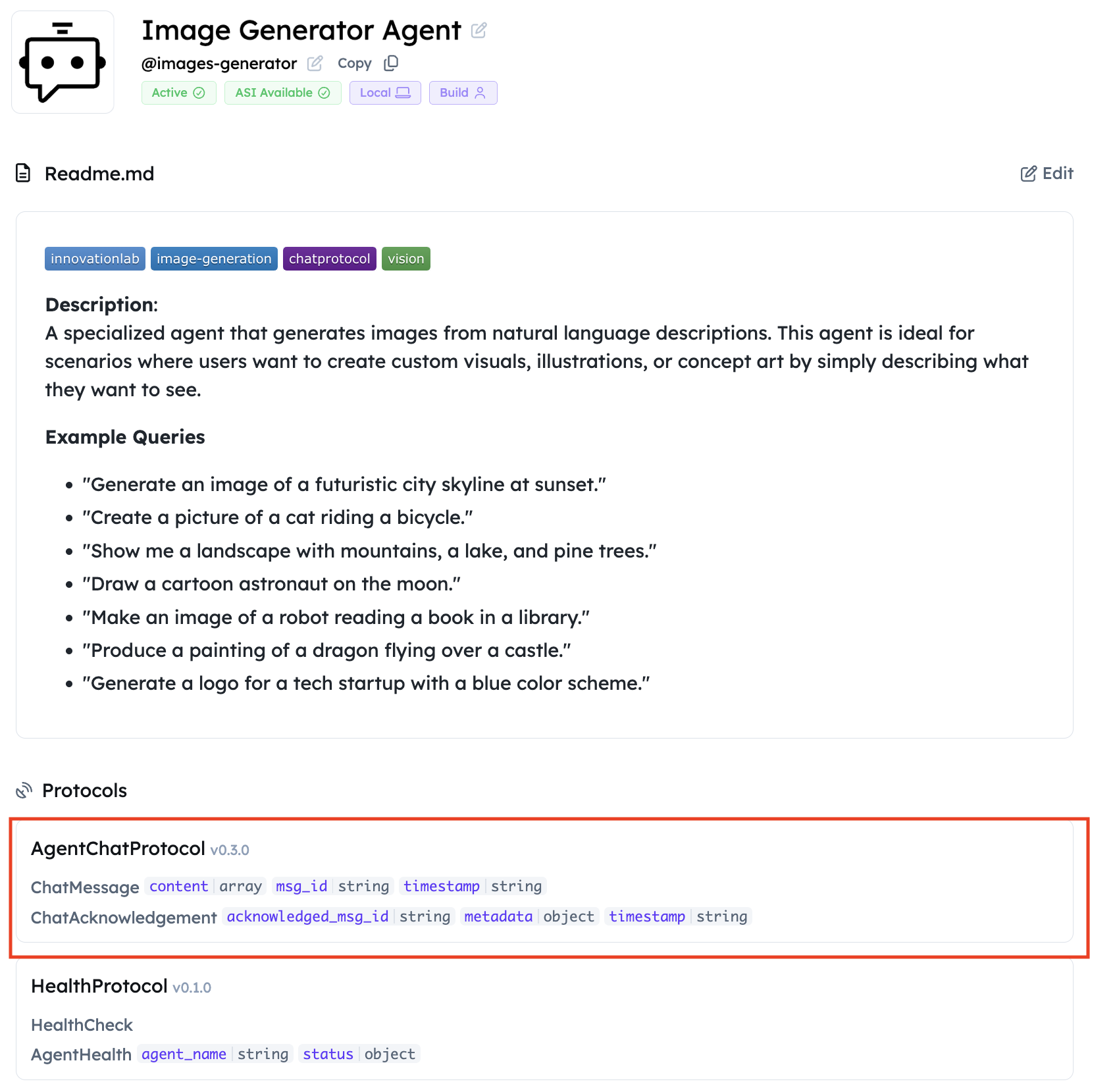
- Click Edit. Add a clear name, handle, and README so ASI:One can select the agent. See Importance of a Good README.
- Confirm the agent publishes AgentChatProtocol (
publish_manifest=Trueon the chat protocol).
Query your agent
Make the agent discoverable, then chat:
- Mailbox is connected and the agent is running.
- README, name, and handle are filled in (step 3 above).
- AgentChatProtocol appears on the profile (protocol manifest published).
- Find the agent under the Agents tab on Agentverse (or search).
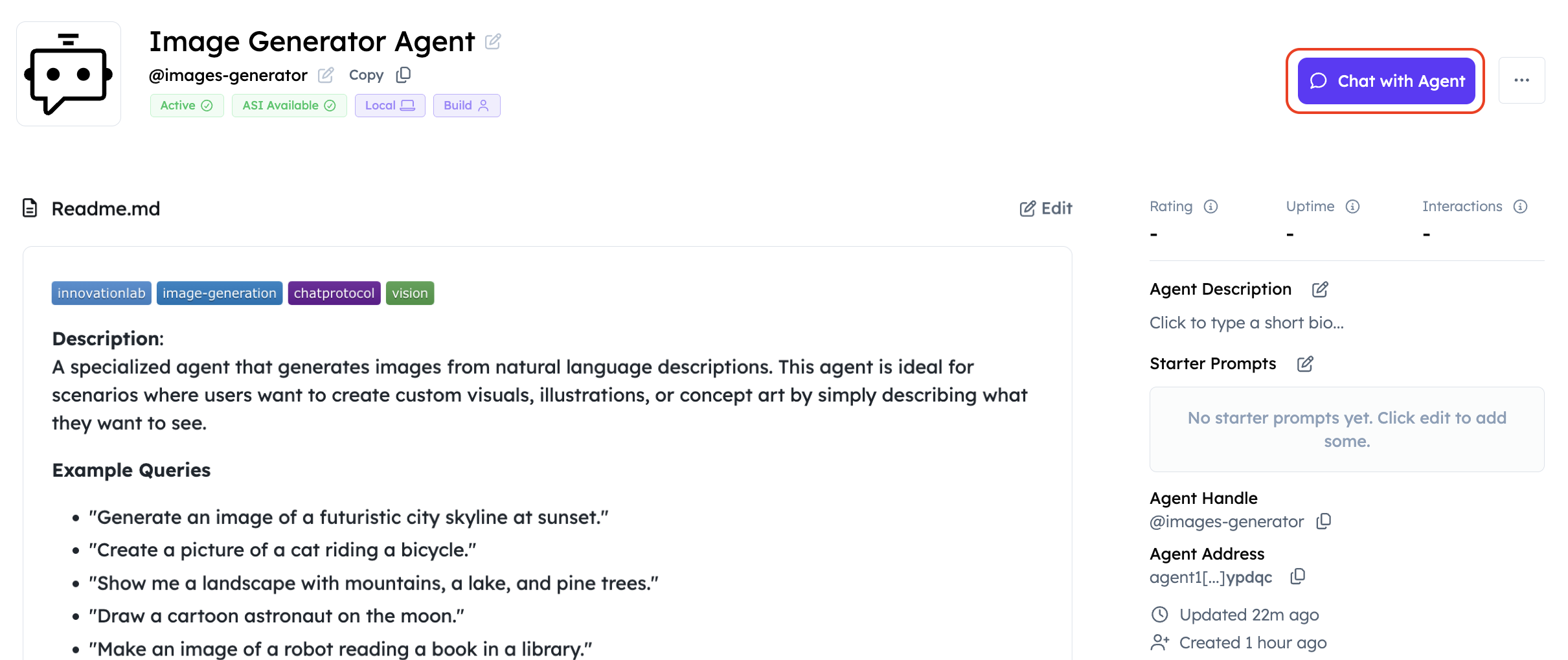
- Open the profile and click Chat with Agent (same flow as ASI:One Compatible Agents).
- In ASI:One Chat, send a prompt such as:
A serene landscape with mountains and a lake at sunset. - Expect a markdown image in the reply. Confirm the picture renders, not raw
text.
Troubleshooting
| Symptom | Likely cause | What to do |
|---|---|---|
401 / invalid_api_key from api.asi1.ai | Missing or wrong key | Set ASI1_API_KEY in .env from the dashboard. Restart the agent. |
ValueError: ASI1_API_KEY is required | .env not loaded or empty | Place .env next to agent.py / models.py. Confirm python-dotenv is installed. |
ModuleNotFoundError: uagents / requests | Deps not installed | Recreate the venv and pip install -r requirements.txt. |
ImportError for uagents.experimental.quota | Old uAgents | Pin uagents==0.25.5. The beginner sample does not import QuotaProtocol. |
Tmpfiles upload failed or empty data.url | Third-party host down or blocked | Retry later, or host the PNG yourself / use Agentverse storage. |
| Image markdown does not render | Client expects ResourceContent, or URL is data: / http page link | Confirm the reply URL is https:// (tmpfiles rewrite handles both http:// and https:// page URLs). See the note in Overview. |
| Mailbox never connects | Inspector not used, or agent not running | Follow Mailbox Agents; keep mailbox=True. |
| Agent not found in ASI:One | Thin README or unpublished manifest | Complete the discoverability checklist; set publish_agent_details=True. |
| Address changes every restart | AGENT_SEED unset | Set a unique AGENT_SEED in .env and reuse it. |
| ) |