FET Image Agent Payment Protocol Example
This example is a paid image generation seller: the user pays native FET on the Fetch.ai ledger, the agent verifies the transfer on-chain, then calls the ASI:One image API (POST https://api.asi1.ai/v1/image/generate) and returns markdown image output.
It is the on-chain FET counterpart of Image Agent Payment Protocol (Skyfire) (USDC via Skyfire). Clone and run the repo first; long modules below are excerpts with links to the full files.
Skyfire USDC (off-ledger token charge): Image Agent Payment Protocol Example. This page is on-chain FET only.
What it demonstrates
- On-chain FET payment verification with Fetch.ai ledger queries (
cosmpy). - Seller role in the payment protocol (
RequestPayment→CommitPayment→CompletePayment). - ASI:One image generation.
- Image delivery as chat markdown. Base64 payloads may be uploaded to public tmpfiles.org (see privacy).
- One retry without a second payment if generation or delivery fails (
_allow_retry).
Getting started (clone first)
The follow-along path is the fet-example tree. Get testnet FET before you try a real payment.
macOS / Linux / WSL:
git clone https://github.com/fetchai/innovation-lab-examples.git
cd innovation-lab-examples/fet-example
python3 -m venv .venv
source .venv/bin/activate
pip install -r requirements.txt
cp .env.example .env
# Edit .env: unique AGENT_SEED_PHRASE, ASI_ONE_API_KEY, FET_USE_TESTNET=true
python3 agent.py
Windows PowerShell:
git clone https://github.com/fetchai/innovation-lab-examples.git
Set-Location innovation-lab-examples\fet-example
py -3.12 -m venv .venv
.\.venv\Scripts\Activate.ps1
py -m pip install -r requirements.txt
Copy-Item .env.example .env
# Edit .env: unique AGENT_SEED_PHRASE, ASI_ONE_API_KEY, FET_USE_TESTNET=true
py agent.py
Then connect Mailbox in the Agentverse inspector (see Mailbox). Keep the process running.
Project structure
| File | Role |
|---|---|
agent.py | Agent identity, mailbox, includes chat + payment protocols |
chat_proto.py | Chat handlers; stores the first prompt, then requests FET |
payment.py | Seller payment, on-chain verify, generate after CommitPayment |
client.py | ASI:One image/generate + optional tmpfiles.org upload |
shared.py | create_text_chat helper |
client.py is the ASI:One image client (POST https://api.asi1.ai/v1/image/generate), not a third-party Imagen wrapper.
Configuration
Copy .env.example to .env. Use one seed everywhere (file default, env, and docs). Change the seed and name so you do not collide with other readers.
# Required: unique identity (do not keep the shared sample seed on a public network)
AGENT_NAME=Fet Example Agent
AGENT_SEED_PHRASE=asi-imagen-agent
AGENT_PORT=8000

# ASI:One image API (https://api.asi1.ai/v1/image/generate)
ASI_ONE_API_KEY=your_asi_one_api_key_here
# ASI_ONE_MODEL=asi1

# true = Fetch.ai stable testnet (Dorado / test FET). false = mainnet (real FET).
FET_USE_TESTNET=true

# Optional price (FET). Code default is 0.1. Startup logs should print this value.
# FIXED_FET_AMOUNT=0.1

# Optional mailbox host (uAgents default is https://agentverse.ai)
# AGENTVERSE_URL=https://agentverse.ai
| Variable | Required | Notes |
|---|---|---|
ASI_ONE_API_KEY | Yes | ASI:One dashboard key for image generate |
AGENT_SEED_PHRASE | Strongly recommended | Canonical sample: asi-imagen-agent. Change it before registering |
AGENT_NAME | Strongly recommended | Default Fet Example Agent collides if many people keep it |
FET_USE_TESTNET | Yes for safety | true → testnet (atestfet, Dorado screenshots). false → mainnet, real FET |
FIXED_FET_AMOUNT | No | Default 0.1 if omitted |
| Mailbox | Yes to chat from ASI:One / Agentverse | mailbox=True in code. No mailbox token in .env: log in to Agentverse, open the inspector URL, Connect → Mailbox. Optional AGENTVERSE_URL |
Agent(name=..., seed=...) derives a deterministic address. If you leave AGENT_SEED_PHRASE=asi-imagen-agent and AGENT_NAME=Fet Example Agent, you share the same agent/wallet as every other tutorial clone (agent1qg8l3y4sj… for that seed). Set a unique seed (and name) before you fund the wallet or register on Agentverse.
Dorado UI screenshots are testnet. Keep FET_USE_TESTNET=true until you intend to spend real FET. false selects NetworkConfig.fetchai_mainnet() and denom afet.
Dependencies
This site pins the Innovation Lab tested combo (uagents 0.25.5 / uagents-core 0.4.9, same as other current examples). The GitHub fet-example requirements.txt may still list older 0.23.6 / 0.4.0; prefer the pins below when you install from these docs.
uagents==0.25.5
uagents-core==0.4.9
python-dotenv
requests
cosmpy
Network: Dorado vs FET_USE_TESTNET
| What you see | Env | Ledger |
|---|---|---|
| Dorado / test FET / faucet | FET_USE_TESTNET=true (default) | NetworkConfig.fetchai_stable_testnet(), denom atestfet |
| Mainnet | FET_USE_TESTNET=false | NetworkConfig.fetchai_mainnet(), denom afet |
Payment metadata sets fet_network to stable-testnet or mainnet to match. Get test tokens first: Getting FET testnet tokens.
Mailbox and Agentverse
agent.py sets mailbox=True so the local process can receive ASI:One / Agentverse chat. uAgents does not read a mailbox key from .env in this example.
- Start
python3 agent.py(orpy agent.pyon Windows). - Copy the inspector URL from the logs.
- While logged in to Agentverse, Connect → Mailbox.
- Chat from Inspector or ASI:One using the agent address.
See Mailbox agents.
ASI:One client prerequisite: buyer_fet_wallet
On-chain verification needs the buyer Fetch wallet address that sent FET. In handle_commit_payment, the agent reads:
CommitPayment.metadata["buyer_fet_wallet"] or metadata["buyer_fet_address"]
If that field is missing, verification is skipped and you get a log like Missing buyer_fet_wallet in CommitPayment.metadata, then CancelPayment.
ASI:One / Dorado: when you Approve FET Payment, the client must attach your FET wallet address in that metadata. If you use a custom buyer, include buyer_fet_wallet (bech32 fetch1…) in CommitPayment.metadata. Wallet-only chat that never sends metadata will always fail verification.
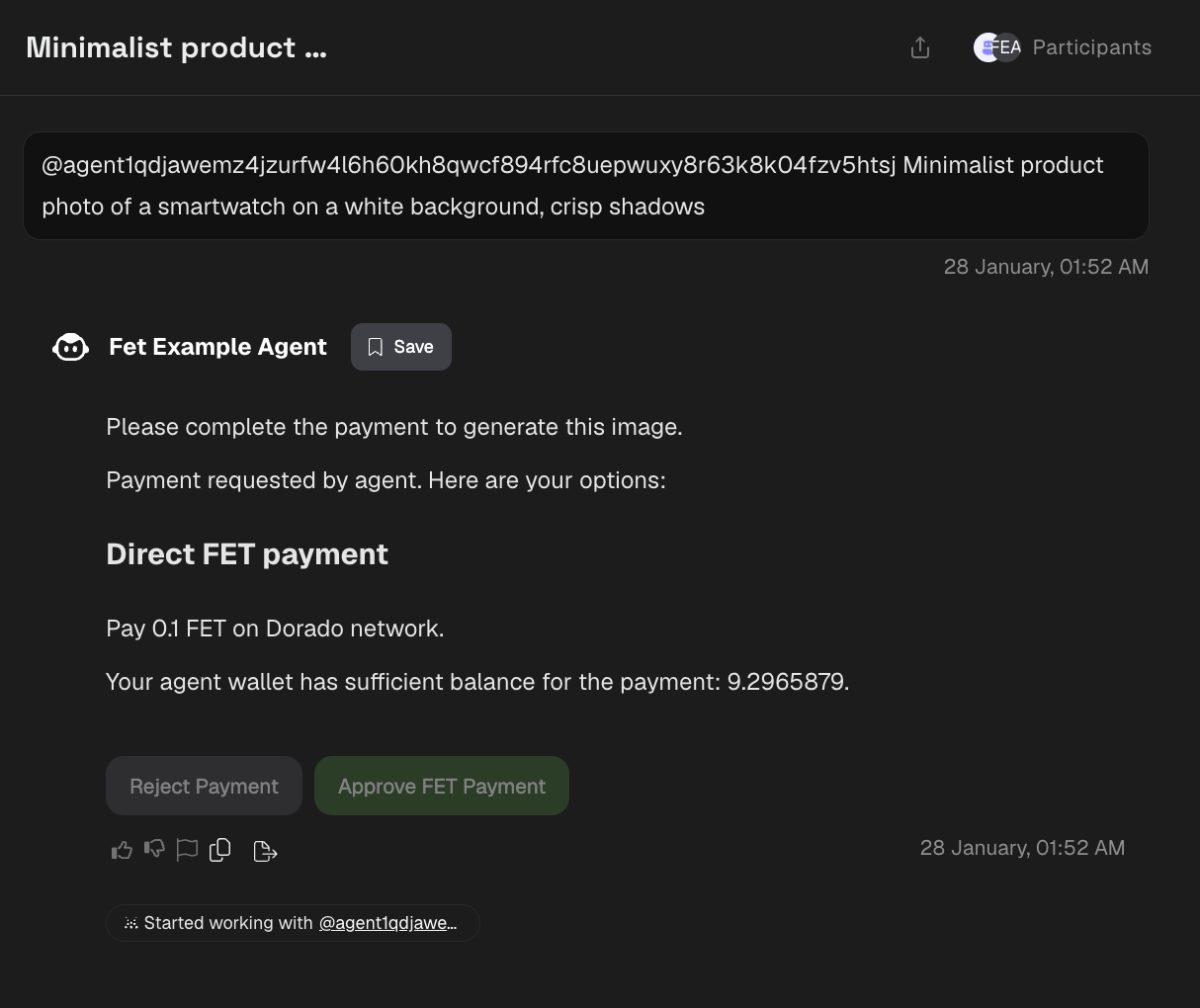
The payment-request screenshot below is the Approve/Reject step; the wallet that pays must be the address in buyer_fet_wallet.
Usage flow (prompt is stored first)
- User sends an image prompt in chat.
chat_protostores that text asprompt:{sender}:{session}and sendsRequestPayment(you do not need a second prompt on the happy path).- User pays 0.1 FET (or
FIXED_FET_AMOUNT) on the matching network, withbuyer_fet_walleton commit. - Agent verifies the tx on-chain, sends
CompletePayment, then immediately calls ASI:One with the stored prompt. - Image markdown is returned (tmpfiles.org URL if the API returned base64).
If generation fails, _allow_retry sets awaiting_prompt + verified_payment. The next chat message is treated as a new prompt and is generated without another payment. That retry path is the only time a second prompt is required.
Core dependencies
from uagents_core.contrib.protocols.payment import (
    Funds,
    RequestPayment,
    RejectPayment,
    CommitPayment,
    CancelPayment,
    CompletePayment,
    payment_protocol_spec,
)
from cosmpy.aerial.client import LedgerClient, NetworkConfig
On-chain payment verification
Canonical implementation: payment.py (verify_fet_payment_to_agent). Standalone snippet includes the imports the function uses:
import os
import traceback

from cosmpy.aerial.client import LedgerClient, NetworkConfig

def verify_fet_payment_to_agent(
    transaction_id: str,
    expected_amount_fet: str,
    sender_fet_address: str,
    recipient_agent_wallet,
    logger,
    use_mainnet: bool = False,
) -> bool:
    """Verify FET payment transaction on Fetch.ai network."""
    try:
        testnet = (
            os.getenv("FET_USE_TESTNET", "true").lower() == "true"
            if not use_mainnet
            else False
        )
        network_config = (
            NetworkConfig.fetchai_stable_testnet()
            if testnet
            else NetworkConfig.fetchai_mainnet()
        )
        ledger = LedgerClient(network_config)
        expected_amount_micro = int(float(expected_amount_fet) * 10**18)

        if not recipient_agent_wallet:
            logger.error("Recipient agent wallet is not set")
            return False

        expected_recipient = str(recipient_agent_wallet.address())
        tx_response = ledger.query_tx(transaction_id)
        if not tx_response.is_successful():
            logger.error(f"Transaction {transaction_id} was not successful")
            return False

        recipient_found = amount_found = sender_found = False
        denom = "atestfet" if testnet else "afet"

        for event_type, event_attrs in tx_response.events.items():
            if event_type == "transfer":
                if event_attrs.get("recipient") == expected_recipient:
                    recipient_found = True
                    if event_attrs.get("sender") == sender_fet_address:
                        sender_found = True
                    amount_str = event_attrs.get("amount", "")
                    if amount_str and amount_str.endswith(denom):
                        try:
                            amount_value = int(amount_str.replace(denom, ""))
                            if amount_value >= expected_amount_micro:
                                amount_found = True
                        except Exception:
                            pass

        if recipient_found and amount_found and sender_found:
            logger.info(f"Payment verified: {transaction_id}")
            return True
        logger.error(
            f"Payment verification failed - recipient: {recipient_found}, "
            f"amount: {amount_found}, sender: {sender_found}"
        )
        return False
    except Exception as e:
        logger.error(f"FET payment verification failed: {e}")
        logger.error(f"Traceback: {traceback.format_exc()}")
        return False
Payment protocol (excerpts)
Full file: payment.py.
Price comes from FIXED_FET_AMOUNT (default 0.1). Metadata should describe image generation, not an LLM chat service.
import os
from uagents import Context, Protocol
from uagents_core.contrib.protocols.payment import (
    CancelPayment,
    CommitPayment,
    CompletePayment,
    Funds,
    RequestPayment,
    payment_protocol_spec,
)

payment_proto = Protocol(spec=payment_protocol_spec, role="seller")

fet_amount = os.getenv("FIXED_FET_AMOUNT", "0.1")
FET_FUNDS = Funds(currency="FET", amount=str(fet_amount), payment_method="fet_direct")

async def request_payment_from_user(ctx: Context, user_address: str, description: str | None = None):
    metadata = {
        "agent": "asi-imagen-agent",
        "service": "image_generation",
        "fet_network": "stable-testnet" if os.getenv("FET_USE_TESTNET", "true").lower() == "true" else "mainnet",
        "content": description
        or "Please complete the payment to proceed. After payment, I will generate your image with ASI:One.",
    }
    payment_request = RequestPayment(
        accepted_funds=[Funds(currency="FET", amount=str(os.getenv("FIXED_FET_AMOUNT", "0.1")), payment_method="fet_direct")],
        recipient=str(_agent_wallet.address()) if _agent_wallet else str(ctx.agent.address),
        deadline_seconds=300,
        reference=str(ctx.session),
        description=description or "ASI:One image generation after FET payment",
        metadata=metadata,
    )
    await ctx.send(user_address, payment_request)

@payment_proto.on_message(CommitPayment)
async def handle_commit_payment(ctx: Context, sender: str, msg: CommitPayment):
    payment_verified = False
    if msg.funds.payment_method == "fet_direct" and msg.funds.currency == "FET":
        buyer_fet_wallet = None
        if isinstance(msg.metadata, dict):
            buyer_fet_wallet = msg.metadata.get("buyer_fet_wallet") or msg.metadata.get(
                "buyer_fet_address"
            )
        if not buyer_fet_wallet:
            ctx.logger.error("Missing buyer_fet_wallet in CommitPayment.metadata")
        else:
            use_testnet = os.getenv("FET_USE_TESTNET", "true").lower() == "true"
            payment_verified = verify_fet_payment_to_agent(
                transaction_id=msg.transaction_id,
                expected_amount_fet=str(msg.funds.amount),
                sender_fet_address=buyer_fet_wallet,
                recipient_agent_wallet=_agent_wallet,
                logger=ctx.logger,
                use_mainnet=not use_testnet,
            )
    if payment_verified:
        await ctx.send(sender, CompletePayment(transaction_id=msg.transaction_id))
        await generate_response_after_payment(ctx, sender)
    else:
        await ctx.send(
            sender,
            CancelPayment(transaction_id=msg.transaction_id, reason="Payment verification failed"),
        )
Image generation (ASI:One)
Full file: client.py. Endpoint: https://api.asi1.ai/v1/image/generate.
Image hosting (tmpfiles.org)
When the API returns b64_json, the example uploads PNG bytes to tmpfiles.org. Those URLs are public, may expire (TTL is not guaranteed), and are not a substitute for Agentverse storage / ResourceContent. Prefer keeping images in Agentverse resources if your client supports them.
Normalize all tmpfiles shapes (http:// page URLs, https:// page URLs, already-/dl/ links) to a direct HTTPS download URL:
from urllib.parse import urlparse, urlunparse

ASI_ONE_API_KEY = os.getenv("ASI_ONE_API_KEY")
ASI_ONE_MODEL = os.getenv("ASI_ONE_MODEL", "asi1")

def to_tmpfiles_download_url(raw_url: str) -> str:
    parsed = urlparse(raw_url)
    host = (parsed.netloc or "").lower()
    if "tmpfiles.org" not in host:
        return raw_url
    path = parsed.path or "/"
    if not path.startswith("/dl/"):
        path = "/dl" + (path if path.startswith("/") else f"/{path}")
    while path.startswith("/dl/dl/"):
        path = path[3:]
    return urlunparse(("https", "tmpfiles.org", path, "", parsed.query, ""))

def upload_to_tmpfiles(image_bytes: bytes, filename: str = "asi1_image.png") -> str:
    response = requests.post(
        "https://tmpfiles.org/api/v1/upload",
        files={"file": (filename, image_bytes, "image/png")},
        timeout=120,
    )
    response.raise_for_status()
    raw_url = response.json().get("data", {}).get("url")
    if not raw_url:
        raise RuntimeError("Tmpfiles upload returned no URL")
    return to_tmpfiles_download_url(raw_url)
Also run to_tmpfiles_download_url on any image_url / url the ASI:One API already returns, not only the http://tmpfiles.org/ prefix replace.
Chat and agent identity
Full files: chat_proto.py, shared.py, agent.py.
Canonical seed default asi-imagen-agent (same as .env.example). Startup logs should print FIXED_FET_AMOUNT and image copy, not “LLM”.
import os

from dotenv import load_dotenv
from uagents import Agent, Context

load_dotenv()

from chat_proto import chat_proto
from payment import payment_proto, set_agent_wallet

agent = Agent(
    name=os.getenv("AGENT_NAME", "Fet Example Agent"),
    seed=os.getenv("AGENT_SEED_PHRASE", "asi-imagen-agent"),
    port=int(os.getenv("AGENT_PORT", "8000")),
    mailbox=True,
    agentverse=os.getenv("AGENTVERSE_URL", "https://agentverse.ai"),
)

agent.include(chat_proto, publish_manifest=True)
agent.include(payment_proto, publish_manifest=True)
set_agent_wallet(agent.wallet)

@agent.on_event("startup")
async def startup(ctx: Context):
    fet_amount = os.getenv("FIXED_FET_AMOUNT", "0.1")
    ctx.logger.info(f"Agent started: {agent.wallet.address()}")
    ctx.logger.info("=== ASI:One image agent (FET payment) ===")
    ctx.logger.info(f"Accepted: {fet_amount} FET (direct)")
    ctx.logger.info("Image via ASI:One API (ASI_ONE_API_KEY)")
    ctx.logger.info("Chat with an image prompt; pay FET, then generation runs")

if __name__ == "__main__":
    agent.run()
Implementation checklist
- Install
cosmpy(inrequirements.txt). - Set
FET_USE_TESTNETand fund the agent wallet on that network. RequestPaymentusespayment_method="fet_direct"and amount fromFIXED_FET_AMOUNT.- Buyer
CommitPayment.metadatamust includebuyer_fet_wallet(orbuyer_fet_address). - Verify with
LedgerClient.query_tx()against transfer events.
Key features
- Direct on-chain verification (no Skyfire / Stripe).
- ASI:One image API (
ASI_ONE_API_KEY). - Session storage for prompt + one unpaid retry.
- Markdown image links (tmpfiles.org when needed).
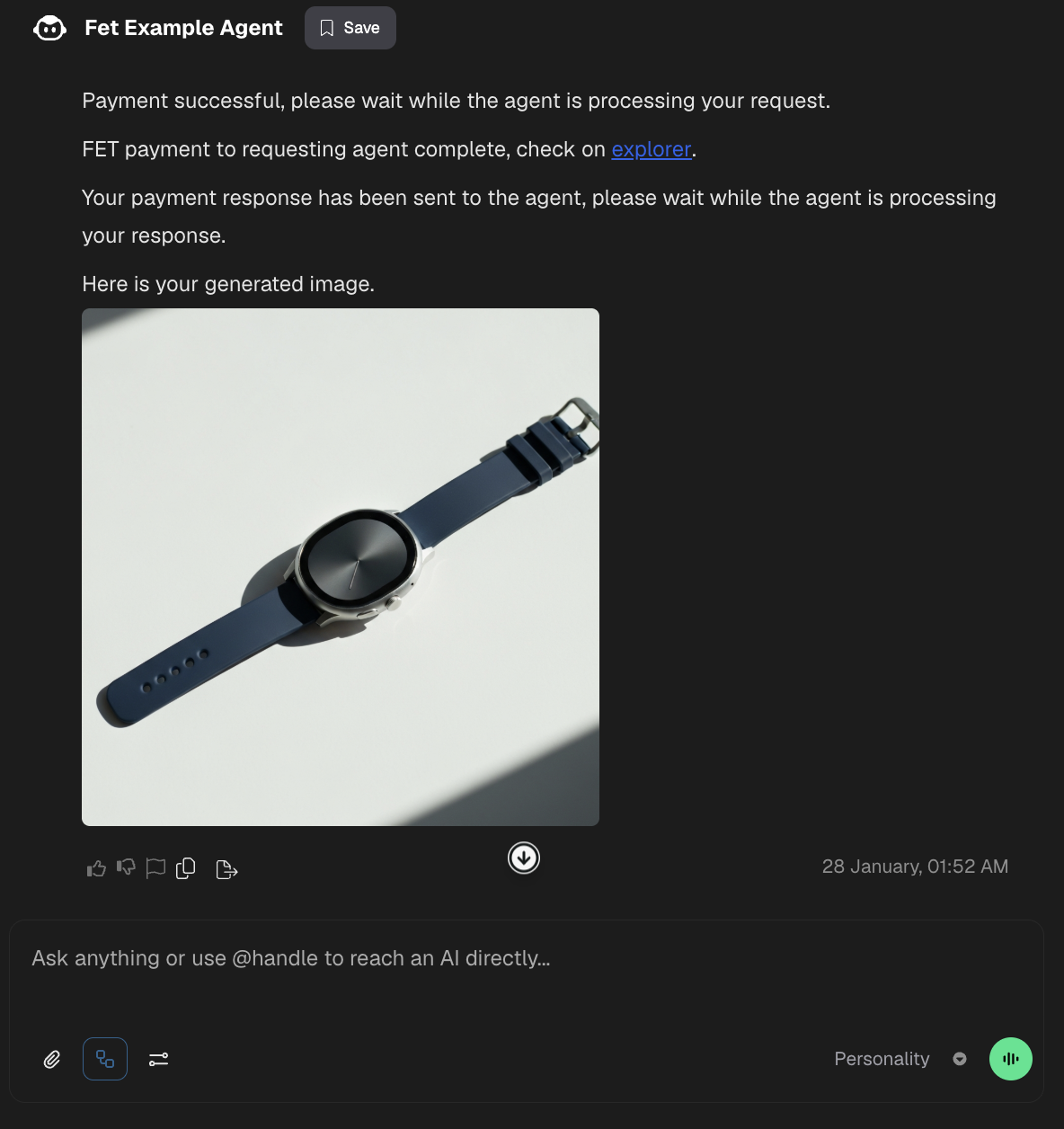
The screenshots show the Fet Example Agent flow: (1) payment request with Reject / Approve FET Payment on Dorado (testnet) — the paying wallet must appear as buyer_fet_wallet — and (2) the generated image after a verified payment.
1. Payment request — Agent asks for 0.1 FET on Dorado (FET_USE_TESTNET=true); user can approve or reject. Approve must include buyer FET wallet metadata.
2. Generated image — After payment, the agent returns the generated image (for example a smartwatch on a white background).
Getting FET testnet tokens
To test on Fetch.ai testnet (FET_USE_TESTNET=true):
- Visit the Fetch.ai Testnet Faucet and request testnet tokens.
- Wait for the transfer to confirm.
For a step-by-step visual guide, see this blog post or watch the video below:
Troubleshooting
| Symptom | Likely cause |
|---|---|
| Copy-paste SyntaxError from this page | Use the GitHub files; fences here are excerpts |
Missing buyer_fet_wallet in CommitPayment.metadata | Client did not send buyer address; ASI:One/Dorado Approve FET must attach it |
| Payment verified but wrong agent address | Seed in .env differs from agent.py default; use asi-imagen-agent or set both |
| Address collision / mailbox already registered | Change AGENT_SEED_PHRASE and AGENT_NAME |
| Image never appears | tmpfiles TTL/privacy, or URL was a page URL not /dl/; check logs |
NameError: os in a copied verify snippet | Import os (and traceback if you log it) |
| Mainnet surprise | FET_USE_TESTNET=false spends real FET |