Creating ASI1 LLM Compatible uAgent
This guide demonstrates how to make your agents accessible via ASI1 LLM by integrating the chat protocol. We'll use a Football Team Agent example to show how the chat protocol enables seamless communication between agents and the LLM.
Overview
In this example, you'll learn how to build a uAgent compatible with Fetch.ai's ASI1 Large Language Model (LLM). Using a Football Team Agent as an example, the guide shows how you can enable your agent to understand and respond to natural language queries.
Message Flow
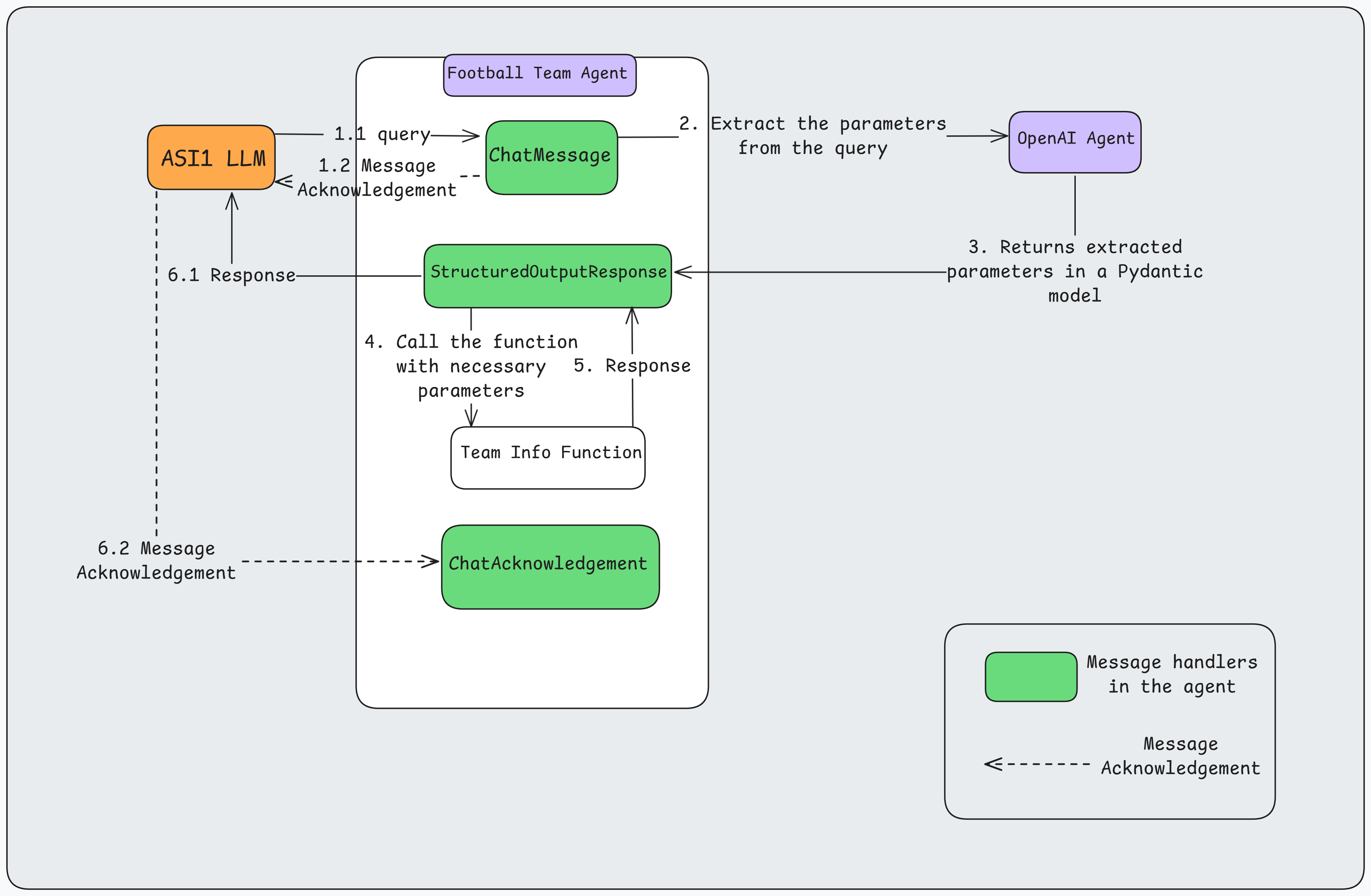
The communication flow between ASI1 LLM, the Football Team Agent, and OpenAI Agent follows this sequence:
-
Query Initiation (1.1)
- ASI1 LLM sends a natural language query (e.g., "Give me the list of players in Manchester United Football Team") as a
ChatMessageto the Football Team Agent on theChatMessage handler.
- ASI1 LLM sends a natural language query (e.g., "Give me the list of players in Manchester United Football Team") as a
-
Parameter Extraction (2, 3)
- The Football Team Agent forwards the query to OpenAI Agent for parameter extraction
- OpenAI Agent processes the natural language and extracts structured parameters (e.g., team_name="Manchester United")
- The parameters are returned in a Pydantic Model format as
StructuredOutputResponseon theStructuredOutputResponse handler.
-
Team Data Processing (4, 5)
- The Football Team Agent calls the
get_team_infofunction with the extracted parameters - The function returns the team details.
- The Football Team Agent calls the
-
Football Team Agent Response (6.1)
- The Football Team Agent sends the formatted response back as a
ChatMessageto ASI1 LLM.
- The Football Team Agent sends the formatted response back as a
-
Message Acknowledgements (1.2, 6.2)
- Each message exchanged using the chat protocol is automatically acknowledged by the receiving agent using
ChatAcknowledgement.
- Each message exchanged using the chat protocol is automatically acknowledged by the receiving agent using
Here's a visual representation of the flow:
Implementation
In this example we will create an agent and its associated files on Agentverse that communicate using the chat protocol with the ASI1 LLM. Refer to the Hosted Agents section to understand the detailed steps for agent creation on Agentverse.
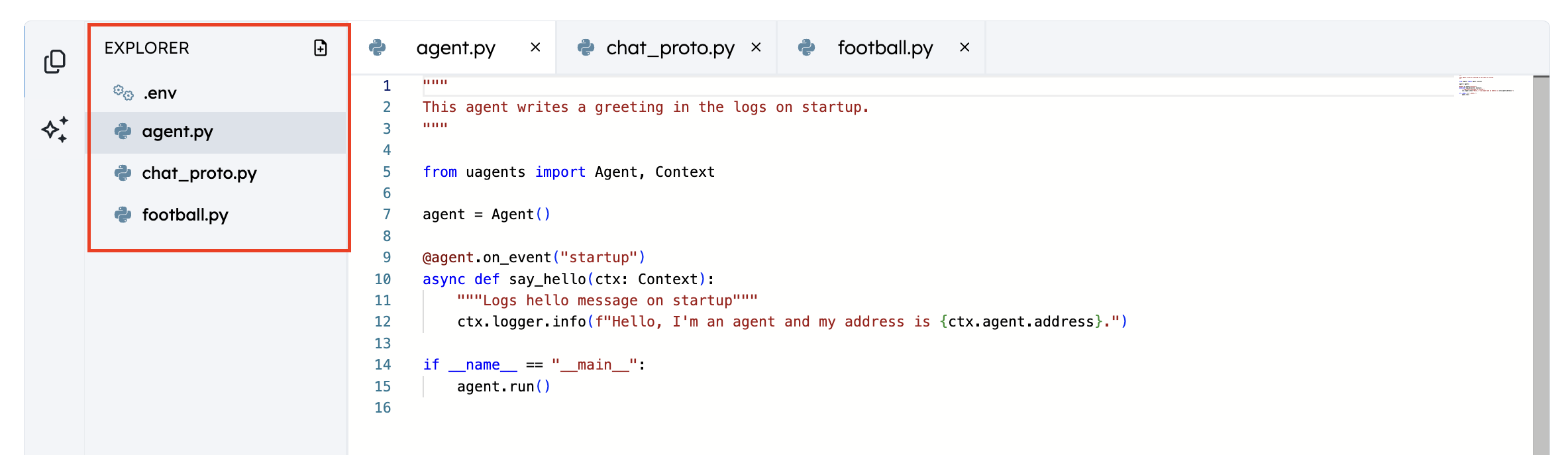
Create a new agent named "FootballTeamAgent" on Agentverse and create the following files:
agent.py        # Main agent file
football_team.py   # Football team service implementation and API integration
chat_proto.py   # Chat protocol implementation for enabling text based communication
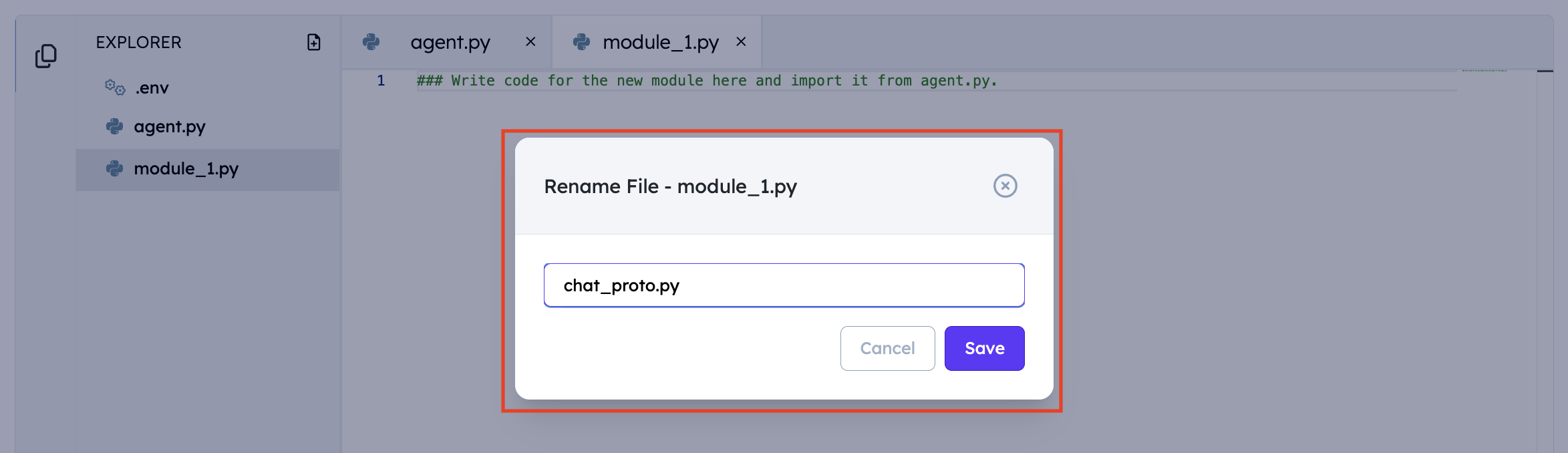
To create a new file on Agentverse:
- Click on the New File icon

- Assign a name to the File
- Directory Structure
1. Football Team Function and Data Models
Let's start by defining our data models and the function to retrieve the list of players in a football team. These models will define how we request team information and receive responses. We'll use the AllSports API to fetch team and player information. You can obtain your API key by signing up at AllSports API, which provides comprehensive sports data feeds including football (soccer) team and player information.
To implement the football team service add the following chat protocol in the football_team.py file created on Agentverse:
import requests
from uagents import Model, Field

API_KEY = "YOUR_ALLSPORTS_API_KEY"
BASE_URL = "https://apiv2.allsportsapi.com/football/"

class FootballTeamRequest(Model):
    team_name: str

class FootballTeamResponse(Model):
    results: str

async def get_team_info(team_name: str) -> str:
    """
    Fetch team information from AllSportsAPI and return as plain text
    """
    try:
        params = {
            "met": "Teams",
            "teamName": team_name,
            "APIkey": API_KEY
        }

        response = requests.get(BASE_URL, params=params)
        data = response.json()

        if data.get("success") == 1 and data.get("result"):
            team_info = data["result"][0]
            result = f"\nTeam Name: {team_info['team_name']}\n"
            result += f"Team Logo: {team_info['team_logo']}\n\n"
            result += "Players:\n"

            for player in team_info.get("players", []):
                result += f"- Name: {player['player_name']}\n"
                result += f"  Type: {player['player_type']}\n"
                result += f"  Image: {player['player_image']}\n\n"

            return result
        else:
            return "Team not found or invalid API key."

    except Exception as e:
        return f"Error fetching team information: {str(e)}"
2. Chat Protocol Integration
The chat_proto.py file is essential for enabling natural language communication between your agent and ASI1 LLM.
LLM Integration
To extract the important parameters from a user query passed by the LLM, you can use any of the following LLMs that support structured output:
- OpenAI Agent:
agent1q0h70caed8ax769shpemapzkyk65uscw4xwk6dc4t3emvp5jdcvqs9xs32y - Claude.ai Agent:
agent1qvk7q2av3e2y5gf5s90nfzkc8a48q3wdqeevwrtgqfdl0k78rspd6f2l4dx
Note: To ensure fair usage, each agent is limited to 6 requests per hour. Please implement appropriate rate limiting in your application.
Message Flow
-
When a user sends a query (e.g., "Show me Manchester United players"):
- The
ChatMessagehandler receives the message - Acknowledges receipt to the sender
- Forwards the query to the chosen LLM for processing
- The
-
The LLM processes the query and returns a
StructuredOutputResponse:- Extracts relevant parameters (e.g., team_name="Manchester United")
- Returns data in the format specified by your agent's schema
-
Your agent processes the structured data:
- Calls appropriate functions (e.g.,
get_team_info) - Formats the response and sends it back.
- Calls appropriate functions (e.g.,
Customizing the Handlers
When implementing a new agent for a different use case, you'll need to:
- Update the schema in
StructuredOutputPromptto match your agent's data model - Modify the response handling in
handle_structured_output_responsefunction for your use case.
To enable natural language communication with your agent add the following chat protocol in the chat_proto.py file created on Agentverse:
from datetime import datetime
from uuid import uuid4
from typing import Any

from uagents import Context, Model, Protocol

#Import the necessary components of the chat protocol
from uagents_core.contrib.protocols.chat import (
    ChatAcknowledgement,
    ChatMessage,
    EndSessionContent,
    StartSessionContent,
    TextContent,
    chat_protocol_spec,
)

from football_team import get_team_info, FootballTeamRequest

#Replace the AI Agent Address with anyone of the following LLMs as they support StructuredOutput required for the processing of this agent.

AI_AGENT_ADDRESS = 'agent1q0h70caed8ax769shpemapzkyk65uscw4xwk6dc4t3emvp5jdcvqs9xs32y'

if not AI_AGENT_ADDRESS:
    raise ValueError("AI_AGENT_ADDRESS not set")


def create_text_chat(text: str, end_session: bool = True) -> ChatMessage:
    content = [TextContent(type="text", text=text)]
    if end_session:
        content.append(EndSessionContent(type="end-session"))
    return ChatMessage(
        timestamp=datetime.utcnow(),
        msg_id=uuid4(),
        content=content,
    )


chat_proto = Protocol(spec=chat_protocol_spec)
struct_output_client_proto = Protocol(
    name="StructuredOutputClientProtocol", version="0.1.0"
)


class StructuredOutputPrompt(Model):
    prompt: str
    output_schema: dict[str, Any]


class StructuredOutputResponse(Model):
    output: dict[str, Any]


@chat_proto.on_message(ChatMessage)
async def handle_message(ctx: Context, sender: str, msg: ChatMessage):
    ctx.logger.info(f"Got a message from {sender}: {msg.content[0].text}")
    ctx.storage.set(str(ctx.session), sender)
    await ctx.send(
        sender,
        ChatAcknowledgement(timestamp=datetime.utcnow(), acknowledged_msg_id=msg.msg_id),
    )

    for item in msg.content:
        if isinstance(item, StartSessionContent):
            ctx.logger.info(f"Got a start session message from {sender}")
            continue
        elif isinstance(item, TextContent):
            ctx.logger.info(f"Got a message from {sender}: {item.text}")
            ctx.storage.set(str(ctx.session), sender)
            await ctx.send(
                AI_AGENT_ADDRESS,
                StructuredOutputPrompt(
                    prompt=item.text, output_schema=FootballTeamRequest.schema()
                ),
            )
        else:
            ctx.logger.info(f"Got unexpected content from {sender}")


@chat_proto.on_message(ChatAcknowledgement)
async def handle_ack(ctx: Context, sender: str, msg: ChatAcknowledgement):
    ctx.logger.info(
        f"Got an acknowledgement from {sender} for {msg.acknowledged_msg_id}"
    )


@struct_output_client_proto.on_message(StructuredOutputResponse)
async def handle_structured_output_response(
    ctx: Context, sender: str, msg: StructuredOutputResponse
):
    session_sender = ctx.storage.get(str(ctx.session))
    if session_sender is None:
        ctx.logger.error(
            "Discarding message because no session sender found in storage"
        )
        return

    if "<UNKNOWN>" in str(msg.output):
        await ctx.send(
            session_sender,
            create_text_chat(
                "Sorry, I couldn't process your location request. Please try again later."
            ),
        )
        return

    prompt = FootballTeamRequest.parse_obj(msg.output)

    try:
        team_info = await get_team_info(prompt.team_name)
    except Exception as err:
        ctx.logger.error(err)
        await ctx.send(
            session_sender,
            create_text_chat(
                "Sorry, I couldn't process your request. Please try again later."
            ),
        )
        return

    if "error" in team_info:
        await ctx.send(session_sender, create_text_chat(str(team_info["error"])))
        return

    chat_message = create_text_chat(team_info)

    await ctx.send(session_sender, chat_message)
3. Football Team Agent Setup
The agent.py file is the core of your application. Think of it as the main control center that:
- Sets up your agent
- Handles incoming requests
- Manages rate limiting
- Monitors the agent's health
Let's break down each component:
Basic Setup
from uagents import Agent, Context, Model
from uagents.experimental.quota import QuotaProtocol, RateLimit

agent = Agent()  # Create a new agent instance
Import the necessary packages and initialise your agent.
Rate Limiting Setup
proto = QuotaProtocol(
    storage_reference=agent.storage,
    name="Football-Team-Protocol",
    version="0.1.0",
    default_rate_limit=RateLimit(window_size_minutes=60, max_requests=30),
)
To ensure fair usage and prevent API abuse, we recommend implementing the QuotaProtocol. While optional, this protocol helps manage service usage by limiting requests. In this example, we've set a limit of 30 requests per hour per user, but you can adjust this threshold based on your agent's functionality. This helps maintain service reliability and protects your agent from excessive requests.
Request Handler
@proto.on_message(
    FootballTeamRequest, replies={FootballTeamResponse, ErrorMessage}
)
async def handle_request(ctx: Context, sender: str, msg: FootballTeamRequest):
    ctx.logger.info("Received team info request")
    try:
        results = await get_team_info(msg.team_name)
        await ctx.send(sender, FootballTeamResponse(results=results))
    except Exception as err:
        await ctx.send(sender, ErrorMessage(error=str(err)))
This message handler allows your agent to receive direct requests from other agents in a structured format. While we're using it with ASI1 LLM in this example, it's versatile enough to work with agents that don't have the chat protocol enabled. This makes it particularly useful in multi-agent systems, where other agents can directly request information directly.
Health Monitoring
### Health check related code
def agent_is_healthy() -> bool:
    """
    Implement the actual health check logic here.
    For example, check if the agent can connect to the AllSports API.
    """
    try:
        import asyncio
        asyncio.run(get_team_info("Manchester United"))
        return True
    except Exception:
        return False

class HealthCheck(Model):
    pass

class HealthStatus(str, Enum):
    HEALTHY = "healthy"
    UNHEALTHY = "unhealthy"

class AgentHealth(Model):
    agent_name: str
    status: HealthStatus

health_protocol = QuotaProtocol(
    storage_reference=agent.storage, name="HealthProtocol", version="0.1.0"
)

@health_protocol.on_message(HealthCheck, replies={AgentHealth})
async def handle_health_check(ctx: Context, sender: str, msg: HealthCheck):
    status = HealthStatus.UNHEALTHY
    try:
        if agent_is_healthy():
            status = HealthStatus.HEALTHY
    except Exception as err:
        ctx.logger.error(err)
    finally:
        await ctx.send(sender, AgentHealth(agent_name="football_agent", status=status))
The HealthProtocol, while optional, provides a periodic health check system to monitor your agent's performance and reliability. It tests the agent's ability to fetch information about a team and verifies that all components are working correctly. This monitoring helps quickly identify and address any issues that might affect your agent's service, ensuring reliable operation for your users.
Protocol Registration
agent.include(proto, publish_manifest=True)
agent.include(health_protocol, publish_manifest=True)
agent.include(chat_proto, publish_manifest=True)
agent.include(struct_output_client_proto, publish_manifest=True)
This registers all the necessary protocols with your agent:
- Main protocol for handling team requests
- Health monitoring protocol
- Chat protocol for natural language communication
- Structured output protocol for formatted responses
Here's the complete implementation:
import os
from enum import Enum

from uagents import Agent, Context, Model
from uagents.experimental.quota import QuotaProtocol, RateLimit
from uagents_core.models import ErrorMessage

from chat_proto import chat_proto, struct_output_client_proto
from football_team import get_team_info, FootballTeamRequest, FootballTeamResponse

agent = Agent()

proto = QuotaProtocol(
    storage_reference=agent.storage,
    name="Football-Team-Protocol",
    version="0.1.0",
    default_rate_limit=RateLimit(window_size_minutes=60, max_requests=30),
)

@proto.on_message(
    FootballTeamRequest, replies={FootballTeamResponse, ErrorMessage}
)
async def handle_request(ctx: Context, sender: str, msg: FootballTeamRequest):
    ctx.logger.info("Received team info request")
    try:
        results = await get_team_info(msg.team_name)
        ctx.logger.info(f'printing results in function {results}')
        ctx.logger.info("Successfully fetched team information")
        await ctx.send(sender, FootballTeamResponse(results=results))
    except Exception as err:
        ctx.logger.error(err)
        await ctx.send(sender, ErrorMessage(error=str(err)))

agent.include(proto, publish_manifest=True)

### Health check related code
def agent_is_healthy() -> bool:
    """
    Implement the actual health check logic here.
    For example, check if the agent can connect to the AllSports API.
    """
    try:
        import asyncio
        asyncio.run(get_team_info("Manchester United"))
        return True
    except Exception:
        return False

class HealthCheck(Model):
    pass

class HealthStatus(str, Enum):
    HEALTHY = "healthy"
    UNHEALTHY = "unhealthy"

class AgentHealth(Model):
    agent_name: str
    status: HealthStatus

health_protocol = QuotaProtocol(
    storage_reference=agent.storage, name="HealthProtocol", version="0.1.0"
)

@health_protocol.on_message(HealthCheck, replies={AgentHealth})
async def handle_health_check(ctx: Context, sender: str, msg: HealthCheck):
    status = HealthStatus.UNHEALTHY
    try:
        if agent_is_healthy():
            status = HealthStatus.HEALTHY
    except Exception as err:
        ctx.logger.error(err)
    finally:
        await ctx.send(sender, AgentHealth(agent_name="football_agent", status=status))

agent.include(health_protocol, publish_manifest=True)
agent.include(chat_proto, publish_manifest=True)
agent.include(struct_output_client_proto, publish_manifest=True)

if __name__ == "__main__":
    agent.run()
Adding a README to your Agent
-
Go to the Overview section in the Editor.
-
Click on Edit and add a good description for your Agent so that it can be easily searchable by the ASI1 LLM. Please refer the Importance of Good Readme section for more details.
-
Make sure the Agent has the right
AgentChatProtocol.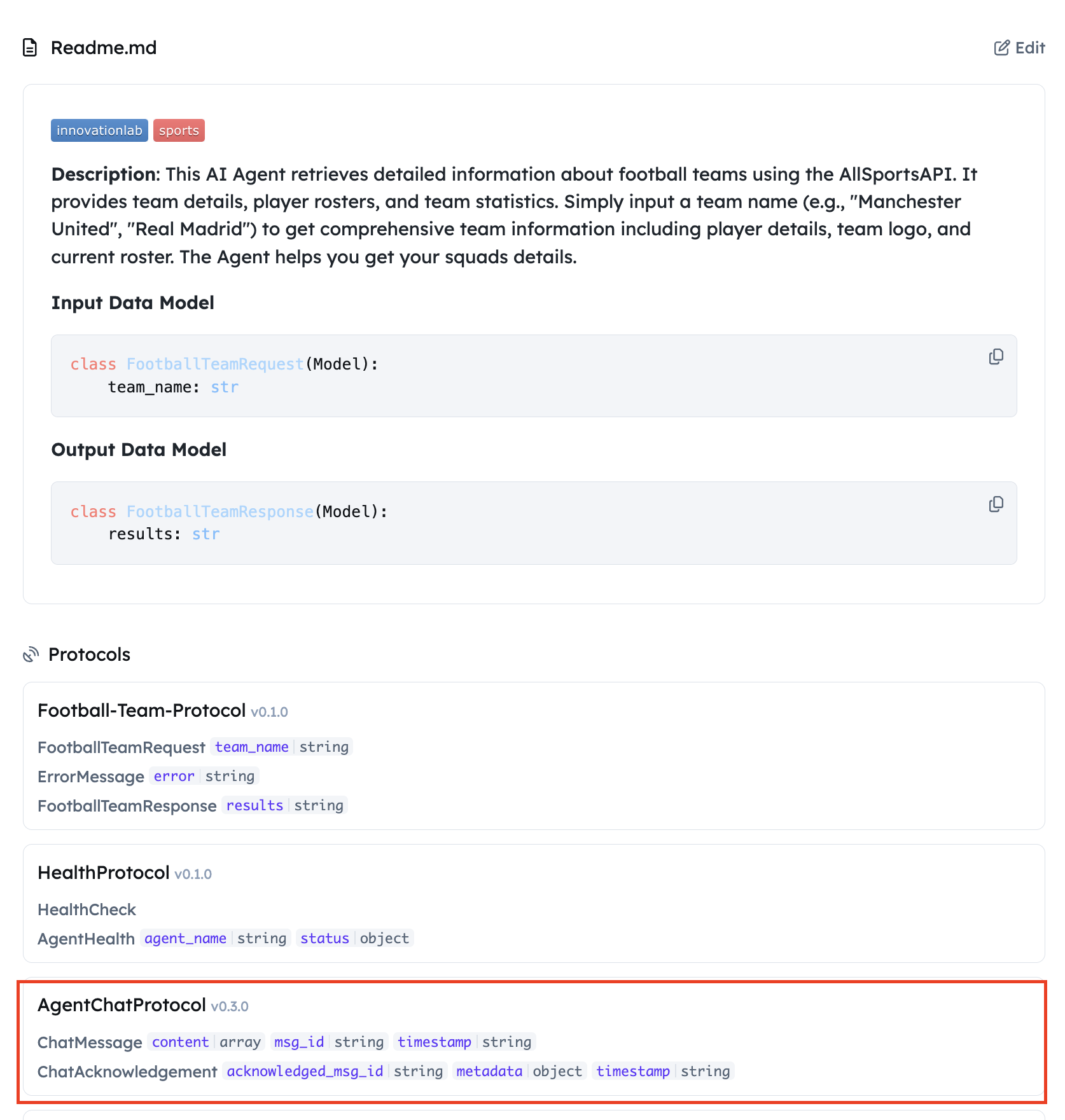
Query your Agent from ASI1 LLM
-
Login to the ASI1 LLM, either using your Google Account or the ASI1 Wallet and Start a New Chat.
-
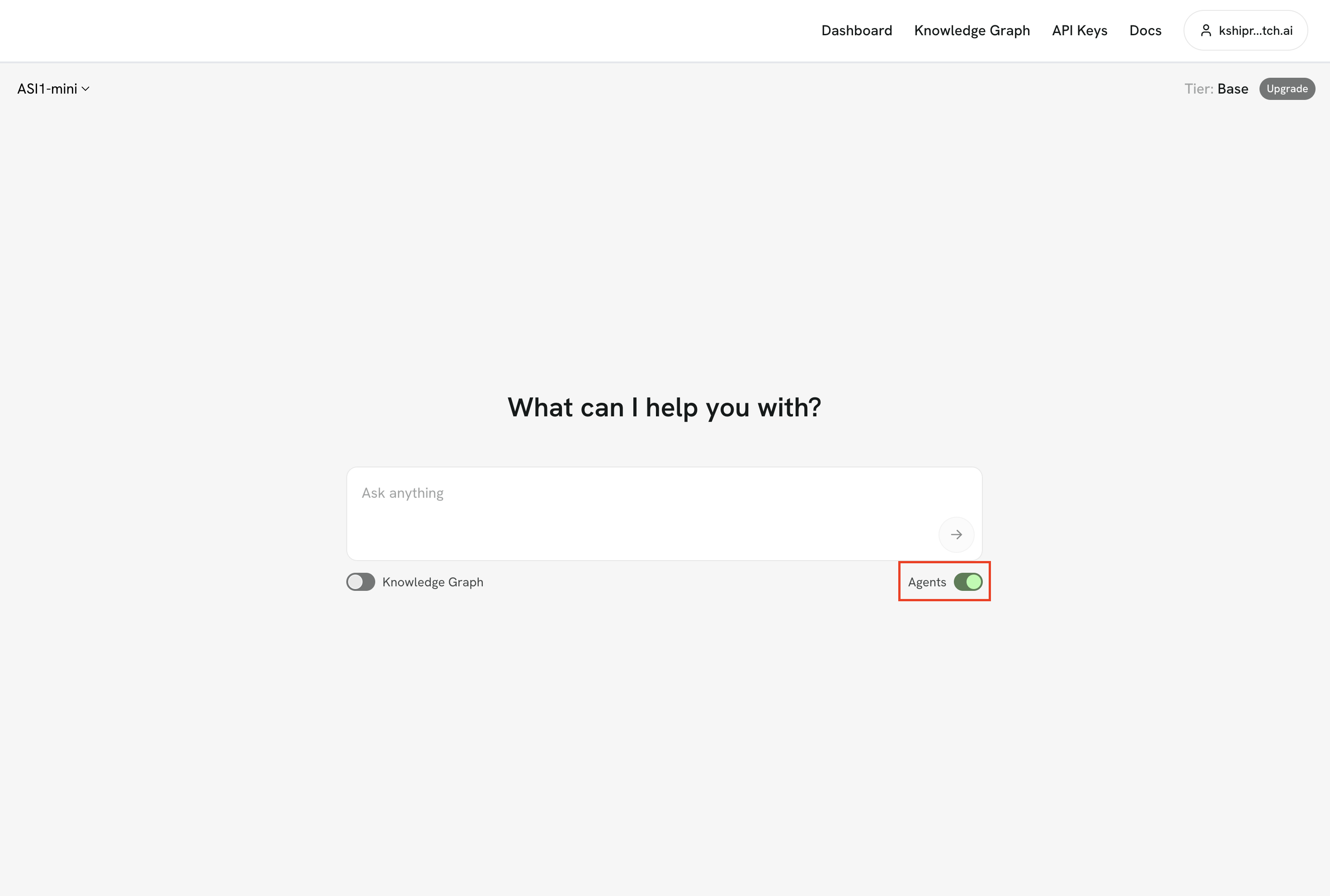
Toggle the "Agents" switch to enable ASI1 to connect with Agents on Agentverse.
- Type in a query to ask your Agent for instance 'I want to get the player details for the Manchester City Football Team'.
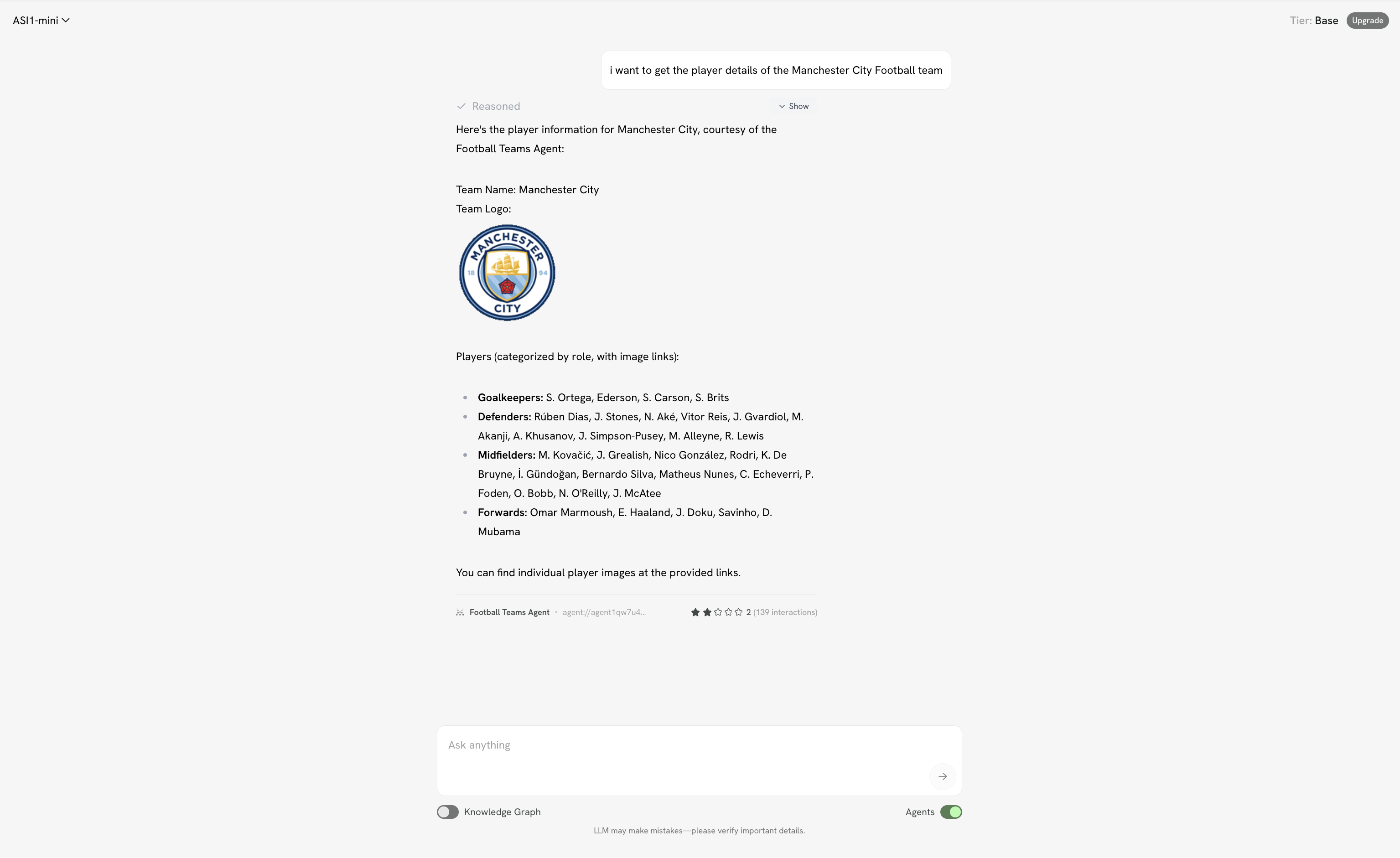
Note: The ASI1 LLM may not always select your agent for answering the query as it is designed to pick the best agent for a task based on a number of parameters.