Function Calling in ASI:One
Function calling lets ASI:One models go beyond text generation by invoking external functions with structured arguments you define. Use it to integrate APIs, databases, or any custom code so the model can retrieve live data, perform tasks, or trigger workflows based on user intent.
Overview
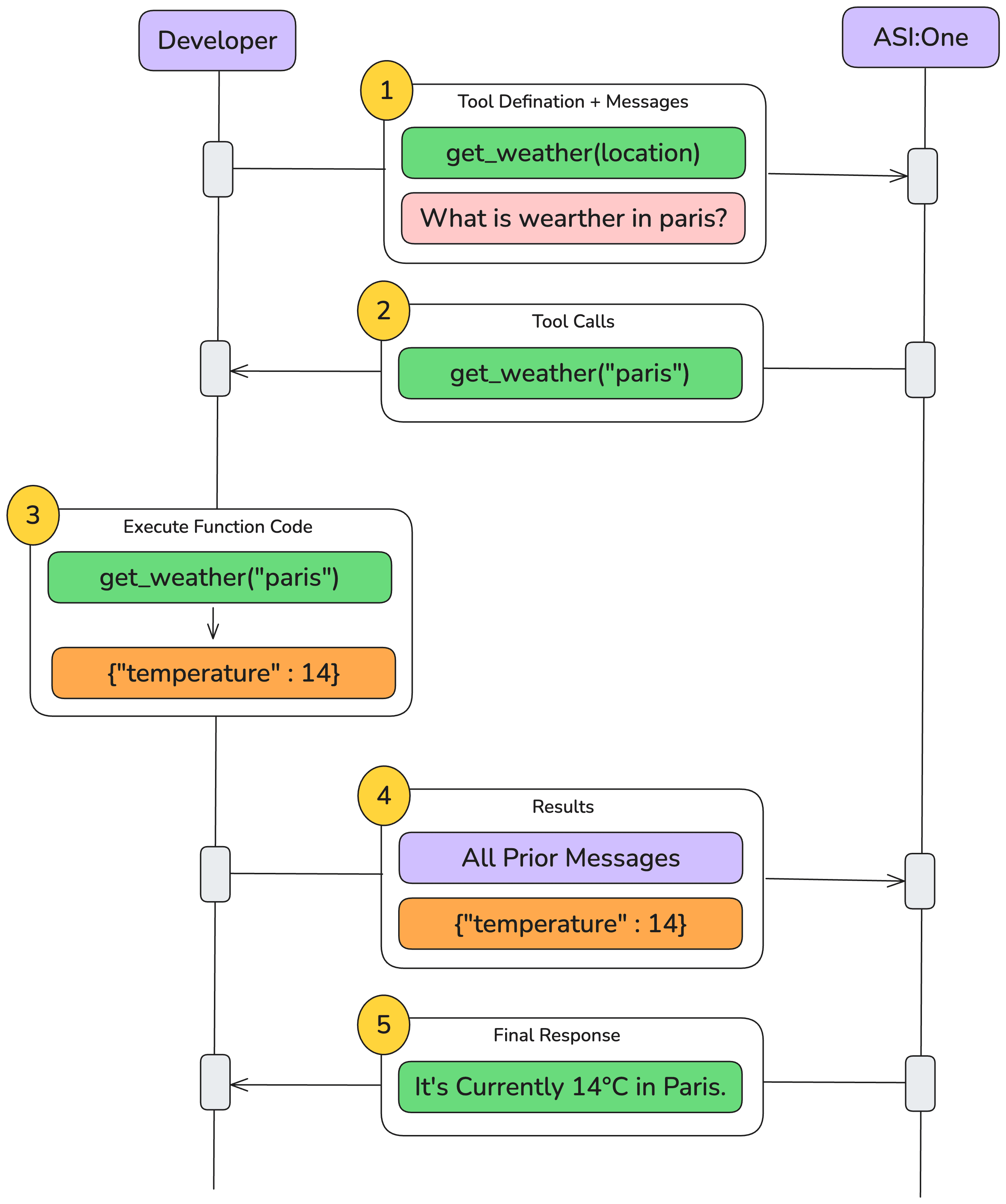
When you supply a tools array (function definitions), the model may decide to call one of those functions during the conversation. The high-level flow is:
- User asks a question → the model thinks a function is needed.
- Assistant emits a function call (
tool_use) specifying the function name and arguments. - Your backend executes the function and sends back the result (
tool_resultmessage). - Assistant incorporates that result into its final reply.
Quick-start Example
Below is the minimal request that defines a single get_weather function and lets the model decide whether to call it.
- Weather example
- Email example
- Knowledge-base example
- cURL
- Python
curl -X POST https://api.asi1.ai/v1/chat/completions \
    -H "Content-Type: application/json" \
    -H "Authorization: Bearer YOUR_API_KEY" \
    -d '{
      "model": "asi1",
      "messages": [
        {
          "role": "system",
          "content": "You are a weather assistant. When a user asks for the weather in a location, use the get_weather function with the appropriate latitude and longitude for that location."
        },
        {
          "role": "user",
          "content": "What's the current weather like in Paris right now?"
        }
      ],
      "tools": [
        {
          "type": "function",
          "function": {
            "name": "get_weather",
            "description": "Get current temperature for a given location (latitude and longitude).",
            "parameters": {
              "type": "object",
              "properties": {
              "latitude": { "type": "number" },
              "longitude": { "type": "number" }
            },
              "required": ["latitude", "longitude"]
            }
          }
        }
      ],
      "temperature": 0.7,
      "max_tokens": 1024
    }
import requests
    import json

    # ASI:One API settings
    API_KEY = "your_api_key"
    BASE_URL = "https://api.asi1.ai/v1"

    headers = {
    "Authorization": f"Bearer {API_KEY}",
    "Content-Type": "application/json"
    }

    # Define the get_weather function
    get_weather_tool = {
    "type": "function",
    "function": {
      "name": "get_weather",
      "description": "Get current temperature for a given location (latitude and longitude).",
      "parameters": {
        "type": "object",
        "properties": {
            "latitude": {"type": "number"},
            "longitude": {"type": "number"}
          },
          "required": ["latitude", "longitude"]
        }
      }
    }

    # Initial message setup
    initial_message = [
      {
        "role": "system",
        "content": "You are a weather assistant. When a user asks for the weather in a location, use the get_weather function with the appropriate latitude and longitude for that location."
      },
      {
        "role": "user",
        "content": "What's the current weather like in Paris right now?"
      }
    ]

    # First call to model
    payload = {
      "model": "asi1",
      "messages": initial_message,
      "tools": [get_weather_tool],
      "temperature": 0.7,
      "max_tokens": 1024
    }

    response = requests.post(
      f"{BASE_URL}/chat/completions",
      headers=headers,
      json=payload
    )
- cURL
- Python
- JavaScript
curl -X POST https://api.asi1.ai/v1/chat/completions \
  -H "Content-Type: application/json" \
  -H "Authorization: Bearer $ASI_ONE_API_KEY" \
  -d '{
    "model": "asi1",
    "messages": [
      {"role": "system", "content": "You are an assistant that can send emails via send_email."},
      {"role": "user", "content": "Can you send an email to [email protected] and [email protected] saying hi?"}
    ],
    "tools": [
      {
        "type": "function",
        "function": {
          "name": "send_email",
          "description": "Send an email to a given recipient with a subject and message.",
          "parameters": {
            "type": "object",
            "properties": {
              "to":      {"type": "string", "description": "Recipient email address"},
              "subject": {"type": "string", "description": "Email subject line"},
              "body":    {"type": "string", "description": "Body of the email message"}
            },
            "required": ["to", "subject", "body"],
            "additionalProperties": false
          }
        }
      }
    ]
  }'
import os, requests, json
API_KEY = os.getenv("ASI_ONE_API_KEY")
BASE_URL = "https://api.asi1.ai/v1"
headers = {"Authorization": f"Bearer {API_KEY}", "Content-Type": "application/json"}
send_email_tool = {
"type": "function",
"function": {
"name": "send_email",
"description": "Send an email via SMTP or any provider.",
"parameters": {
"type": "object",
"properties": {
"to": {"type": "string"},
"subject": {"type": "string"},
"body": {"type": "string"}
},
"required": ["to", "subject", "body"]
}
}
}
payload = {
"model": "asi1",
"tools": [send_email_tool]
}
resp = requests.post(f"{BASE_URL}/chat/completions", headers=headers, json=payload).json()
print(json.dumps(resp, indent=2))
// Using fetch in Node.js
import fetch from "node-fetch";
const payload = {
model: "asi1",
messages: [
],
tools: [
{
type: "function",
function: {
name: "send_email",
description: "Send email",
parameters: {
type: "object",
properties: {
to: { type: "string" },
subject: { type: "string" },
body: { type: "string" }
},
required: ["to", "subject", "body"]
}
}
}
]
};
const res = await fetch("https://api.asi1.ai/v1/chat/completions", {
method: "POST",
headers: { "Content-Type": "application/json", Authorization: `Bearer ${process.env.ASI_ONE_API_KEY}` },
body: JSON.stringify(payload)
});
console.log(await res.json());
- cURL
- Python
- JavaScript
curl -X POST https://api.asi1.ai/v1/chat/completions \
  -H "Content-Type: application/json" \
  -H "Authorization: Bearer $ASI_ONE_API_KEY" \
  -d '{
    "model": "asi1",
    "messages": [
      {"role": "system", "content": "You can look up answers in an internal knowledge base via search_knowledge_base."},
      {"role": "user", "content": "Can you find information about ChatGPT in the AI knowledge base?"}
    ],
    "tools": [
      {
        "type": "function",
        "function": {
          "name": "search_knowledge_base",
          "description": "Query a knowledge base to retrieve relevant info on a topic.",
          "parameters": {
            "type": "object",
            "properties": {
              "query":  {"type": "string", "description": "Search query"},
              "options": {
                "type": "object",
                "properties": {
                  "num_results":    {"type": "number",  "description": "Number of top results"},
                  "domain_filter":  {"type": ["string","null"], "description": "Optional domain filter"},
                  "sort_by":        {"type": ["string","null"], "enum": ["relevance","date","popularity","alphabetical"], "description": "Sorting"}
                },
                "required": ["num_results","domain_filter","sort_by"],
                "additionalProperties": false
              }
            },
            "required": ["query","options"],
            "additionalProperties": false
          }
        }
      }
    ]
  }'
import os, requests, json

API_KEY = os.getenv("ASI_ONE_API_KEY")
BASE_URL = "https://api.asi1.ai/v1"
headers  = {"Authorization": f"Bearer {API_KEY}", "Content-Type": "application/json"}

search_tool = {
  "type": "function",
  "function": {
    "name": "search_knowledge_base",
    "description": "Search KB",
    "parameters": {
      "type": "object",
      "properties": {
        "query": {"type": "string"},
        "options": {
          "type": "object",
          "properties": {
            "num_results":   {"type": "number"},
            "domain_filter": {"type": ["string","null"]},
            "sort_by":       {"type": ["string","null"], "enum": ["relevance","date"]}
          },
          "required": ["num_results","domain_filter","sort_by"]
        }
      },
      "required": ["query","options"]
    }
  }
}

payload = {
  "model": "asi1",
  "messages": [{"role":"user","content":"Search ChatGPT"}],
  "tools": [search_tool]
}

resp = requests.post(f"{BASE_URL}/chat/completions", headers=headers, json=payload).json()
print(json.dumps(resp, indent=2))
import fetch from "node-fetch";

const payload = {
  model: "asi1",
  messages: [{ role: "user", content: "Search ChatGPT" }],
  tools: [
    {
      type: "function",
      function: {
        name: "search_knowledge_base",
        description: "Search KB",
        parameters: {
          type: "object",
          properties: {
            query: { type: "string" },
            options: {
              type: "object",
              properties: {
                num_results: { type: "number" },
                domain_filter: { type: ["string","null"] },
                sort_by: { type: ["string","null"], enum: ["relevance","date"] }
              },
              required: ["num_results","domain_filter","sort_by"]
            }
          },
          required: ["query","options"]
        }
      }
    }
  ]
};

const res = await fetch("https://api.asi1.ai/v1/chat/completions", {
  method: "POST",
  headers: { "Content-Type": "application/json", Authorization: `Bearer ${process.env.ASI_ONE_API_KEY}` },
  body: JSON.stringify(payload)
});
console.log(await res.json());
Example Assistant Response (truncated)
{
    "id": "b26495eb13dc48ce863bf1405415c8ac",
    "choices": [{
        "finish_reason": "tool_calls",
        "index": 0,
        "logprobs": null,
        "message": {
            "content": "I'll get the current weather information for Paris, France for you.",
            "refusal": null,
            "role": "assistant",
            "annotations": null,
            "audio": null,
            "function_call": null,
            "tool_calls": [{
                "id": "call_13f125faf3cc422e81b10621",
                "function": {
                    "arguments": "{\"latitude\": 48.8566, \"longitude\": 2.3522}",
                    "name": "get_weather"
                },
                "type": "function",
                "index": -1
            }],
            "reasoning_content": null
        },
        "matched_stop": null
    }],
    "created": 1768409382,
    "model": "asi1",
    "object": "chat.completion",
    "service_tier": null,
    "system_fingerprint": null,
    "usage": {
        "completion_tokens": 40,
        "prompt_tokens": 2210,
        "total_tokens": 2250,
        "completion_tokens_details": null,
        "prompt_tokens_details": null,
        "reasoning_tokens": 0
    },
    "metadata": {
        "weight_version": "default"
    }
}
At this point you execute the function (e.g. get_weather("Paris")), then send back the tool_result message so the model can finish its answer.
Complete End-to-End Example
Below is a working Python script that demonstrates the full function calling flow with ASI:One. This example uses a city-name-based weather function that handles geocoding internally.
Step 1: Define your backend function
import requests

def get_weather(location: str) -> float:
    """Return current temperature in °C for 'City, Country'."""
    # Geocode the city name to coordinates
    geo = requests.get(
        "https://nominatim.openstreetmap.org/search",
        params={"q": location, "format": "json", "limit": 1},
        timeout=10,
        headers={"User-Agent": "asi-demo"}
    ).json()
    if not geo:
        raise ValueError(f"Could not geocode {location!r}")

    lat, lon = geo[0]["lat"], geo[0]["lon"]

    # Get weather data
    wx_resp = requests.get(
        "https://api.open-meteo.com/v1/forecast",
        params={
            "latitude": lat,
            "longitude": lon,
            "current_weather": "true",
            "temperature_unit": "celsius"
        },
        timeout=10,
        headers={"User-Agent": "asi-demo"}
    )
    if wx_resp.status_code != 200:
        raise RuntimeError(f"Open-Meteo {wx_resp.status_code}: {wx_resp.text[:120]}")

    return wx_resp.json()["current_weather"]["temperature"]
Step 2: Define the function schema
weather_tool = {
    "type": "function",
    "function": {
        "name": "get_weather",
        "description": "Get current temperature (°C) for a given city name.",
        "parameters": {
            "type": "object",
            "properties": {"location": {"type": "string"}},
            "required": ["location"],
            "additionalProperties": False
        },
        "strict": True
    }
}
Step 3: Make the initial request
import os, json, requests

API_KEY = os.getenv("ASI_ONE_API_KEY")
BASE_URL = "https://api.asi1.ai/v1/chat/completions"
MODEL = "asi1"

messages = [
    {"role": "user", "content": "Get the current temperature in Paris, France using the get_weather function."}
]

resp1 = requests.post(
    BASE_URL,
    headers={"Authorization": f"Bearer {API_KEY}", "Content-Type": "application/json"},
    json={"model": MODEL, "messages": messages, "tools": [weather_tool]},
).json()

choice = resp1["choices"][0]["message"]
if "tool_calls" not in choice:
    print("Model replied normally:", choice["content"])
    exit()

tool_call = choice["tool_calls"][0]
print("Function call from model:", json.dumps(tool_call, indent=2))
Step 4: Execute the function and send result back
# Extract arguments
arg_str = tool_call.get("arguments") or tool_call.get("function", {}).get("arguments")
args = json.loads(arg_str)
print("Parsed arguments:", args)

# Execute the function
temp_c = get_weather(**args)
print(f"Backend weather result: {temp_c:.1f} °C")

# Send the result back to ASI:One
assistant_msg = {
    "role": "assistant",
    "content": "",
    "tool_calls": [tool_call]
}

tool_result_msg = {
    "role": "tool",
    "tool_call_id": tool_call["id"],
    "content": json.dumps({"temperature_celsius": temp_c})
}

messages += [assistant_msg, tool_result_msg]

resp2 = requests.post(
    BASE_URL,
    headers={"Authorization": f"Bearer {API_KEY}", "Content-Type": "application/json"},
    json={
        "model": MODEL,
        "messages": messages,
        "tools": [weather_tool]  # repeat schema for safety
    },
).json()

if "choices" not in resp2:
    print("Error response:", json.dumps(resp2, indent=2))
    exit()

final_answer = resp2["choices"][0]["message"]["content"]
print("Assistant's final reply:")
print(final_answer)
Example Output
Function call from model:
{
  "id": "call_OCsdY",
  "index": 0,
  "type": "function",
  "function": {
    "name": "get_weather",
    "arguments": "{\"location\":\"Paris, France\"}"
  }
}

Parsed arguments: {'location': 'Paris, France'}
Backend weather result: 22.4 °C

Assistant's final reply:
The current temperature in Paris, France is 22.4°C. It's quite pleasant weather there right now!
Simple script with OpenAI client (Paris weather)
ASI:One is OpenAI-compatible. Here is a minimal, runnable script that uses the official openai Python package to ask for the weather in Paris and run the function-calling loop until the model responds with a final answer. Uses the same flow as the diagram below.
import json
import os
from typing import Any, Dict

import requests
from openai import OpenAI

# ASI:One is OpenAI-compatible.
client = OpenAI(
    api_key=os.getenv("ASI_ONE_API_KEY"),
    base_url="https://api.asi1.ai/v1"
)

def _geocode_city(city: str) -> Dict[str, Any]:
    r = requests.get(
        "https://geocoding-api.open-meteo.com/v1/search",
        params={"name": city, "count": 1, "language": "en", "format": "json"},
        timeout=30,
    )
    r.raise_for_status()
    data = r.json()
    results = data.get("results") or []
    if not results:
        raise ValueError(f"No geocoding result for city={city!r}")
    return results[0]

def get_weather(city: str) -> Dict[str, Any]:
    geo = _geocode_city(city)
    lat, lon = geo["latitude"], geo["longitude"]
    r = requests.get(
        "https://api.open-meteo.com/v1/forecast",
        params={"latitude": lat, "longitude": lon, "current": "temperature_2m,wind_speed_10m"},
        timeout=30,
    )
    r.raise_for_status()
    data = r.json()
    current = data.get("current") or {}
    return {
        "city": geo.get("name"),
        "country": geo.get("country"),
        "temperature_c": current.get("temperature_2m"),
        "wind_speed_kph": current.get("wind_speed_10m"),
    }

TOOLS = [
    {
        "type": "function",
        "function": {
            "name": "get_weather",
            "description": "Get current weather for a city name (uses Open-Meteo).",
            "strict": True,
            "parameters": {
                "type": "object",
                "properties": {"city": {"type": "string"}},
                "required": ["city"],
                "additionalProperties": False,
            },
        },
    }
]

def run_tool_call(name: str, arguments_json: str) -> str:
    args = json.loads(arguments_json) if arguments_json else {}
    if name == "get_weather":
        result = get_weather(**args)
    else:
        result = {"error": f"Unknown tool: {name}"}
    return json.dumps(result)

def main() -> None:
    messages = [
        {"role": "system", "content": "Use functions for live data."},
        {"role": "user", "content": "What's the weather in Paris right now?"},
    ]
    for _ in range(5):
        resp = client.chat.completions.create(
            model="asi1", messages=messages, tools=TOOLS, temperature=0.2
        )
        assistant_msg = resp.choices[0].message.model_dump()
        tool_calls = assistant_msg.get("tool_calls") or []
        messages.append(assistant_msg)
        if not tool_calls:
            print(assistant_msg.get("content") or "")
            return
        for call in tool_calls:
            tool_output = run_tool_call(
                call["function"]["name"],
                call["function"].get("arguments") or "{}"
            )
            messages.append({
                "role": "tool",
                "tool_call_id": call["id"],
                "name": call["function"]["name"],
                "content": tool_output,
            })
    raise RuntimeError("Function-calling loop did not terminate after 5 turns.")

if __name__ == "__main__":
    main()
Set ASI_ONE_API_KEY in your environment and run the script. The flow matches the diagram below.
Function calling steps (diagram)
Defining functions (schema cheatsheet)
| Field | Required | Notes |
|---|---|---|
type | yes | always function |
name | yes | snake_case or camelCase |
description | yes | what & when |
parameters | yes | JSON-Schema object |
strict | optional (recommended) | enforce schema |
Handling multiple function calls
for call in resp.tool_calls:
    out = dispatch(call.name, json.loads(call.arguments))
    messages.append({"role":"tool","tool_call_id":call.id,"content":json.dumps(out)})
Additional configs
tool_choice: "auto" (default) | "required" |{type:"function",name:"…"}| "none"parallel_tool_calls:falseto force at most one per turn.strict:trueto guarantee arguments match schema.
Best practices
- Write clear parameter docs.
- Keep fewer than 20 active functions.
- Validate inputs & handle errors gracefully.
- Log every request / result for debugging.