Creating and Registering CrewAI based Job descriptions creator
This documentation explains how to build CrewAI agents that generate tailored job descriptions, register them on Fetch.ai’s Agentverse, and enable collaboration between agents for dynamic data sharing. Below, you'll see the main.py script containing the workflow logic run_job_posting_workflow, as well as sample scripts for a Job Description Agent and a User Agent.
Overview
Purpose
This project showcases:
- Creating CrewAI agents for complex tasks (e.g., analyzing company requirements and generating job descriptions).
- Integrating with Fetch.ai’s Agentverse, enabling seamless communication and data exchange.
- Using autonomous agents to streamline job description creation while aligning with company culture and specific role requirements.
Prerequisites
Environment Setup
To begin creating and registering CrewAI agents, ensure you have the following:
- Python 3.10+ or higher
- A virtual environment (recommended)
- Fetch.ai SDK for agent creation and registration
- CrewAI Framework for defining tasks and workflows
Key Components
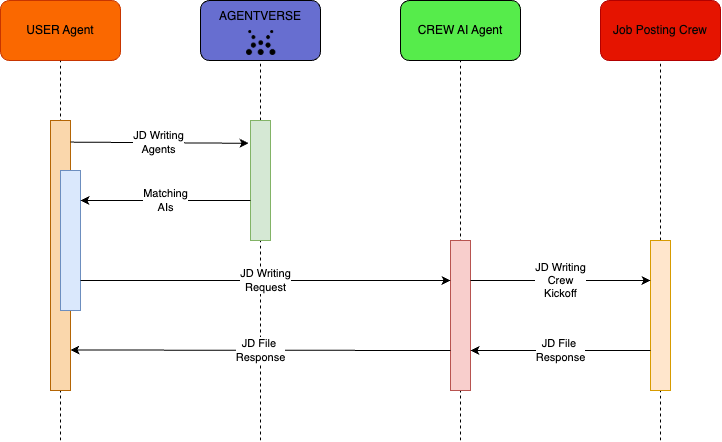
- Job Description Agent: A specialized CrewAI agent that processes input (company domain, hiring needs, etc.) to generate a job description.
- User Agent: Acts as a client to discover and interact with the Job Description Agent.
- Agent Collaboration: Multiple agents communicate via Agentverse, orchestrating tasks through CrewAI workflows.
Architecture Diagram
Environment Variables
Create a .env file with your API keys:
SERPER_API_KEY=<your_serper_api_key>
OPENAI_API_KEY=<your_openai_api_key>
AGENTVERSE_API_KEY=<your_agentverse_api_key>
Replace the placeholders with your actual keys.
Project Directory & Configuration Files
For a clean, maintainable setup, we recommend the following structure:
crewai_job_descriptions/
├── .env
├── config/
│   ├── agents.yaml
│   └── tasks.yaml
├── crew.py
├── jd_agent.py
├── main.py
├── requirements.txt
├── user_agent.py
├── job_description_example.md
└── README.md
1. requirements.txt
Purpose: Declares project dependencies so you (or anyone) can install them quickly with pip install -r requirements.txt.
Create a file called requirements.txt at the root of your project (alongside jd_agent.py and main.py). Example contents:
flask==2.2.5
flask-cors==3.0.10
fetchai==0.16.3
crewai==0.100.1
crewai_tools==0.33.0
python-dotenv==1.0.0
Install everything at once via:
pip install -r requirements.txt
2. Crew.py
Purpose: Defines your JobPostingCrew class, specifying the Agents and Tasks.
Place crew.py at the root directory. It contains the code:
from typing import List
from crewai import Agent, Crew, Process, Task
from crewai.project import CrewBase, agent, crew, task

# Check our tools documentations for more information on how to use them
from crewai_tools import SerperDevTool, ScrapeWebsiteTool, WebsiteSearchTool, FileReadTool
from pydantic import BaseModel, Field

web_search_tool = WebsiteSearchTool()
seper_dev_tool = SerperDevTool()
file_read_tool = FileReadTool(
    file_path='./job_description_example.md',
    description='A tool to read the job description example file.'
)

class ResearchRoleRequirements(BaseModel):
    """Research role requirements model"""
    skills: List[str] = Field(..., description="List of recommended skills ...")
    experience: List[str] = Field(..., description="List of recommended experience ...")
    qualities: List[str] = Field(..., description="List of recommended qualities ...")

@CrewBase
class JobPostingCrew:
    """JobPosting crew"""
    agents_config = 'config/agents.yaml'
    tasks_config = 'config/tasks.yaml'

    @agent
    def research_agent(self) -> Agent:
        return Agent(
            config=self.agents_config['research_agent'],
            tools=[web_search_tool, seper_dev_tool],
            verbose=True
        )

    @agent
    def writer_agent(self) -> Agent:
        return Agent(
            config=self.agents_config['writer_agent'],
            tools=[web_search_tool, seper_dev_tool, file_read_tool],
            verbose=True
        )

    @agent
    def review_agent(self) -> Agent:
        return Agent(
            config=self.agents_config['review_agent'],
            tools=[web_search_tool, seper_dev_tool, file_read_tool],
            verbose=True
        )

    @task
    def research_company_culture_task(self) -> Task:
        return Task(
            config=self.tasks_config['research_company_culture_task'],
            agent=self.research_agent()
        )

    @task
    def research_role_requirements_task(self) -> Task:
        return Task(
            config=self.tasks_config['research_role_requirements_task'],
            agent=self.research_agent(),
            output_json=ResearchRoleRequirements
        )

    @task
    def draft_job_posting_task(self) -> Task:
        return Task(
            config=self.tasks_config['draft_job_posting_task'],
            agent=self.writer_agent()
        )

    @task
    def review_and_edit_job_posting_task(self) -> Task:
        return Task(
            config=self.tasks_config['review_and_edit_job_posting_task'],
            agent=self.review_agent()
        )

    @task
    def industry_analysis_task(self) -> Task:
        return Task(
            config=self.tasks_config['industry_analysis_task'],
            agent=self.research_agent()
        )

    @crew
    def crew(self) -> Crew:
        """Creates the JobPostingCrew"""
        return Crew(
            agents=self.agents,  # Automatically created by the @agent decorator
            tasks=self.tasks,    # Automatically created by the @task decorator
            process=Process.sequential,
            verbose=True,
        )
3. config/agents.yaml
Purpose: Specifies each agent’s role, goal, and backstory.
Create a folder named config/ at your project root. Inside it, create agents.yaml:
research_agent:
  role: >
    Research Analyst
  goal: >
    Analyze the company website and provided description...
  backstory: >
    Expert in analyzing company cultures and identifying key values...

writer_agent:
  role: >
    Job Description Writer
  goal: >
    Use insights from the Research Analyst to create...
  backstory: >
    Skilled in crafting compelling job descriptions...

review_agent:
  role: >
    Review and Editing Specialist
  goal: >
    Review the job posting for clarity, engagement...
  backstory: >
    A meticulous editor ensuring every piece of content is polished...
4. config/tasks.yaml
Purpose: Defines the text prompts (description) and expected output for each task.
In the same config/ folder, make a second file called tasks.yaml:
research_company_culture_task:
  description: >
    Analyze {company_domain} and {company_description}...
  expected_output: >
    A comprehensive report detailing the company's culture...

research_role_requirements_task:
  description: >
    Based on {hiring_needs}, list recommended skills, experience...
  expected_output: >
    A list of recommended skills, experiences, and qualities...

draft_job_posting_task:
  description: >
    Draft a job posting for {hiring_needs}, using {specific_benefits}...
  expected_output: >
    A detailed, engaging job posting that includes an introduction...

review_and_edit_job_posting_task:
  description: >
    Review the job posting for {hiring_needs} for clarity...
  expected_output: >
    A polished, error-free job posting with final approval in markdown.

industry_analysis_task:
  description: >
    Conduct an in-depth analysis of {company_domain}'s industry...
  expected_output: >
    A detailed analysis highlighting major industry trends, opportunities...
Main.py (Workflow Definition)
Below is an example main.py script containing the run_job_posting_workflow function that the Job Description Agent calls to generate job descriptions. It uses Crew to structure tasks and (optionally) a local SQLite database for storage or logging.
import sys
from crew import JobPostingCrew
import sqlite3

async def run_job_posting_workflow(company_domain, company_description, hiring_needs, specific_benefits):
    """
    Executes the job posting workflow with proper connection handling and debugging output.

    Args:
        company_domain (str): The company's domain.
        company_description (str): A description of the company.
        hiring_needs (str): Description of the role being hired for.
        specific_benefits (str): Specific benefits offered for the role.

    Returns:
        str: The raw output of the 'industry_analysis_task' if found, else None.
    """
    try:
        # Initialize the JobPostingCrew
        job_posting_crew = JobPostingCrew().crew()

        # Define the inputs
        inputs = {
            'company_domain': company_domain,
            'company_description': company_description,
            'hiring_needs': hiring_needs,
            'specific_benefits': specific_benefits,
        }

        # Execute the job posting process
        result = job_posting_crew.kickoff(inputs=inputs)

        # Debugging output
        print("Result type:", type(result))
        print("Attributes:", dir(result))

        # Attempt to retrieve and print tasks_output
        if hasattr(result, 'tasks_output') and result.tasks_output:
            print("Tasks Output:")
            for task_output in result.tasks_output:
                print(f"Task Name: {task_output.name}")
                if task_output.name == "industry_analysis_task":
                    return task_output.raw
            print("Task 'review_and_edit_job_posting_task' not found in tasks_output.")
        else:
            print("No 'tasks_output' attribute found or it's empty.")

    except Exception as e:
        print(f"Error occurred: {e}")
        return None
The run_job_posting_workflow function is invoked by the Job Description Agent’s webhook to handle incoming requests and generate the job description.
Job Description Agent Script
A Job Description Agent is a specialized CrewAI agent that creates detailed job descriptions based on:
- Company Domain
- Company Description
- Hiring Needs
- Specific Benefits
It registers itself with Agentverse, processes incoming requests (via a Flask webhook), and sends the generated output back to the requester.
Script Breakdown (JD_Agent.py)
Importing Required Libraries
The script imports essential libraries for agent registration, communication, and Flask-based HTTP handling:
import os
import logging
import asyncio
from uagents_core.crypto import Identity
from flask import Flask, request, jsonify
from fetchai.registration import register_with_agentverse
from fetchai.communication import parse_message_from_agent, send_message_to_agent
from main import run_job_posting_workflow
Setting Up Flask and Logging
The script initializes Flask for handling webhooks and sets up logging to monitor activities:
# Configure logging
logging.basicConfig(level=logging.INFO, format='%(asctime)s - %(name)s - %(levelname)s - %(message)s')
logger = logging.getLogger(__name__)
# Flask app for webhook
flask_app = Flask(__name__)
# Identity for the agent
jd_agent_identity = None
content = ''
Webhook Endpoint
The /webhook endpoint handles incoming requests and processes inputs to generate a job description:
@flask_app.route('/webhook', methods=['POST'])
async def webhook():
    global content
    global jd_agent_identity
    try:
        # Parse the incoming message
        data = request.get_data().decode('utf-8')
        message = parse_message_from_agent(data)
        company_domain = message.payload.get("company_domain", "")
        company_description = message.payload.get("company_description", "")
        hiring_needs = message.payload.get("hiring_needs", "")
        specific_benefits = message.payload.get("specific_benefits", "")
        agent_address = message.sender
        # Run the job posting workflow
        content = await run_job_posting_workflow(
            company_domain=company_domain,
            company_description=company_description,
            hiring_needs=hiring_needs,
            specific_benefits=specific_benefits
        )
        # Send the generated content back to the requesting agent
        payload = {'content': content}
        send_message_to_agent(jd_agent_identity, agent_address, payload)
        return jsonify({"status": "job_description_sent"})
    except Exception as e:
        logger.error(f"Error in webhook: {e}")
        return jsonify({"status": "error", "message": str(e)}), 500
Registering the Agent
The init_agent function registers the Job Description Agent with Fetch.ai's Agentverse, providing metadata such as agent title, description, and use cases:
def init_agent():
    global jd_agent_identity
    try:
        jd_agent_identity = Identity.from_seed("Job Description Agent Seed", 0)
        register_with_agentverse(
            identity=jd_agent_identity,
            url="http://localhost:5008/webhook",
            agentverse_token=os.getenv("AGENTVERSE_API_KEY"),
            agent_title="Job Description Creation Agent",
            readme="""
                <description>Job Description creator to create JD according to the company's career website and description using CrewAI.</description>
                <use_cases>
                    <use_case>Generates job descriptions for specified roles.</use_case>
                </use_cases>
                <payload_requirements>
                    <description>Expects company domain, description, hiring needs, and specific benefits.</description>
                    <payload>
                        <requirement>
                            <parameter>company_domain</parameter>
                            <description>Career Page for the company</description>
                            <parameter>company_description</parameter>
                            <description>Description of the company</description>
                            <parameter>hiring_needs</parameter>
                            <description>Role for which the person is needed</description>
                            <parameter>specific_benefits</parameter>
                            <description>Benefits offered with the role</description>
                        </requirement>
                    </payload>
                </payload_requirements>
            """
        )
        logger.info("Job Description Creator Agent registered successfully!")
    except Exception as e:
        logger.error(f"Error initializing agent: {e}")
        raise
Running the Agent
The script starts the Flask server on port 5008:
if __name__ == "__main__":
    init_agent()
    flask_app.run(host="0.0.0.0", port=5008, debug=True)
User Agent Script (user.py)
The User Agent serves as a client. It registers itself with Agentverse, can search for existing agents, and forwards relevant data (e.g., company info, role) to the Job Description Agent. Afterwards, it retrieves the response and saves it locally.
Script Breakdown
Importing Required Libraries
The script imports libraries for Flask-based HTTP handling, Fetch.ai's identity and communication utilities, and environment variable management:
from flask_cors import CORS
from flask import Flask, request, jsonify
from uagents_core.crypto import Identity
from fetchai import fetch
from fetchai.registration import register_with_agentverse
from fetchai.communication import parse_message_from_agent, send_message_to_agent
import logging
import os
from dotenv import load_dotenv
Setting Up Flask and Logging
Logging and Flask are initialised to handle web requests and log agent activities:
# Configure logging
logging.basicConfig(level=logging.INFO, format='%(asctime)s - %(name)s - %(levelname)s - %(message)s')
logger = logging.getLogger(__name__)
app = Flask(__name__)
CORS(app)

# Global variables for client identity and agent response
client_identity = None
agent_response = None
Initialising the User Agent
The init_client function registers the User Agent with Fetch.ai's Agentverse, providing metadata such as the agent's purpose and use cases:
def init_client():
    """Initialize and register the client agent."""
    global client_identity
    try:
        # Load the client identity from environment variables
        client_identity = Identity.from_seed("User for Testing JD Agents", 0)
        logger.info(f"Client agent started with address: {client_identity.address}")

        # Register the agent with Agentverse
        register_with_agentverse(
            identity=client_identity,
            url="http://localhost:5002/api/webhook",
            agentverse_token=os.getenv("AGENTVERSE_API_KEY"),
            agent_title="JD User Testing Agent",
            readme="""
                <description>Frontend client that interacts with JD agents to fetch job descriptions.</description>
                <use_cases>
                    <use_case>Searches for agents and interacts with them.</use_case>
                </use_cases>
                <payload_requirements>
                    <description>Handles responses related to job descriptions.</description>
                    <payload>
                        <requirement>
                            <parameter>field</parameter>
                            <description>Data required for job description creation</description>
                        </requirement>
                    </payload>
                </payload_requirements>
            """
        )

        logger.info("Client agent registration complete!")

    except Exception as e:
        logger.error(f"Initialization error: {e}")
        raise
Searching for Agents
The /api/search-agents endpoint allows the User Agent to search for agents in Fetch.ai's Agentverse/Almanac Contract based on a query:
@app.route('/api/search-agents', methods=['GET'])
def search_agents():
    """Search for available agents based on user input."""
    try:
        # Extract the query from the request
        user_query = request.args.get('query', '')
        if not user_query:
            return jsonify({"error": "Query parameter 'query' is required."}), 400

        # Search agents in Agentverse/almanac contract
        available_ais = fetch.ai(user_query)
        agents = available_ais.get('ais', [])

        # Format the agent data
        extracted_data = [
            {'name': agent.get('name'), 'address': agent.get('address')}
            for agent in agents
        ]

        return jsonify(extracted_data), 200

    except Exception as e:
        logger.error(f"Error finding agents: {e}")
        return jsonify({"error": str(e)}), 500
Sending Data to Another Agent
The /api/send-data endpoint forwards input data (such as company details and hiring needs) to the selected Job Description Agent:
@app.route('/api/send-data', methods=['POST'])
def send_data():
    """Send payload to the selected agent based on the provided address."""
    global agent_response
    agent_response = None

    try:
        # Parse the request payload
        data = request.json
        payload = data.get('payload')  # Extract the payload dictionary
        agent_address = data.get('agentAddress')  # Extract the agent address

        # Validate input data
        if not payload or not agent_address:
            return jsonify({"error": "Missing payload or agent address"}), 400

        # Send the payload to the agent
        send_message_to_agent(client_identity, agent_address, payload)
        logger.info(f"Payload sent to agent: {agent_address}")
        return jsonify({"status": "request_sent", "agent_address": agent_address, "payload": payload})

    except Exception as e:
        logger.error(f"Error sending data to agent: {e}")
        return jsonify({"error": str(e)}), 500
Retrieving the Agent's Response
The /api/get-response endpoint retrieves the response (job description) from the Job Description Agent and saves it as a markdown file:
@app.route('/api/get-response', methods=['GET'])
def get_response():
    """Fetch the response from the agent and save it to a file."""
    global agent_response
    try:
        if agent_response:
            response = agent_response
            agent_response = None  # Clear the response after fetching

            # Save the response to a markdown file
            file_path = os.path.join(os.getcwd(), "jd_response.md")
            with open(file_path, "w", encoding="utf-8") as md_file:
                md_file.write(response.get("content", ""))

            logger.info(f"Markdown file created at {file_path}")
            return jsonify({"status": "file_created", "file_path": file_path})
        else:
            return jsonify({"error": "No response available"}), 404

    except Exception as e:
        logger.error(f"Error creating markdown file: {e}")
        return jsonify({"error": str(e)}), 500
Webhook Endpoint
The webhook endpoint processes messages sent by the Job Description Agent and stores the response globally:
@app.route('/api/webhook', methods=['POST'])
def webhook():
    """Handle incoming messages from the Job Description Agent."""
    global agent_response
    try:
        # Parse the incoming message
        data = request.get_data().decode("utf-8")
        logger.info("Received response")

        message = parse_message_from_agent(data)
        agent_response = message.payload

        logger.info(f"Processed response: {agent_response}")
        return jsonify({"status": "success"})

    except Exception as e:
        logger.error(f"Error in webhook: {e}")
        return jsonify({"error": str(e)}), 500
Running the User Agent
The Flask server runs on port 5002 to handle requests:
def start_server():
    """Start the Flask server."""
    try:
        # Load environment variables
        load_dotenv()
        init_client()
        app.run(host="0.0.0.0", port=5002)
    except Exception as e:
        logger.error(f"Server error: {e}")
        raise

if __name__ == "__main__":
    start_server()
Step-by-Step Execution
1. Environment Variables
Update '.env' with SERPER_API_KEY, OPENAI_API_KEY, and AGENTVERSE_API_KEY.
2. Start the Job Description Agent
python jd_agent.py
- Registers the agent on Agentverse.
- Launches JD Agent with Flask on port 5008.
3. Start the User Agent
python user_agent.py
- Registers the agent on Agentverse.
- Launches Flask on port 5002.
Interacting with the Agents
Search for Agents
To list agents in the Agentverse:
curl -X GET "http://localhost:5002/api/search-agents?query=I%20want%20to%20write%20job%20description"
Sample Output
[
    {
        "name": "Job Description Creation Agent",
        "address": "agent1qdjqpsusql3nlvr6hnrhhru5tmytz3yxsephvwxgjerx7qetdv5usuevcae"
    },
    ...
]
Send Data to the Job Description Agent
Send JD details from the User Agent to the JD Agent:
curl -X POST "http://localhost:5002/api/send-data" \
-H "Content-Type: application/json" \
-d '{
    "payload": {
        "company_domain": "careers.wbd.com",
        "company_description": "Warner Bros. Discovery is a premier global media and entertainment company, offering audiences the world\u2019s most differentiated and complete portfolio of content, brands and franchises across television, film, sports, news, streaming and gaming. We\u2019re home to the world\u2019s best storytellers, creating world-class products for consumers.",
        "hiring_needs": "Production Assistant, for a TV production set in Los Angeles in June 2025",
        "specific_benefits": "Weekly Pay, Employee Meals, healthcare"
    },
    "agentAddress": "agent1qdjqpsusql3nlvr6hnrhhru5tmytz3yxsephvwxgjerx7qetdv5usuevcae"
}'
Sample Output
{
    "status": "request_sent",
    "agent_address": "agent1qdjqpsusql3nlvr6hnrhhru5tmytz3yxsephvwxgjerx7qetdv5usuevcae",
    "payload": {
        "company_domain": "careers.wbd.com",
        "company_description": "Warner Bros. Discovery is a premier global media and entertainment company...",
        "hiring_needs": "Production Assistant, for a TV production set in Los Angeles in June 2025",
        "specific_benefits": "Weekly Pay, Employee Meals, healthcare"
    }
}
Retrieve the Agent’s Response
Fetch the JD document response from the User Agent:
curl -X GET "http://localhost:5002/api/get-response"
Sample Output
- Stores the Job Description result in
jd_response.md.
{
    "status": "file_created",
    "file_path": "/path/to/jd_response.md"
}
You can open the jd_response.md file to review the generated job description.
You now have CrewAI agents integrated with the Fetch.ai Agentverse, collaborating to create custom job descriptions. Feel free to adapt the main.py workflow, agent scripts, or user scripts to suit your own requirements—whether you’re refining AI logic, adding advanced search filters, or customizing the final job posting format.